The deep integration of cloud native and AI, with the ARK platform, provides a new paradigm for engineering multi-agent systems.
Introduction
AI Agents are moving from the “single agent demo” stage to “large-scale operation.” The real challenge does not lie in the model itself, but in engineering issues at runtime: model management, tool invocation, state maintenance, elastic scaling, team collaboration, observability, deployment, and upgrades. These are problems that traditional agent libraries struggle to solve.
ARK (Agentic Runtime for Kubernetes) provides a fully operational, observable, governable, and continuously deliverable multi-agent operating system. It is not a Python library, but a complete runtime platform.
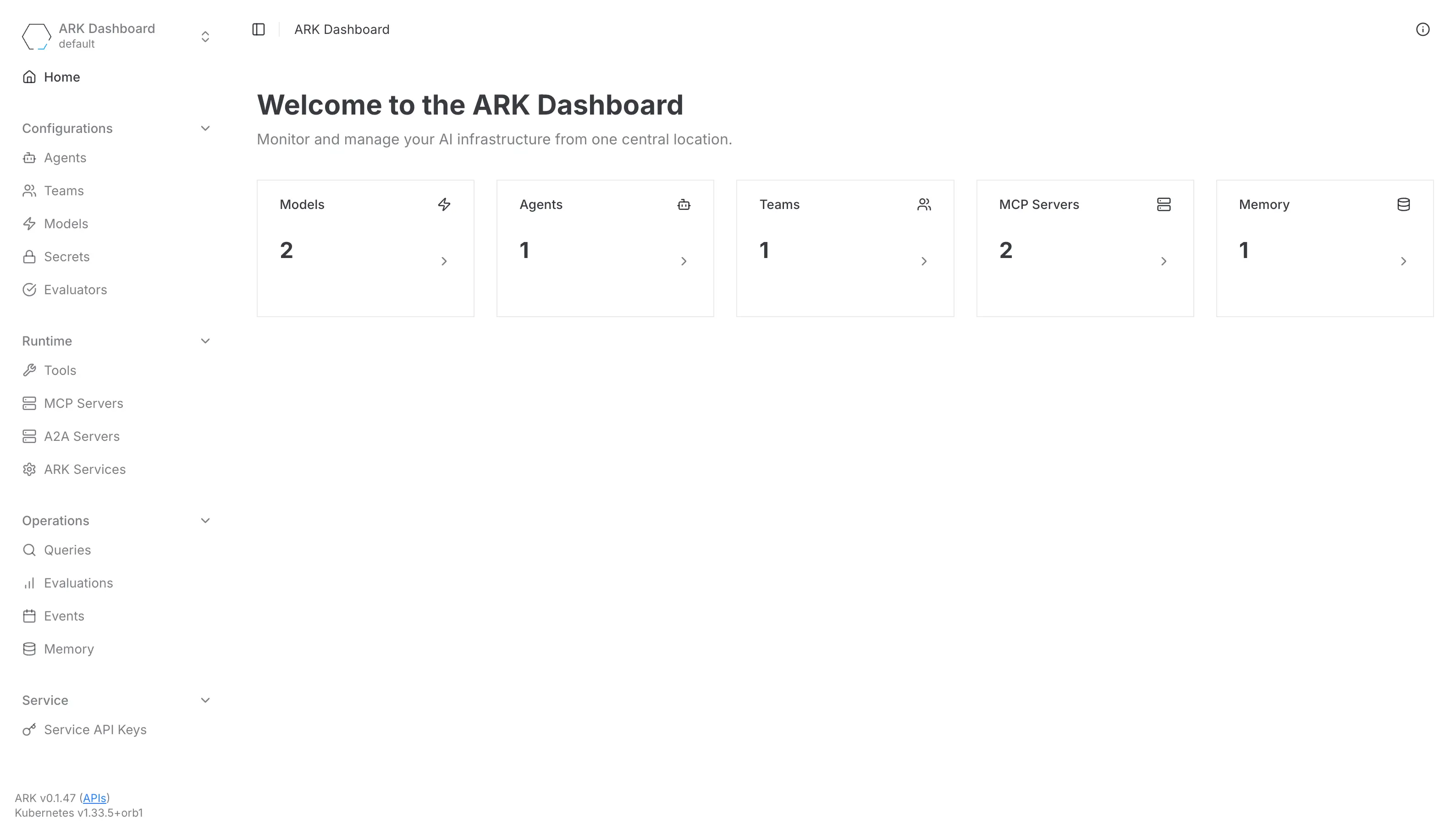
Note: In this article, ARK refers to McKinsey’s open-source ARK Agent Runtime for Kubernetes.
This article, from an engineer’s perspective, will reorganize ARK’s core capabilities and answer the following questions:
- What engineering challenges does ARK actually solve?
- Why is it worth special attention in the cloud native field?
- How is it fundamentally different from frameworks like LangChain and CrewAI?
- What insights does it offer for the Agentic Runtime ecosystem?
ARK Architecture: Treating Agents as Kubernetes-Native Workloads
The core idea of ARK is: An agent is not a script, but a schedulable, governable, and observable Kubernetes workload.
The following architecture diagram illustrates ARK’s underlying structure.

This diagram highlights ARK’s key design points:
- CRDs declare requirements (Agent, Model, Team, Tool, Memory, etc.)
- The Controller translates declarations into actual Pods/Services
- The API provides a unified communication entry point and team orchestration
- Memory supports long-term state management for agents
- MCP Server enables external systems to become tools
- Dashboard provides visual management and observability
ARK adopts the typical cloud-native Operator pattern and applies it to multi-agent systems.
CRD: ARK’s “Abstraction Layer”
Unlike traditional agent frameworks where “code is logic,” ARK uses CRDs (Custom Resource Definitions) to abstract the components of agent applications.
The main CRD types in ARK include:
- Model
- Agent
- Team
- Tool
- Memory
- Evaluation
These CRDs correspond to all the key components of an agent system.
The following diagram shows the structure of the CRDs:

Through CRDs, ARK achieves the following engineering features:
- All resources are GitOps-ready, supporting declarative management
- Changes are auditable, reversible, and continuously deliverable
- The evolution of models, tools, and agents does not require business code changes
This is the key gene of ARK’s engineering-oriented system.
Agent Execution Flow: From Query to Tool Invocation
The following image shows how to view query details in the ARK Dashboard.
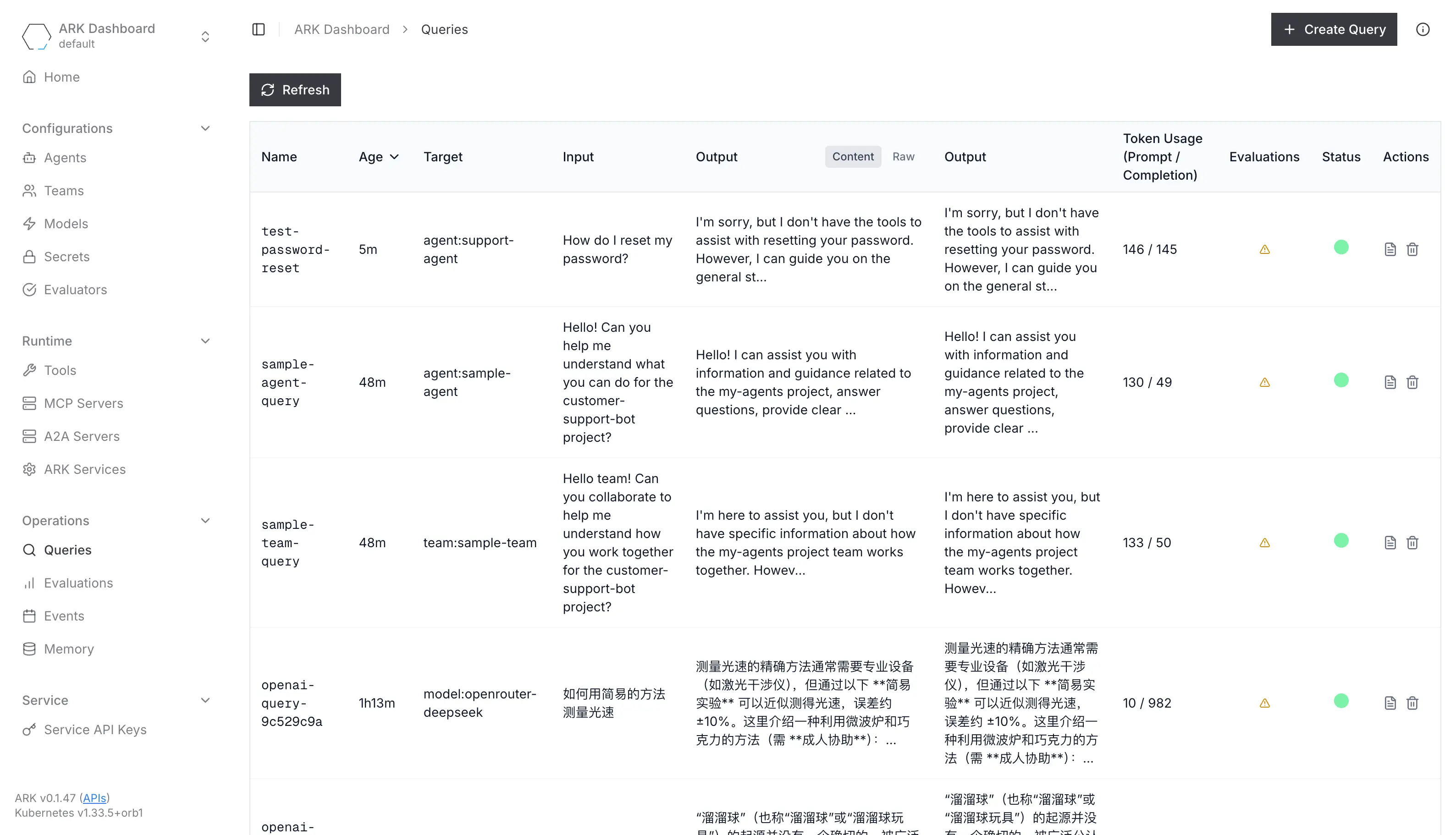
In ARK, the complete execution flow for an agent receiving a query is as follows:
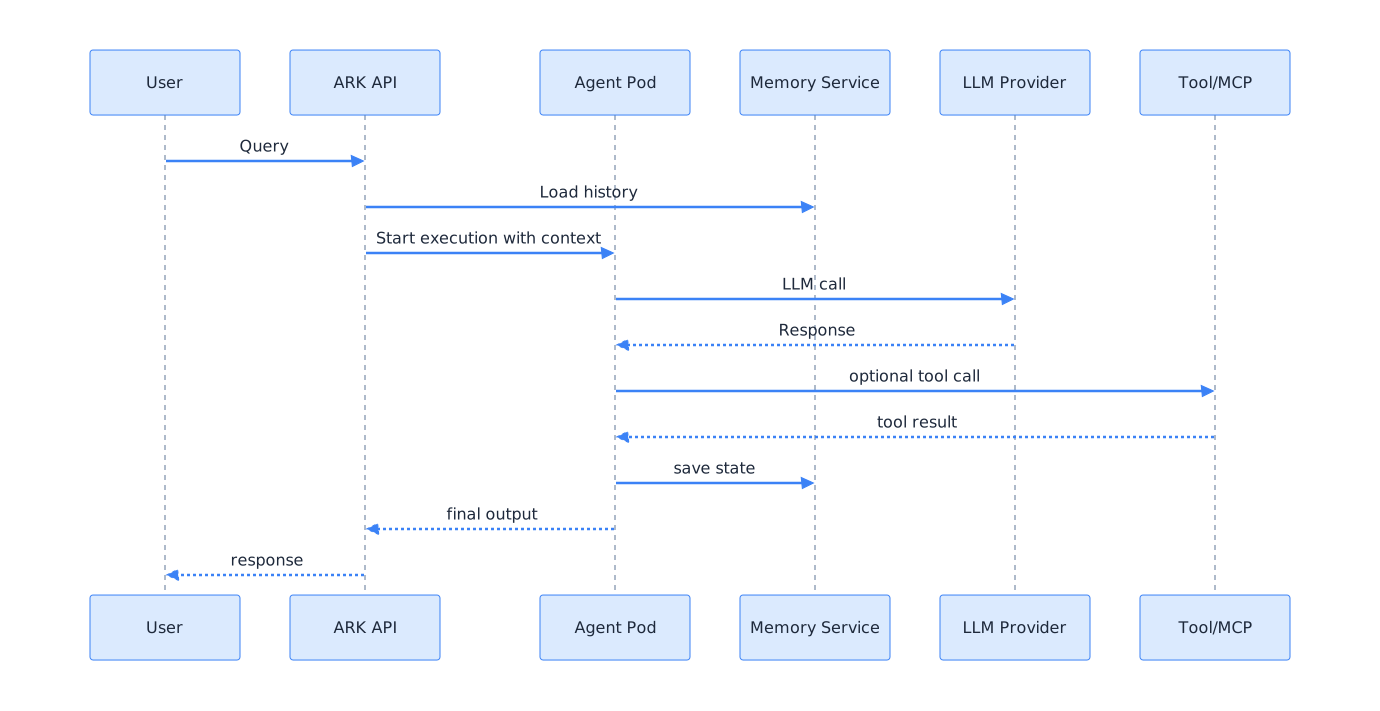
This flow has the following characteristics:
- Memory modules are naturally involved in the execution flow, without code specialization
- Large language model (LLM, Large Language Model) and tool invocation are governed by the runtime
- Agents can reside in Pods long-term, not just as one-off processes
This makes ARK more like an “agent microservice platform.”
Below is an example of a request and response:
Request and Response Example
kubectl describe query test-password-reset
Name:         test-password-reset
Namespace:    default
Labels:       <none>
Annotations:  <none>
API Version:  ark.mckinsey.com/v1alpha1
Kind:         Query
Metadata:
  Creation Timestamp:  2025-12-11T11:16:45Z
  Finalizers:
    ark.mckinsey.com/finalizer
  Generation:        2
  Resource Version:  63109
  UID:               52bf94fc-cda2-48a7-9d2f-085489fc4877
Spec:
  Input:  How do I reset my password?
  Targets:
    Name:   support-agent
    Type:   agent
  Timeout:  5m0s
  Ttl:      720h0m0s
  Type:     user
Status:
  Conditions:
    Last Transition Time:  2025-12-11T11:16:49Z
    Message:               Query completed successfully
    Observed Generation:   2
    Reason:                QuerySucceeded
    Status:                True
    Type:                  Completed
  Duration:                3.070165248s
  Phase:                   done
  Responses:
    Content:  I'm sorry, but I don't have the tools to assist with resetting your password. However, I can guide you on the general steps you might need to take:

1. Visit the login page of the website or application.
2. Look for a link or button that says "Forgot Password" or "Reset Password."
3. Click on that link and follow the instructions provided. Typically, you'll need to enter your email address or username.
4. Check your email for a password reset link or code.
5. Follow the link or enter the code to create a new password.

If you're still having trouble, you might want to contact the customer support of the specific service for further assistance.
    Phase:  done
    Raw:    [{"name":"support-agent","content":"I'm sorry, but I don't have the tools to assist with resetting your password. However, I can guide you on the general steps you might need to take:\n\n1. Visit the login page of the website or application.\n2. Look for a link or button that says \"Forgot Password\" or \"Reset Password.\"\n3. Click on that link and follow the instructions provided. Typically, you'll need to enter your email address or username.\n4. Check your email for a password reset link or code.\n5. Follow the link or enter the code to create a new password.\n\nIf you're still having trouble, you might want to contact the customer support of the specific service for further assistance.","role":"assistant"}]
    Target:
      Name:  support-agent
      Type:  agent
  Token Usage:
    Completion Tokens:  145
    Prompt Tokens:      146
    Total Tokens:       291
Events:
  Type    Reason                   Age   From            Message
  ----    ------                   ----  ----            -------
  Normal  QueryExecutionStart      68s   ark-controller  Executing query test-password-reset (timestamp: 2025-12-11T11:16:46.073237149Z)
  Normal  TargetExecutionStart     68s   ark-controller  Executing target agent/support-agent (timestamp: 2025-12-11T11:16:46.089103821Z)
  Normal  AgentExecutionStart      68s   ark-controller  Executing agent default/support-agent (timestamp: 2025-12-11T11:16:46.0895992Z)
  Normal  LLMCallStart             68s   ark-controller  Calling model mistralai/devstral-2512:free (timestamp: 2025-12-11T11:16:46.089628283Z)
  Normal  LLMCallComplete          65s   ark-controller  Model call completed successfully (timestamp: 2025-12-11T11:16:49.123529026Z)
  Normal  AgentExecutionComplete   65s   ark-controller  Agent execution completed successfully (timestamp: 2025-12-11T11:16:49.123840945Z)
  Normal  TargetExecutionComplete  65s   ark-controller  Target execution completed successfully (timestamp: 2025-12-11T11:16:49.123929654Z)
  Normal  QueryExecutionComplete   65s   ark-controller  Query execution completed (timestamp: 2025-12-11T11:16:49.152154135Z)
The True Value of Multi-Agent: Team Orchestration
ARK’s Team CRD allows multiple agents to be woven into a higher-level “system,” enabling multi-agent collaboration.
The following diagram shows the collaboration model of a multi-agent team:

The engineering value of Team is reflected in:
- Making “expert collaboration” declarative and configurable
- Flexible strategies (such as polling, role assignment, routing, etc.)
- A2A Gateway handles message passing
- The Team itself is observable (every round of collaboration is logged)
For enterprises, this means the “agent organizational structure” can be standardized, replayed, and tuned.
Fundamental Differences Between ARK and Other Frameworks
Many engineers, upon first seeing ARK, may wonder:
“Is it just LangChain or CrewAI wrapped in Kubernetes?”
In fact, there are fundamental differences. The following diagram compares the structural differences between ARK and mainstream agent frameworks:

The table below further summarizes the key differences:
| Dimension | Traditional Agent Libraries | ARK |
|---|---|---|
| Core Pattern | Write Python code | Write CRDs (declarative) |
| Deployment | Local/Container | Kubernetes-native scheduling |
| State | Managed inside code | Memory CR + Service |
| Tools | Integrated at code level | Tool CR + MCP |
| Multi-Agent | Dialog managed in code | Team CR + A2A protocol |
| Observability | Almost none | OTel / Langfuse / Dashboard |
| Use Cases | Demo / Prototype / Single Agent | Enterprise production / Multi-Agent Systems |
In short:
LangChain is a “library for building agents,” while ARK is a “platform for running agents.”
The two are not in conflict and are, in fact, highly complementary.
The Engineering Value of ARK
To summarize ARK’s engineering value in simple terms:
- Turns agents into governable workloads
- Unifies models, tools, and memory as reusable resources
- Makes multi-agent collaboration structured, observable, and tunable
- Brings agent upgrades and iteration into CI/CD + GitOps mode
- Enables enterprises to manage agents like microservices
This is a clear evolution path:
Agent → Service → Platform → Runtime → Operating System
ARK is currently positioned at the fourth stage: Runtime.
Insights for Agentic Runtime
ARK provides three direct insights for building Agentic Runtimes:
Unified Scheduling System
- The agent runtime must run on a unified scheduling system (Kubernetes, MicroVM, Wasmtime, etc.)
Declarative Capability Boundaries
- Must use declarative abstractions to split capability boundaries, including:
- Model Layer
- Tool Layer
- Memory Layer
- Workflow Layer
- Team Layer
- State Layer
Observability
- Observability is essential; otherwise, multi-agent systems cannot be engineered
- Langfuse
- OTel
- Logs / Events
- Structured JSON
ARK demonstrates a direction:
Multi-agent systems are an engineering problem, not a prompt engineering problem.
Summary
If you only need to build a simple agent, frameworks like LangChain, CrewAI, and AutoGPT are sufficient.
But if you want to operate a system composed of dozens or hundreds of agents that need to collaborate, run long-term, and support continuous delivery and governance, runtimes like ARK are the inevitable trend.
It provides Agentic AI with:
- A cloud-native runtime model
- Observable execution paths
- Governable abstraction layers
- Extensible, componentized architecture
Therefore, ARK deserves to be regarded as an early model for engineering multi-agent systems.