Installing 30 plugins felt great; cutting them to 20 a week later was the real experience. Architecture observations, market setup, and why the survivors stayed.
Why Install Yet Another Agent Tool
Agent tools are not scarce in 2026; my terminal already hosts several coding assistants. What drew me to DeepSeek Harness (DSH below) was not the model but the positioning: it is not another chat app, it is an agent runtime. The model, the tools, the skills, even the UI can all be swapped out.
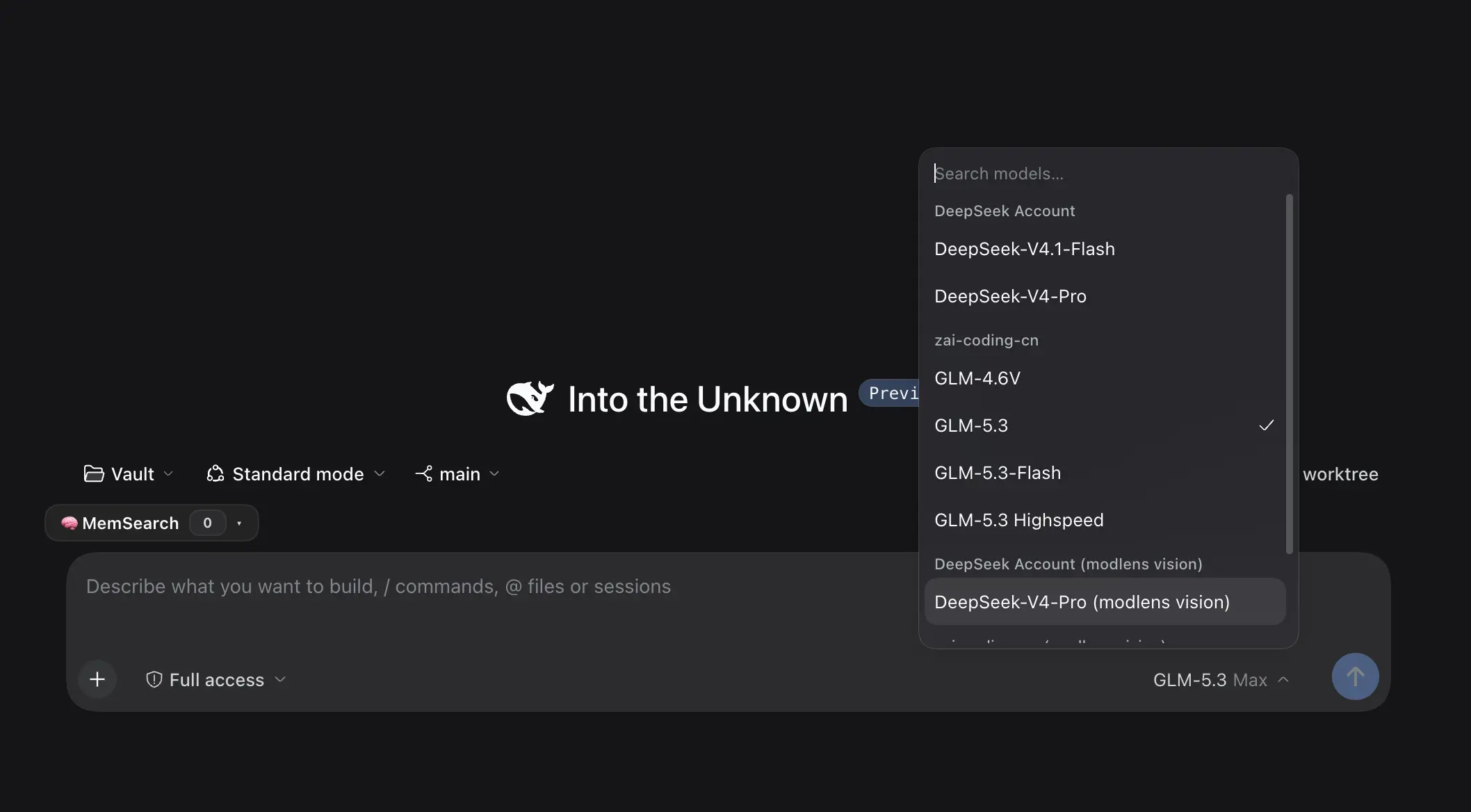
My first week was aggressive: after installing the official desktop app, I configured a third-party plugin market and loaded 30 plugins in one spree. Then came the most valuable part: trying each one, deleting, disabling. After a week, 3 are deleted, 7 are disabled, and 20 remain running. On the model side I skipped the official API and configured a third-party endpoint running Zhipu’s (Z.ai) GLM coding plan, so the model picker shows GLM-5.3. This post records what I observed about the architecture, how the plugin market is configured, and the curation from 30 down to 20.
Architecture: A Layered Plugin Runtime
The short version: the DSH core is deliberately thin, and every capability lives in the plugin layer.
The install gives you a desktop app backed by a local web service (it listens on 127.0.0.1, exchanges a one-time token for a login state at startup, and keeps no credentials on disk), with the GUI served from that local service. The dsh CLI shares the same profile system as the desktop app, and the CLI help defines a profile as an “ordered stack of plugin-bundle patch layers”. In other words, every profile you build is a stack of plugins layered on top of each other; the core only does the scheduling.
The picture below is the layered panorama of this runtime.
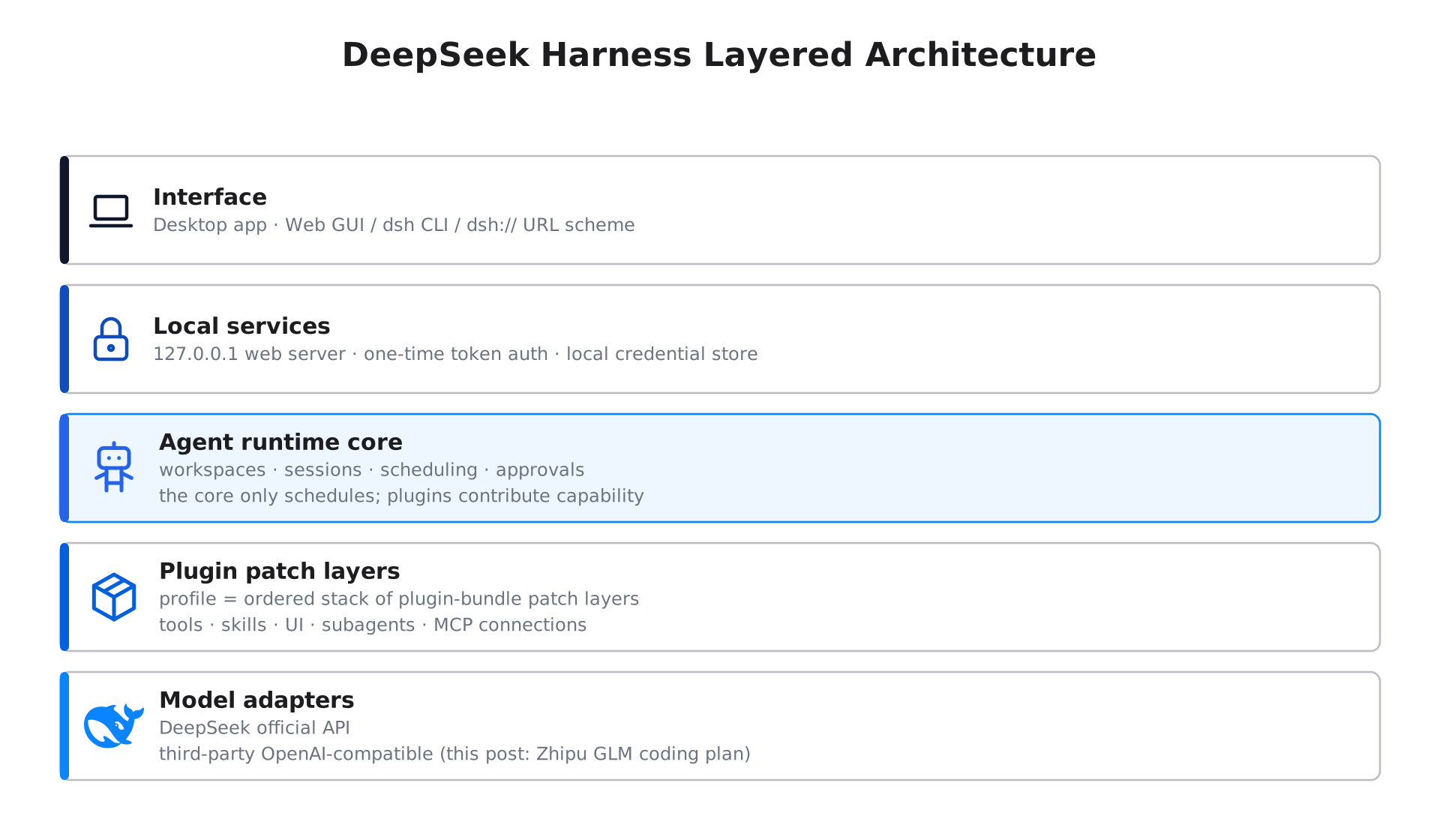
Day-to-day organization is workspaces plus sessions: each git repository is a workspace, each workspace holds multiple sessions, and each session has its own context, todo plan, and approval records. A plugin can contribute five kinds of things to this runtime:
- Tools: functions the agent can call, such as the dozens of
ego_*tools from the browser plugin - Skills: on-demand playbooks, such as this site’s blog-writing conventions
- UI: sidebar buttons, tabs, and panels, such as the task board and the context dashboard
- Subagents: dispatch work to another model or another agent
- MCP connections: reach external resource servers
Precisely because capabilities live in plugins, deleting and disabling them is safe: the core never moves, and the stacked layers come and go. That is why I dared to install 30 at once and then subtract slowly.
First Impressions: A Conversation That Feels Like an IDE
Onboarding is smooth and the Chinese UI works out of the box. A few details stood out:
- Session titles are generated automatically; no naming chores
- Tool calls render as collapsible cards; expand them for full inputs and outputs
- The todo plan sits in its own strip above the input box, progress at a glance
- Approval modes are configurable; I run Full access and tried an approval-gate plugin as a backstop, then stopped it once it proved unnecessary for daily use
- A follow-up queue lets me fire questions while the agent is working; they get processed in order, and the last unanswered one never leaks into the saved session
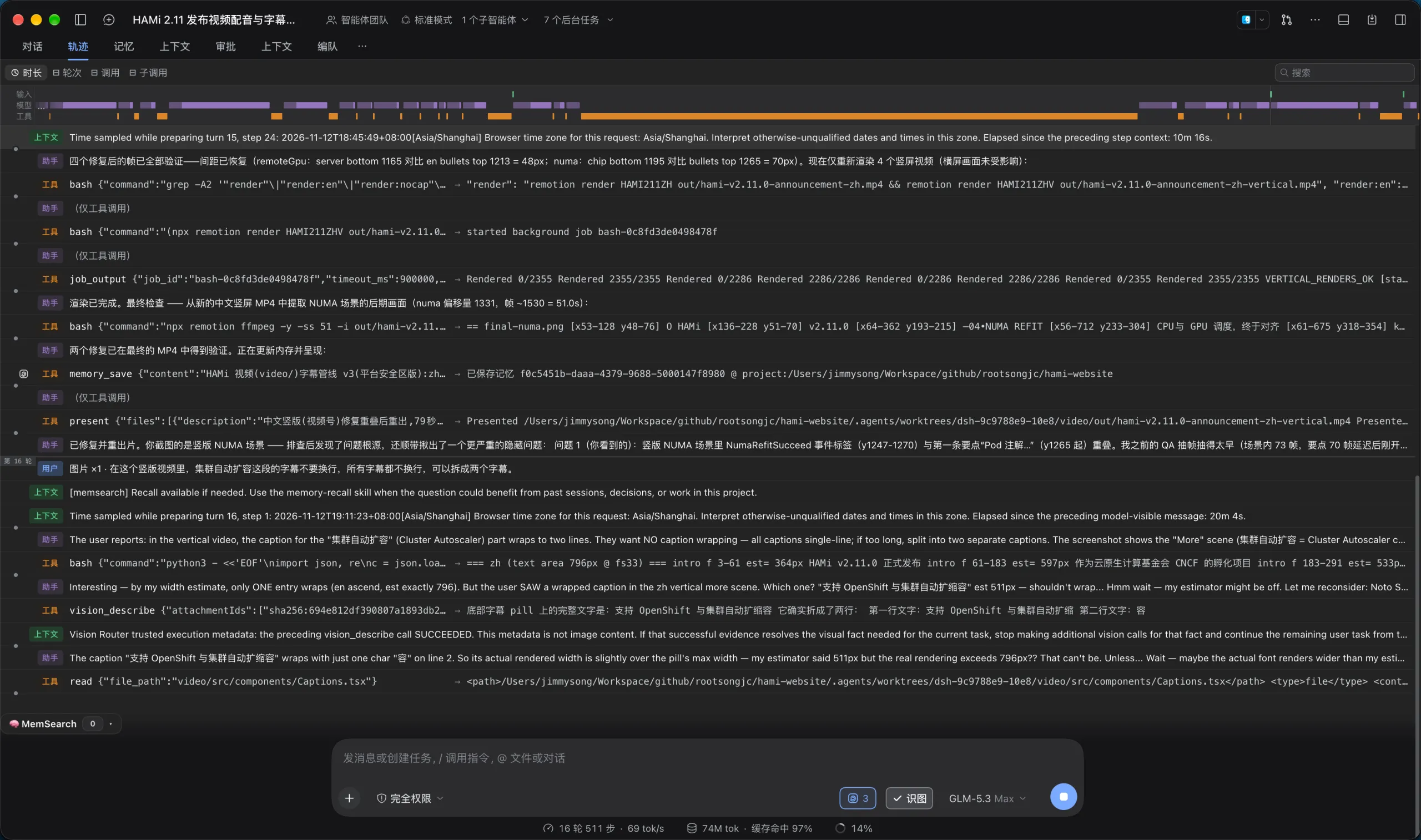
- The trajectory view records the whole working session as a timeline of model thinking, tool calls, and wait times, which makes post-mortems of how a task actually got done trivial
The trajectory screenshot below comes from a real task: fixing a caption-wrapping bug in the HAMI 2.11 release video. You can watch it extract frames to verify, spawn background render jobs, update its memory, and deliver the final cut, with the full reasoning about the width-estimate mismatch preserved in between.
Multi-agent collaboration gets its own visualization too. Switch to the fleet view and the main agent with its sub-agents becomes a live network, each node showing run status, work items, and message counts, with background tasks in plain sight.
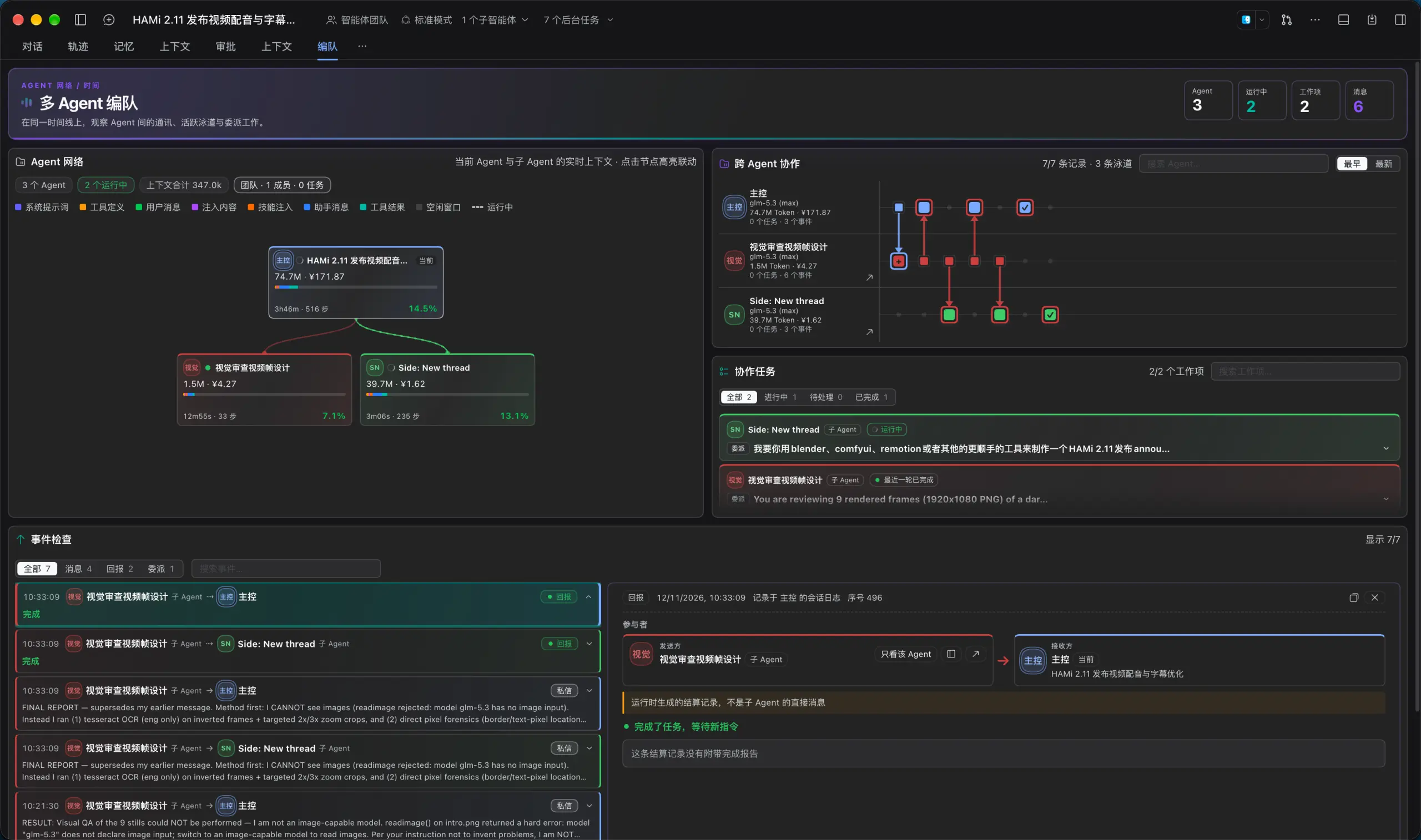
Stack these together and the feel is closer to “a conversational IDE” than “a web chat”.
Third-Party API: the Zhipu GLM Coding Plan
DSH does not lock you to the official model; configure any OpenAI-compatible third-party API and you are in. I use Zhipu’s GLM coding plan: a subscription with a generous quota, ideal for high-frequency coding and writing, with no per-token anxiety. Credentials live in a local credentials file, the UI masks secrets automatically, and nothing leaks in normal use.
In practice GLM-5.3 is good enough at Chinese writing that I let it draft this very post: stable long-form structure, accurate terminology, and no real misfires in tool-call instruction following. A nice side effect of writing Chinese content with a Chinese-first model is that there is no translation detour in the thinking process.
Configuring the Plugin Market in Three Minutes
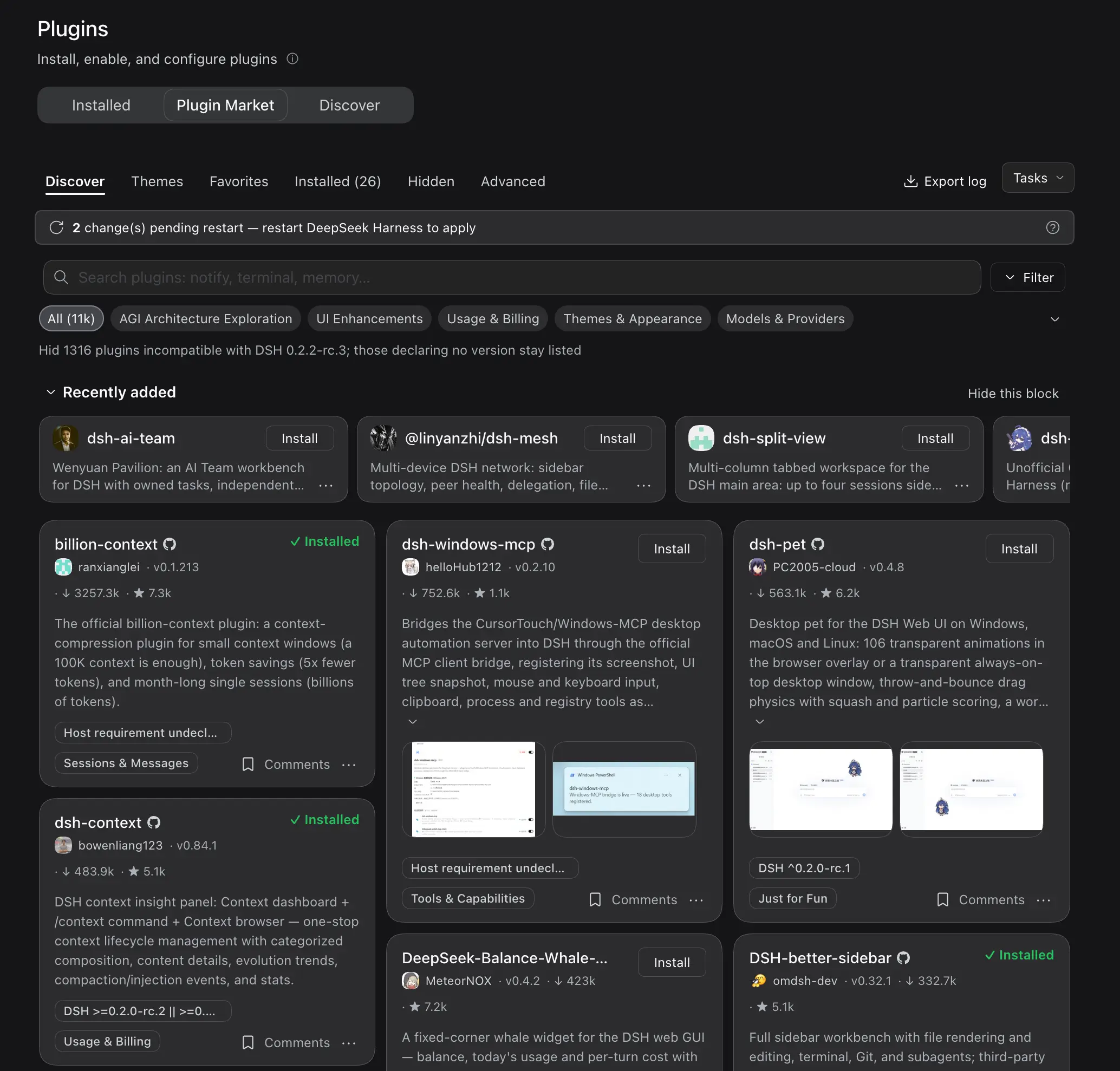
DSH ships a set of optional official plugins; plugin-market-bundle adds custom plugin indexes, so you can add third-party market sources right in settings. I also installed dshmarket, which provides a full visual market: browse, search, open details, one-click install; the experience is close to a phone app store.
A one-click install just adds an npm package to the profile and asks for a restart. During the installation spree, dsh-autorestart was a blessing: it waits until every session is idle before restarting safely, never interrupting a running agent. It is very much a renovation-phase tool, though; once the plugin set stabilized I stopped it, because restarts stopped being a daily affair.
From 30 to 20: A Week of Curation
Every install felt exciting in the moment, but only real workflows can judge a plugin. My bar was simple: anything I did not reach for again within a week had not earned its place; anything overlapping another plugin lost to the one that felt better; anything whose cost outweighed its benefit got switched off.
First the outcome: the 20 survivors, by family. Context and memory is the largest, which fits the nature of an agent tool: how you spend context and keep memory decides the agent’s ceiling.
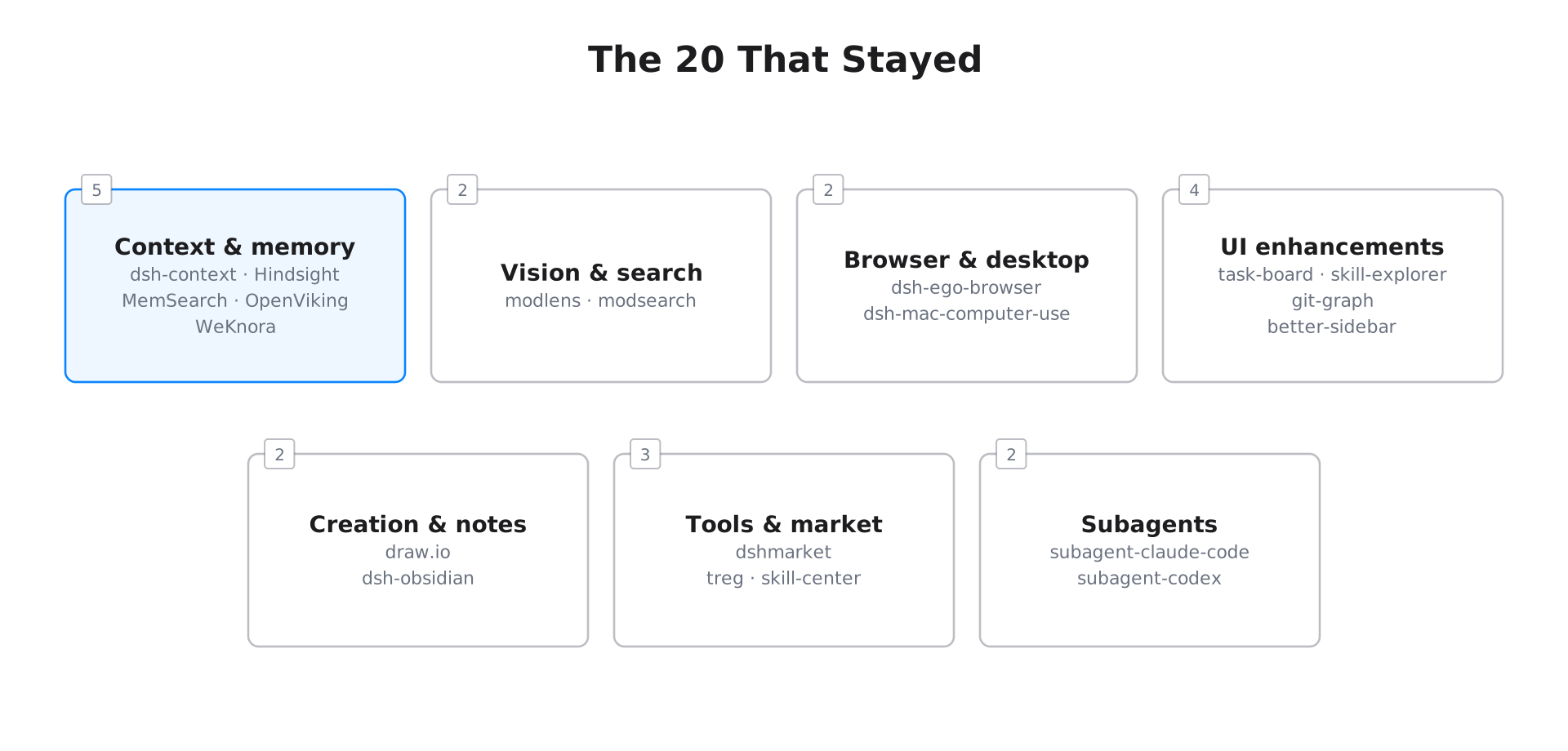
The profile still holds 27 packages: 20 enabled, 7 disabled; another 3 are deleted outright. To be clear, these 20 are not a “best of” list: a few of them are just on observation, and I do not necessarily use every one. Subtraction is not a one-time event either; it will continue, and the number will most likely keep going down. First the survivors, then the ten that did not make it.
The 20 That Stayed
| Category | Plugin | Version | One-line review |
|---|---|---|---|
| Market | dshmarket | 1.73.19 | Visual plugin market: browse, search, one-click install |
| Context | dsh-context | 0.84.1 | Context dashboard, usage at a glance |
| Memory | @vectorize-io/hindsight-coding-agents | 0.8.7 | Cross-session long-term memory for decisions and lessons |
| Memory | @zilliz/memsearch-dsh | 0.1.9 | Shared Markdown memory across agents |
| Memory | @openviking/dsh-memory-plugin | 0.5.36 | Persistent context store; promoted after its upgrade |
| Knowledge | @wxg-prc-cpg/dsh-weknora | 0.1.0 | Local knowledge-base retrieval and RAG |
| Vision | @liustack/modlens | 3.27.3 | Gives text-only models image understanding |
| Search | @liustack/modsearch | 5.10.12 | Free web search, X search, and page fetching |
| Browser | dsh-ego-browser | 0.9.14 | Agent browser: 34 tools plus a live watch panel |
| Desktop | dsh-mac-computer-use | 1.5.5 | Vision-first macOS desktop control |
| UI | @linxin666/dsh-client-ui-git-graph | 0.4.14 | Git branch picker and commit graph |
| UI | @linxin666/dsh-client-ui-skill-explorer | 0.4.18 | Skill browsing, toggles, and creation |
| UI | @linxin666/dsh-client-ui-task-board | 0.4.18 | Task board where cards map to real session runs |
| UI | dsh-better-sidebar | 0.32.1 | File tree, editor, and changes merged into one sidebar |
| Creation | @next-ai-drawio/dsh | 0.1.0 | Live draw.io canvas in the sidebar, co-edited with the agent |
| Notes | dsh-obsidian | 0.2.8 | Read and write a local Obsidian vault directly |
| Tools | treg-dsh | 0.30.0 | Tools-as-an-OpenRouter: 4,000+ tools, pay per use |
| Tools | @restregular/dsh-skill-center | 0.3.11 | Skill center: manage every skill in one panel |
| Subagent | @deepseek-ai/dsh-subagent-claude-code | 0.2.2-rc.3 | Official Claude Code subagent; revived after the version fix |
| Subagent | @deepseek-ai/dsh-subagent-codex | 0.2.2-rc.3 | Official Codex subagent; revived after the version fix |
Two footnotes. On memory I ended up keeping the Hindsight, MemSearch, and OpenViking trio: Hindsight answers “why we decided this”, MemSearch shares snippets across sessions, and OpenViking earned its place after the 0.5.36 upgrade proved stable. On subagents there is a small reversal: the two official plugins sat broken for a week at rc.2 with version-mismatch errors, and came back to life once everything aligned at 0.2.2-rc.3. Sometimes a plugin error just needs patience.
A Few Genuinely Useful Scenarios
Some highlights from actual use.
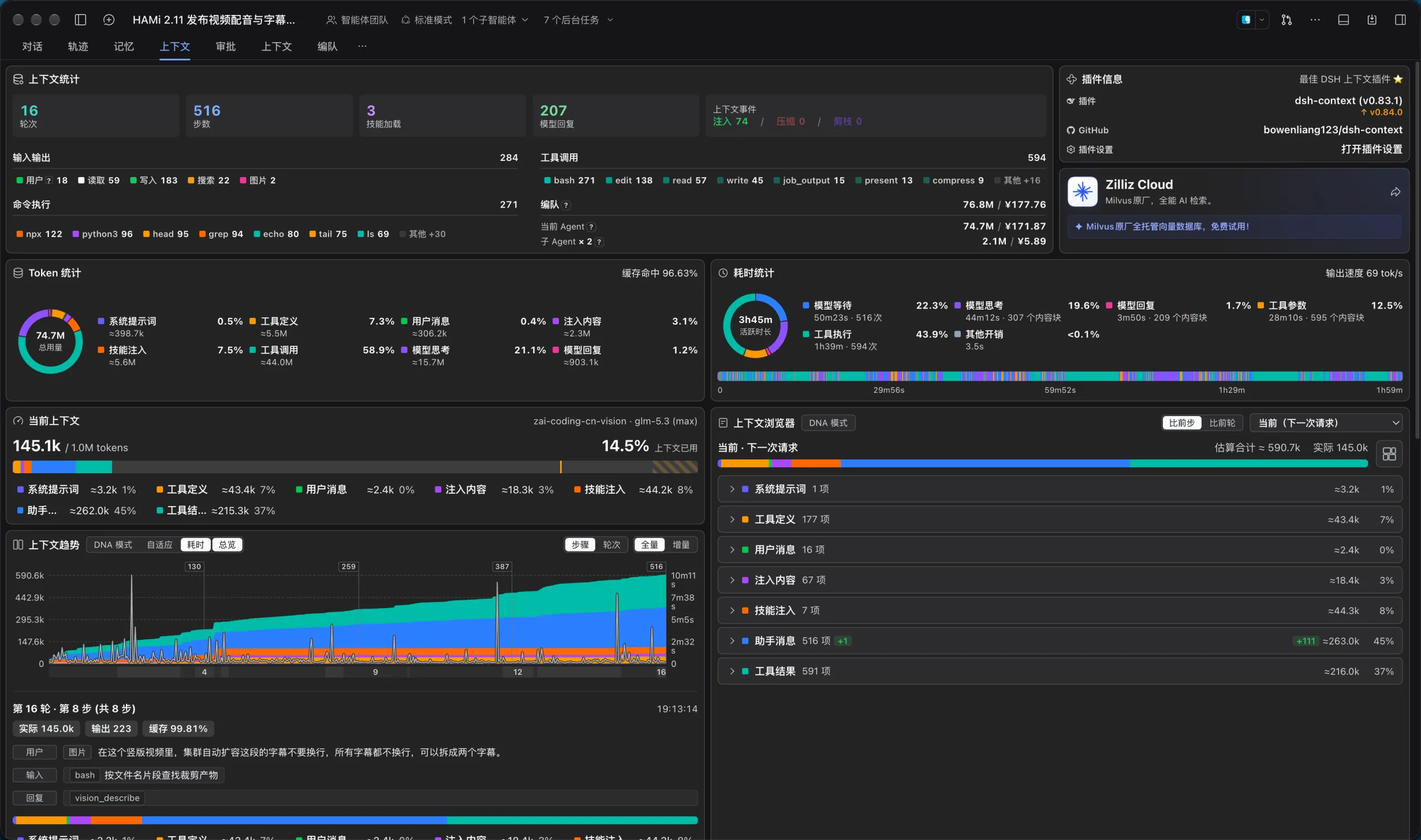
Context dashboard (dsh-context): every session gains a Context tab with a visualization of context usage: which messages consume how many tokens, and which ranges have already been folded away. When debugging “why did the context blow up again”, it is essential. Below is the dashboard for the same video task: 16 turns and 516 steps, tool calls taking nearly sixty percent of the token budget, a 96.63% cache hit rate, and a latency breakdown where waiting on the model is barely a fifth of the wall clock, tool execution dominates. Numbers that used to be gut feelings are now visible at a glance.
Task board (task-board): the cards are not sticky notes; each card maps to a real session run, and scheduled tasks are supported. I pinned the draft generation of a weekly community report on the board, and it fires on schedule automatically.
Skill center (skill-center): after installing twenty-odd skills, centralized management becomes a necessity. The skill center lists them all in one panel; toggle, create, delete, all in one place. Much nicer than digging through config files.
The draw.io canvas (@next-ai-drawio/dsh): I asked the agent to draw an architecture diagram from a requirement; the canvas opens live in the sidebar, and when I dislike something I just tell it in natural language and export the SVG afterwards. Drawing went from “open a diagramming app” to “two extra sentences”.
The agent browser (dsh-ego-browser): 34 ego_* tools cover navigation, snapshots, clicks, form filling, screenshots, and network watching, with a live observation panel on the right. I send it to research and verify page structures without ever touching a browser myself.
The Ten That Did Not Make It
The rejection list is more informative than the winners, so here it is in full.
Deleted, 3: two browser plugins (dsh-native-browser, browser-skill) overlapped dsh-ego-browser; one browser is enough, so they went. dsh-media-desk (idea to script, cover, storyboard) looked cool at install time; I opened it twice in a week. Not part of my workflow, deleted.
Disabled, 7:
billion-context: context compression; saves tokens, costs speed; detailed belowdsh-vision-router: overlapped modlens; one vision chain is enough@restregular/dsh-memory: of four memory plugins I kept three; this was the least used@xmanrui/dsh-im: pipes WeChat, Feishu, and a dozen other IMs into DSH; impressive, but I do not want IM messages to become agent task sources for nowdsh-approval-gate: auto-approval gating; redundant once Full access became routinedsh-autorestart: a renovation-phase helper with no job once the plugin set stabilizeddsh-pocket: reach the desktop DSH from a phone by scanning a QR code; great demo, but I still sit in front of the computer
All 7 remain installed but disabled: toggling a DSH plugin costs nothing beyond a restart, so any of them can come back the day I need it. That is why I keep subtracting without ceremony: disabling is not farewell, it is tidying up.
The Efficiency Tax of “Million-Token Context”
The most instructive item on the rejection list is billion-context, which the community calls the “million-token context” plugin: it folds consumed conversation history into summary blocks and decompresses them on demand, so small context windows can run very long tasks. The token savings are real: the session that drafted this post ran on it, and a single compression reported saving about 59K tokens, with more accumulating over the session. Its ledger panel does the arithmetic bluntly: in the screenshot below, 378 requests accumulated roughly 116.7M tokens of compression savings, worth about 35 US dollars, with actual context use at 145K, 14% of the 1M window.
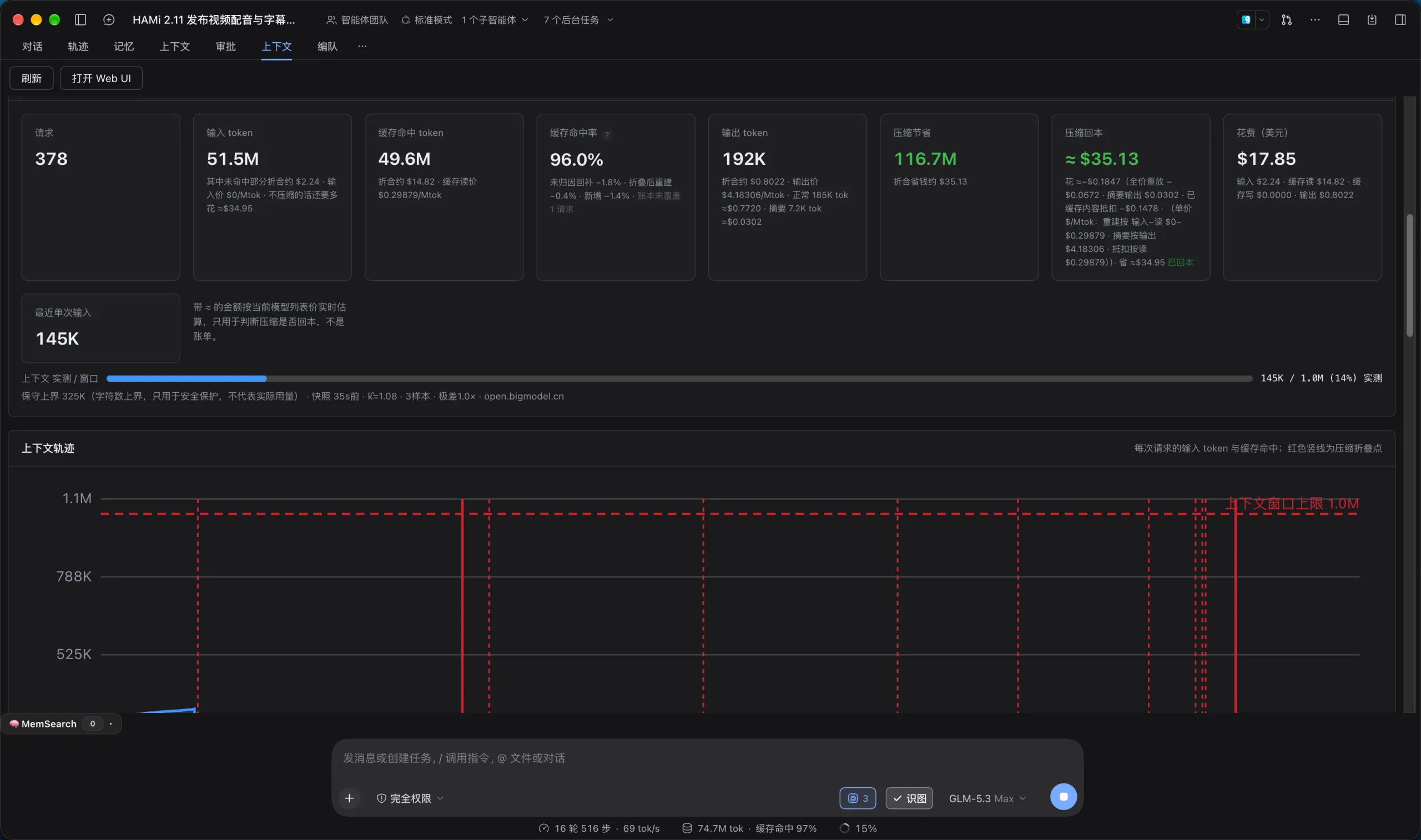
The mechanism and its cost fit in one picture.
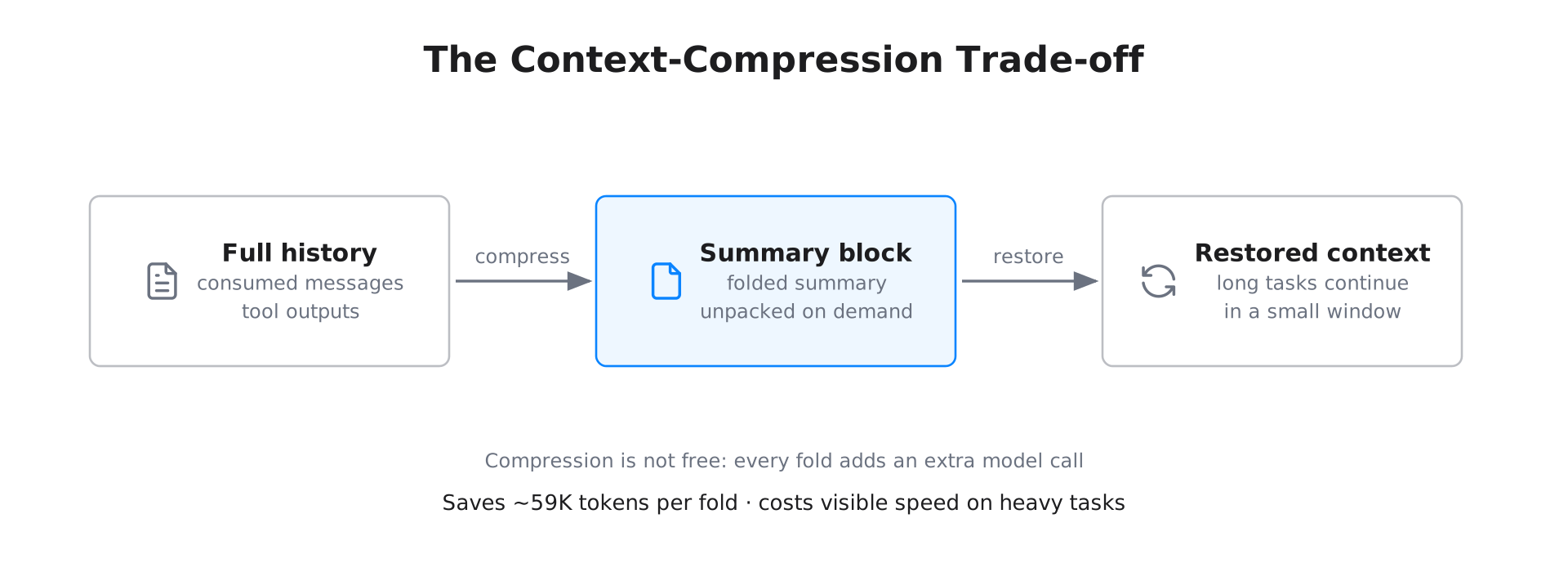
But the cost is just as real: compression is not free. Every fold runs an extra model call to produce the summary; the heavier the task and the longer the history, the more often compression fires, and the slower the agent gets. My felt experience: heavy tasks drag noticeably. You save tokens and sacrifice speed. After weighing it up I disabled the plugin outright: for daily writing and coding, responsiveness is worth more than saved tokens; I will switch it back on for weeks-long research tasks. Once disabled, the duplicate Context tab disappeared with it.
A fun aside: after installing dsh-context, two tabs both named Context appeared at the top of every session, and I first assumed it was a UI bug. Reading the source confirmed the two plugins each register a same-named tab; the dsh-context settings can rename or hide the billion-context tab (environment variable BILI_DSH_CONTEXT_TAB=0), and the collision is solved.
Conclusion
After a week, DSH feels like the “Kubernetes moment” for agents: the core only schedules, capabilities are all plugins, and even the UI is plugin-mutable. The third-party API decoupling is genuine; pairing it with Zhipu’s GLM coding plan makes Chinese tasks smooth and the cost predictable.
Beyond the architecture, the curve I most want to share is this one: the excitement of 30 installed, and the discipline of 20 kept, and I know that number is not the destination; what goes unused will keep being disabled and deleted. A thriving plugin ecosystem is both a dividend and noise; the real skill is subtraction: keep only the one that feels right among overlaps, disable what you never reach for, and switch off whatever costs more than it returns. My advice is simple: set up the market, start with five or six plugins, do not hoard memory plugins, and save context compression for the genuinely long tasks.
If you are also tinkering with agent runtimes, see my earlier 2026 AI infrastructure outlook; DSH is a concrete sample of that thesis landing.