Recently, the Istio community has been working on Issue 17763 to add Istio support for certificate revocation. This feature is currently under development, as seen in PR #42859 - OCSP Stapling and OCSP Stapling for Istio Gateways. This blog post will introduce certificate revocation methods and the progress of Istio’s solution.
Istio uses Envoy SDS to distribute certificates. There are two scenarios:
- Distributing internal certificates for mTLS, which requires verifying whether both client and server certificates have been revoked
- Distributing external service certificates to services within the cluster for encrypting communication outside the cluster. In this case, services within the cluster act as clients and only need to verify whether server certificates have been revoked
This article discusses the second scenario - certificate revocation for Istio Gateways, as shown in the diagram below:
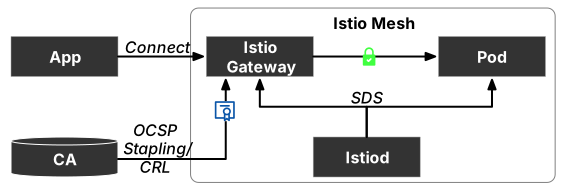
CAs control certificate lifespan by setting TTL. If you need to terminate a certificate early, you can revoke it. There are two ways to revoke certificates:
- Configure a Certificate Revocation List (CRL)
- Online Certificate Status Protocol (OCSP)
CRL (Certificate Revocation List)
CRL (Certificate Revocation List) is a mechanism for managing and validating certificate validity. It contains a list of revoked certificates that is regularly updated by the certificate authority (CA). When a client verifying a certificate (such as a browser) receives a certificate, it checks whether the certificate is listed as revoked in the CRL. If it is, the certificate is considered invalid.
CRLs are typically stored on the certificate authority’s (CA) server and can be publicly accessed over the Internet. Clients verifying certificates (such as browsers) can download and check the CRL to determine whether a certificate is valid. CRLs can be stored in various formats (such as DER or PEM) and published via HTTP, LDAP, or other protocols for verification.
CRL files are typically stored in binary format, not directly readable text files. However, tools (like OpenSSL) can be used to convert them to other formats, such as PEM, for easier reading. Below is an example CRL file named crl.pem in PEM format:
-----BEGIN X509 CRL-----
MIIBtjCBqwIBATANBgkqhkiG9w0BAQUFADBBMQswCQYDVQQGEwJVUzERMA8GA1UE
CBMITmV3IFlvcmsxETAPBgNVBAcTCE5ldyBZb3JrMREwDwYDVQQKEwhNeSBDQTEQ
MA4GA1UECxMHQ2VydGlmaWNhdGUxGDAWBgNVBAMTD01ZIEJ1c2luZXNzIENBMB4X
DTA5MDUwMzE1MTQwMFoXDTEwMDUwMjE1MTQwMFqgLzAtMB8GA1UdIwQYMBaAFJ4f
6Nz7Vuw/NcZXG0U8O6OZ9XB0MAsGA1UdDwQEAwIFoDAdBgNVHQ4EFgQUU6G9fjRK
op+JU6vQPnnhxBxHtzUwDQYJKoZIhvcNAQEFBQADgYEAbYoLz7MnJ4ltIS+nCquG
N/v+8rE00/N0pGzN/dCv/8t0W0tGTGr2zGRb0mv67MPOmWmHcZZq3sOxgEIp8T+O
OJxDCD/xJN6hB0NgN/Z0+fX9hU6bL/6zhwUy/l51xddmSd5KKhJ7FmOh2Py5m9Au
4fJh7w+OLyjKV7rz55WKjvY=
-----END X509 CRL-----
Use OpenSSL to convert it to readable format:
openssl crl -inform PEM -in crl.pem -noout -textThe output is:
Certificate Revocation List (CRL):
        Version 2 (0x1)
    Signature Algorithm: sha256WithRSAEncryption
        Issuer: /C=US/ST=New York/L=New York/O=My CA/OU=Certificate/CN=My Business CA
        Last Update: May 3 11:40:00 2009 GMT
        Next Update: May 2 11:40:00 2010 GMT
    Revoked Certificates:
        Serial Number: 1 (0x1)
Revocation Date: May 3 11:40:00 2009 GMTNote: This CRL file’s list only contains one revoked certificate.
Although CRLs are widely used, using CRL files to revoke certificates has several disadvantages:
- Timeliness: CRL files must be regularly updated, otherwise recently revoked certificates cannot be identified.
- Availability: If the CRL server is inaccessible, certificate revocation status cannot be verified.
- Efficiency: As the number of certificates increases, CRL files become larger, potentially slowing down the certificate verification process.
- Security: CRL files themselves require security protection, otherwise attackers might tamper with CRLs to evade certificate revocation restrictions.
Therefore, more efficient and secure certificate revocation mechanisms now exist, such as OCSP (Online Certificate Status Protocol), which can verify certificate status in real-time without storing a list of all revoked certificates.
OCSP Stapling
OCSP Stapling (officially known as TLS Certificate Status Query Extension) is a TLS (Transport Layer Security) extension used to prove that a certificate’s status is valid. It allows the server to retrieve certificate status information in advance and “staple” that information into the TLS certificate, reducing dependence on the certificate authority and improving certificate status verification efficiency. It can replace OCSP for querying X.509 certificate status. The server sends a pre-cached OCSP response during the TLS handshake, and users only need to verify the response’s validity without sending requests to the digital certificate authority (CA). See Wikipedia for details.
OCSP only applies to a single certificate, not a list. After receiving a certificate, the client communicates with the CA to check revocation status. The response can be one of “good”, “revoked”, or “unknown”.
Using OCSP Stapling eliminates the burden of maintaining CRLs, but it still has several disadvantages:
- Additional Resource Overhead: CA servers need to continuously respond to OCSP queries to ensure certificate validity, imposing additional overhead on server CPU and network bandwidth.
- Availability Issues: If the OCSP server is unavailable, clients cannot obtain certificate validity information.
- Security Issues: If OCSP responses are tampered with or the server is not secure, certificate validity information might be tampered with, affecting security.
- Compatibility Issues: OCSP Stapling is not supported by all browsers, so additional compatibility implementation may be needed for older browsers.
The challenge with OCSP is that it places a significant burden on CAs, as each client needs to independently obtain certificate verification. Overall, OCSP Stapling can improve certificate verification efficiency and security, but there are still some issues to consider. Therefore, multiple factors need to be comprehensively considered when adopting this technology.
Istio’s Support for OCSP Stapling
Many web servers support OCSP Stapling, and the cloud-native edge proxy Envoy also supports this functionality. The following Envoy configuration is required:
- Configure
ocsp_staple_policyinDownstreamTlsContext:LENIENT_STAPLING: OCSP response is optional (default value)STRICT_STAPLING: OCSP response is optional, but if present and valid, it will be usedMUST_STAPLE: OCSP response is required
- Configure
ocsp_stapleinTlsCertificate. The response must be DER-encoded and can only be provided through filename orinline_bytes. The response may only relate to one certificate.
Currently, Envoy supports OCSP Stapling. As Istio’s data plane and the proxy in Istio Gateways, theoretically Istio can also support this functionality. However, Istio’s OCSP Stapling certificate revocation feature support is still in progress. See PR #42859 - OCSP Stapling for details. New developments on this feature will be updated in this article, so please stay tuned.