A personal AI infrastructure is not a single tool — it’s a system of long-term synergy.
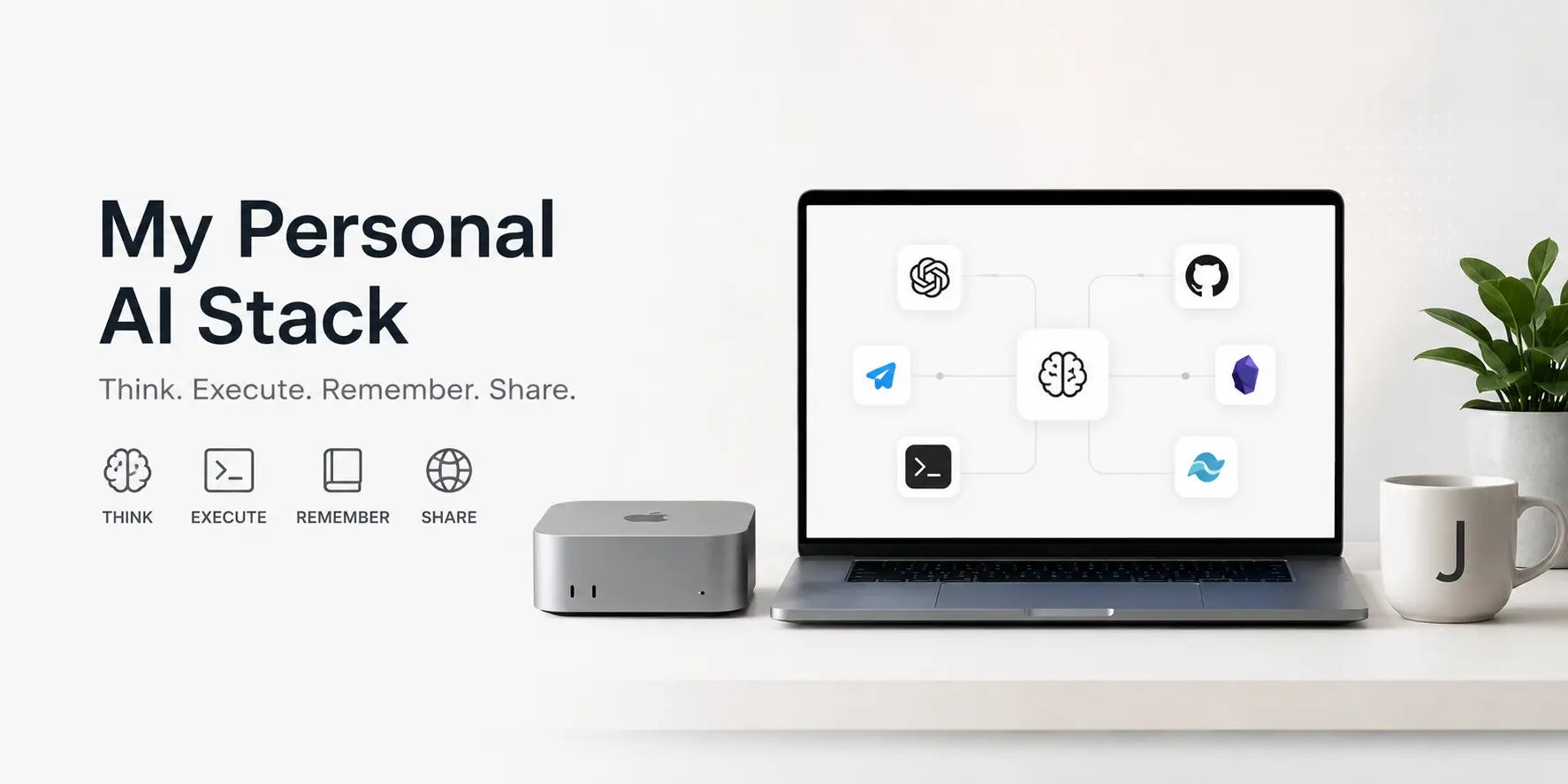
Many people talk about AI Agents, Second Brain, Personal Knowledge Management (PKM), and digital avatars.
But over the past year, I’ve come to realize that what I’m actually building is not some AI assistant — it’s a continuously running Personal AI Infrastructure.
It’s not a single product, nor a single model. It’s a set of systems that work together over the long term.
This system helps me think, research, write, code, manage knowledge, process emails, maintain my website, and accumulate long-term memory — every single day.
If I had to summarize it in one sentence:
ChatGPT handles thinking, OpenClaw handles execution, Obsidian handles memory, GitHub handles publishing.
From Tools to Infrastructure
Most AI workflow articles follow a similar structure: start with the model, then the plugins, then the editor.
But I increasingly feel that tools are not the point.
What matters is how these tools work together.
My work spans:
- AI infrastructure research
- Open source community operations
- Technical writing
- Developer Relations
- Product and ecosystem building
Every day produces a massive amount of information:
- ChatGPT conversations
- Technical research
- GitHub activity
- Community discussions
- Email newsletters
- Hacker News
- Discord
- WeChat and Lark messages
The problem is never a lack of information — it’s how to organize it.
So I gradually built a Personal AI Stack around my own work.
Workflow Perspective
This is not a single tool, not a single model. It emphasizes continuous synergy across four layers: thinking, memory, execution, and publishing.
Overall Architecture
The architecture diagram below shows how my Personal AI Stack works in layers.

The core components for each layer are listed below.
| Layer | Components |
|---|---|
| Interface Layer | ChatGPT, Telegram, Discord, Lark, WeChat |
| Reasoning Layer | ChatGPT, GLM-5.1, Claude Code, Codex |
| Memory Layer | Obsidian, Markdown, iCloud |
| Execution Layer | OpenClaw, Gmail, Calendar, Lark CLI |
| Publishing Layer | GitHub, Hugo, Cloudflare Pages |
ChatGPT: My Thinking System
Although many workflows revolve around Agents, the tool I use most frequently is actually ChatGPT.
I primarily use it for:
- Deep Research
- Technical analysis
- Architecture discussions
- Content planning
- Writing assistance
- Career decisions
Rather than calling it an assistant, it’s more like:
- Research Partner
- Technical Advisor
- Thinking Companion
Years of accumulated conversations have helped it gradually understand my background, projects, and long-term goals.
Many articles, talks, and technical judgments actually originate from these ongoing conversations.
OpenClaw: My Execution System
OpenClaw is the OpenClaw Agent I deployed on my Mac mini M4 at home.
I mainly interact with OpenClaw through Telegram.
To avoid context mixing, I use separate Telegram groups for different topics:
- HAMi
- AI Handbook
- Personal
- Work
- Research
- Blog
This naturally creates Context Isolation.
OpenClaw handles:
- Gmail email management
- Apple Calendar scheduling
- Scheduled tasks
- Obsidian operations
- GitHub operations
- Website maintenance
- Lark knowledge base operations
- Automated workflows
It’s more like a Chief of Staff than a chatbot.
OpenClaw’s Positioning
OpenClaw’s value lies in unifying scattered execution entry points into structured workflows, rather than being a simple chat interface.
OpenClaw’s Workflow
OpenClaw’s main path unfolds through the Telegram entry point for multi-platform execution.

Lark: Company Workflow Entry Point
I had barely used Lark before.
After joining my current company, which heavily promotes Lark adoption, all daily workflows, knowledge bases, and collaborative communication happen in Lark.
At first, I just treated it as an enterprise IM tool.
But looking at it now, Lark is more of a company-level workflow entry point:
- Group chats
- Documents
- Knowledge bases
- Approvals
- Tasks
- Automation
For me, what truly changed the experience was Lark CLI.
Through Lark CLI, I can more easily manage the company’s knowledge bases, documents, and some process-driven information.
This turns Lark from merely a chat tool into something that OpenClaw can incorporate into its automation system.
From the perspective of a Personal AI Stack, Lark serves as:
The organizational workflow layer.
It connects information, knowledge, and tasks in a company context.
Obsidian: Working Memory
Obsidian is my most frequently used knowledge tool.
But I don’t consider it my final knowledge base.
For me:
Obsidian
=
Working Memory
This is where I store:
- Daily Notes
- Weekly Reports
- Research Notes
- Inbox
- Drafts
- Fleeting thoughts
Starting three years ago, I developed a habit of consistently writing weekly reports.
These reports record:
- Work progress
- Learning content
- Community activities
- Project evolution
- Personal reflections
In a sense, weekly reports constitute my daily memory.
And Obsidian is the carrier of these memories.
GitHub and jimmysong.io: Long-term Memory
Many people think of a blog as a content publishing platform.
But for me, jimmysong.io is closer to a long-term memory system.
This website has been continuously maintained for nearly ten years.
What’s recorded here is not just technical articles, but more importantly:
- My viewpoints
- My judgments
- My experiences
- My growth trajectory
Unlike Obsidian, content that makes it to the website typically goes through:
Research
↓
Thinking
↓
Validation
↓
Writing
↓
Revision
↓
Publishing
Therefore:
Obsidian
=
Working Memory

jimmysong.io
=
Long-term Memory
The following flow shows the basic path from Obsidian to website publishing.

Information Flow
There are clear boundaries between content sources, curation methods, and output channels. This diagram reveals my information flow logic.

GitHub: Execution and Publishing Layer
For me, GitHub is no longer just a code repository.
It also handles:
- Blog content
- Website source code
- Documentation system
- AI Handbook
- AI Native Landscape
All content eventually makes its way into GitHub.
GitHub Actions automatically handles:
- Building
- Testing
- Publishing
Finally, everything is served through Cloudflare Pages.
The diagram below shows the publishing path from Markdown to static site.

My Development Toolchain
I currently use three main AI development tools.
Claude Code
My daily development workhorse.
Despite the name Claude Code, I primarily use Zhipu’s GLM-5.1 model.
It handles:
- Coding
- Refactoring
- Debugging
- Documentation maintenance
Codex
Mainly used for:
- Project initialization
- Large-scale code generation
- Automated execution of complex tasks
OpenClaw
Handles automation work beyond development.
The three form a clear division of labor.
The diagram below shows how my toolchain collaborates.

Why Not Claude?
This is one of the questions I get asked most often.
Objectively speaking, Claude is indeed very strong in code generation and code understanding.
I seriously considered using Claude as my primary model.
But ultimately, I chose not to.
The reason is not about model capability — it’s about overall return on investment.
First, there’s the account issue.
I’ve registered Claude accounts multiple times in the past, and each time I ran into restrictions and bans.
Second, there’s the cost issue.
Because I pay for all my AI tools out of pocket.
So I care more about:
Capability / Cost
Rather than:
Absolute Capability
For enterprise users, Claude Max might be a very reasonable choice.
But for individual paying users, the conclusion may be different.
This article discusses a Personal AI Stack that is entirely self-funded.
If the company reimburses expenses, or if you have an enterprise budget, many choices would change.
Why Not Self-host Large Models?
This is another frequently asked question.
Many people believe:
Buy a GPU + Open-source Model = Free AI
In reality, this is often not the case.
If the goal is simply to get a stable, powerful AI assistant, I lean toward:
Subscription > Self-hosting
The reasons include:
Time Cost
Maintaining a model is work in itself.
Including:
- CUDA
- Drivers
- Inference frameworks
- Model upgrades
- Networking issues
All of these require time.
And I’d rather spend my time on:
- Writing
- Community
- Product
- Technical research
Cost Issue
Currently:
- ChatGPT Plus
- GLM Coding Plan Max
Total monthly cost is under 600 CNY.
While a high-end GPU:
- RTX 5090D
- RTX PRO
- Enterprise GPU
Typically costs tens of thousands of CNY.
Plus:
- Electricity
- Depreciation
- Maintenance
For my use case, it’s simply not worth it.
Model Upgrade Speed
Cloud models upgrade every month.
Local models require manual follow-up.
For knowledge workers:
Using the latest model is more important than owning a model.
Subscription vs. Self-hosting
For individual users, subscription services typically offer advantages in time cost, upgrade speed, and stability. They let you focus on results rather than infrastructure maintenance.
Daily Tools
Beyond the core systems described above, I also rely on some daily tools to complete the workflow.
- Atlas Browser: My primary browser for web reading, research, and information gathering. Noteworthy content is saved to my knowledge base via Obsidian Clipper.
- Warp: My most frequently used terminal tool. Its modern interactive experience and AI capabilities make command-line work more efficient.
- Typora: A Markdown editor I’ve used for a long time, ideal for immersive writing and long-form editing. Many blog posts and documents are completed here.
- CodexBar: Used to monitor usage of ChatGPT, Codex, Claude Code, and other tools. For heavy AI users, token consumption has become a resource metric worth tracking.
- Sogou Input Method: My primary voice input tool. Compared to keyboard input, voice better matches my thinking habits, especially when working remotely, writing, and communicating with AI.
These tools are not the core of the system themselves, but they form the foundational experience layer of the entire Personal AI Stack, making information acquisition, content creation, and daily development smoother.
My AI Usage Scale
Current approximate consumption:
GLM-5.1
Weekly:
- 600 million Tokens
Monthly:
- 2.4 billion Tokens
Codex
Weekly:
- 200 million Tokens
Monthly:
- 800 million Tokens
Total:
Approximately 3.2 billion Tokens per month
That’s roughly 100 million Tokens consumed per day. Through ChatGPT Plus and GLM Coding Plan subscriptions, this is much more cost-effective than paying per token — otherwise, these tokens would cost at least $500 per month.
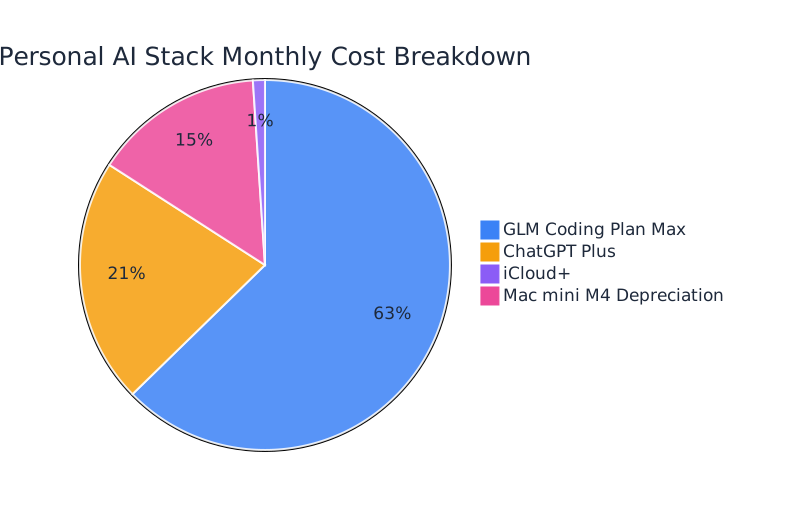
How Much Does This System Cost Per Month?
The table below compares the fixed monthly costs.
| Service | Monthly Cost |
|---|---|
| ChatGPT Plus | $19.99 |
| GLM Coding Plan Max | ¥422.10 |
| iCloud+ | $0.99 |
Approximately:
¥573 / month
OpenClaw runs on my Mac mini M4.
Hardware includes:
- Mac mini M4
- Samsung 990 Pro 1TB
- HAGIBIS Dock
Total investment:
¥4,469
Amortized over four years:
Approximately ¥100 / month
Total Cost
The entire Personal AI Stack’s fixed cost is approximately:
¥700 CNY / month (~$100)
This cost pie chart shows the monthly spending structure of the Personal AI Stack.
FAQ
Is This the Most Powerful Setup?
No.
This is not a “most powerful AI tool configuration guide.”
This is a completely self-funded Personal AI Stack designed for long-term individual use.
If your company reimburses expenses, or if you have a higher budget, you could choose Claude Max, Cursor, more API services, or even a local GPU workstation.
But my goal is not to pursue the absolute best — it’s to achieve stable, sustainable, and cumulative productivity within a personal budget.
Why Not Sync All ChatGPT Conversations to Obsidian?
Because I don’t want to turn Obsidian into a chat log repository.
What I care about more is:
Which content is worth preserving long-term?
Manual saving is itself a curation process.
That’s more important than automatically syncing everything.
Why Not Use Notion?
It’s not because Notion isn’t good.
It’s because I prefer Markdown First.
The benefits of Markdown include:
- Local-first
- Version controllable
- Portable
- AI-friendly
- Suitable for long-term preservation
Why Use Telegram Only for OpenClaw?
Because Telegram’s Bot ecosystem and API are better suited as an Agent entry point.
WeChat, Lark, and Discord are more for person-to-person communication and community collaboration for me.
Why Emphasize Lark?
Because after joining my current company, I truly started using Lark.
The company’s entire workflow revolves around Lark.
For me, Lark isn’t a personal knowledge base — it’s a company knowledge and collaboration system.
Through Lark CLI, it can further become a workflow entry point that OpenClaw can operate.
Why Not Use a Local AI Workstation?
Because my main work is not training models or running inference services.
My main work is:
- Thinking
- Research
- Writing
- Open source community
- Software development
Subscription models + a Mac mini is more than enough.
A local AI workstation requires significant investment, complex maintenance, and the model upgrade speed may not keep up with cloud services.
Why Not Buy a High-end NVIDIA GPU?
If the primary purpose is learning CUDA, GPU scheduling, or AI infrastructure, buying a GPU has value.
But if the primary purpose is daily productivity, a high-end GPU isn’t necessarily cost-effective.
For me:
Subscribing to models is more important than owning a GPU.
Workflow Matters More Than Models
My biggest takeaway from the past year is:
Many people believe the core of AI is the model.
But my experience suggests the opposite.
What truly affects productivity is often not the model leaderboard, but workflow design.
A 95-score model in an excellent workflow is usually more valuable than a 100-score model in a chaotic workflow.
In a sense, this is very similar to the evolution of the cloud-native world.
GPUs are important, but scheduling systems are equally important.
Models are important, but workflows are equally important.
Agents are important, but long-term memory and execution systems are equally important.
For me, the ultimate goal of the Personal AI Stack is not to replace people.
It’s to connect thinking, memory, and execution — freeing up more time for what truly matters.
Conclusion
This article defines my Personal AI Stack as a long-term runnable infrastructure, rather than a single tool or a single model.
The core conclusion is: in a self-funded scenario, stable workflows, continuous memory systems, and executable automation are more productive than chasing the most powerful model.
If your goal is to accumulate long-term value, investing time in “how things work together” often yields better returns than investing time in “model rankings.”