I do not need more agents. I need the agents on both Macs to share one control plane.
I have been thinking about whether to connect my MacBook and Mac mini so that different agents can handle the right task on the right machine, while progress and results arrive quickly on my phone or in email.
I spent a while comparing alternatives. I tried tools and workflows including OpenCode, Lody, Pi, and a DeepSeek-oriented harness, and explored VS Code Remote SSH and several remote-access approaches. Each solved a local problem, but none naturally connected devices, agents, tasks, and notifications into a single workflow.
In the end, I kept the tools I already understand. VS Code handles local development and SSH access to the Mac mini. OpenClaw handles mail, browsers, scheduled tasks, Obsidian, and local automation. T3 Code is the newest candidate in my stack: a control plane focused on coding agents.
Tailscale has remained valuable through this exploration. Although using both Tailscale and another VPN on a phone can require switching, I can reliably reach the Mac mini from my Macs. It solves device connectivity, but it does not solve task scheduling or status tracking.
I recently updated and restarted OpenClaw and found that it had changed substantially. It now handles execution, scheduling, and notifications well, and can use subscriptions from Codex, Claude, and GitHub Copilot as providers. Copilot is especially useful to me: it no longer feels confined to VS Code. When it is available through OpenClaw or another harness, its scope becomes much broader.
Not every task is coding. I also need research, email organization, browser automation, video rendering, and scheduled jobs that run overnight. These tasks differ in model requirements, runtime, and response time. There is no reason to send every job to the most expensive model.
I subscribe to ChatGPT Plus, VS Code Enterprise, and the Zhipu GLM Coding Plan, and I have OpenClaw running again. The problem is not finding another agent. It is organizing the tools, machines, and workflows I already have. I introduced this broader setup in My Personal AI Stack, and this article continues to define how those pieces should cooperate.
I need more than another chat window
Previously, I organized work by tool: coding in an IDE or terminal, mail and calendars in OpenClaw, notes in Obsidian, and projects and articles in GitHub. Each tool could complete a task, but cross-machine work spanning models and time was difficult to start, track, and reconcile.
I want this workspace to provide the following capabilities:
- Start coding tasks on the MacBook or Mac mini from another device.
- Let Claude Code, Codex, VS Code agents, and other harnesses use their own subscriptions and authentication.
- Keep browser automation, email organization, and Obsidian operations in OpenClaw.
- Run long jobs on the machine that suits them, such as rendering and scheduled tasks on the Mac mini.
- Return code changes to GitHub with branches, issues, and pull requests as durable records.
- Check remote tasks from a phone and deliver email notifications through OpenClaw.
One boundary matters: I do not expect one product to take over every task. I want clear responsibilities across programming, automation, knowledge management, and notification.
I started by considering a control plane of my own
My first idea was to assemble one: an agent service on the Mac, a Cloudflare Tunnel for access, and a task-status and notification layer. That would offer control and flexibility, but authentication, device approval, connection recovery, and mobile UX would become maintenance work too.
Tailscale remains useful to me. On a phone, however, Tailscale and another VPN can compete for the active network route. Tailscale can place devices on a private network, but I do not want to switch between two network entry points while working remotely.
T3 Code already provides T3 Connect. According to its remote-access documentation, one T3 Connect account can currently link up to three machines. Phones and browsers do not count toward that limit. My MacBook and Mac mini fit comfortably within it.
T3 Connect is not a general-purpose VPN. It provides T3 Code clients with remote access to linked T3 environments. It does not automatically place a phone, MacBook, and Mac mini on a private network that can reach every service on every machine. SSH, file sharing, and other services still need their own network setup. This distinction matters: T3 Code may remove the need for me to build a custom tunnel for coding, but it does not make every other networking tool unnecessary.
T3 Code fills the coding-agent layer
T3 Code describes itself as a control plane for coding agents. It connects agents running on a local machine, exposes them through desktop, web, and mobile clients, and provides Git worktrees, diff review, and GitHub pull request workflows. It is not a model service, and it does not resell or merge subscriptions.
That fits my current setup. Existing model plans and local agent authentication remain with their tools, while T3 Code provides a common entry point for coding tasks and remote collaboration. Switching control surfaces does not require migrating every model or subscription.
I have personally confirmed that Codex and GitHub Copilot integrate smoothly and can use models from my existing subscriptions. I do not need to buy a separate token quota or API allocation for every agent. The experience is substantially better than treating those subscriptions as isolated entry points.
Subscription compatibility still cannot be inferred from the product name. A VS Code Enterprise license does not cause T3 Code to take over VS Code. Whether GLM Coding Plan is usable through a particular agent entry point depends on the harness and authentication flow.
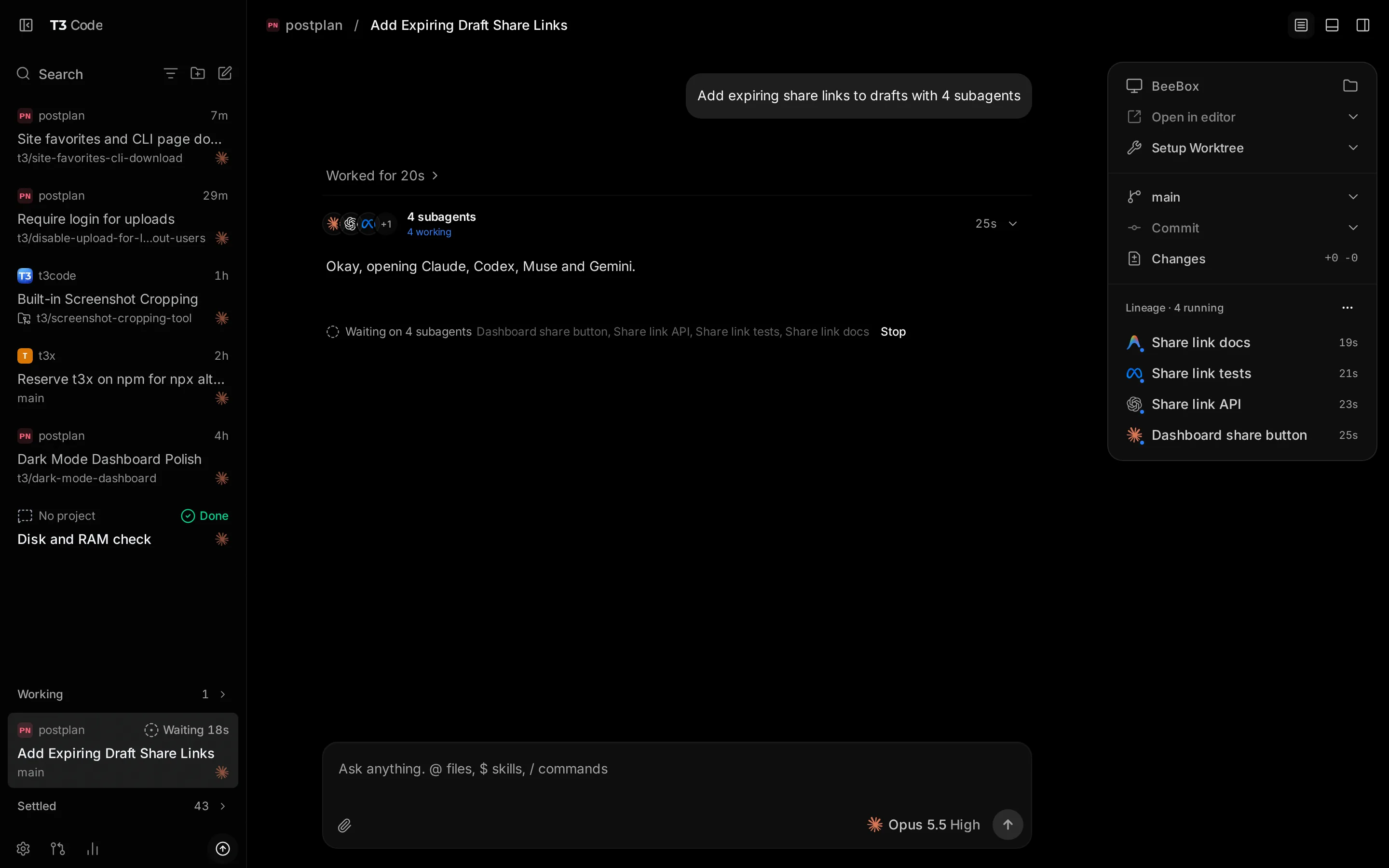
Image source: T3 Code official website.
In practical terms, T3 Code brings different programming harnesses into a shared workflow and strengthens remote environments and multi-agent orchestration. What attracts me is not one more chat interface. It is that work can remain on the machine running the agent while I continue to inspect and steer it from another device.
How I would divide the work across two Macs
The target architecture below is incremental. T3 Code would manage coding agents and remote access, OpenClaw would handle broader automation, and GitHub, email, and Obsidian would hold code results, notifications, and local knowledge.
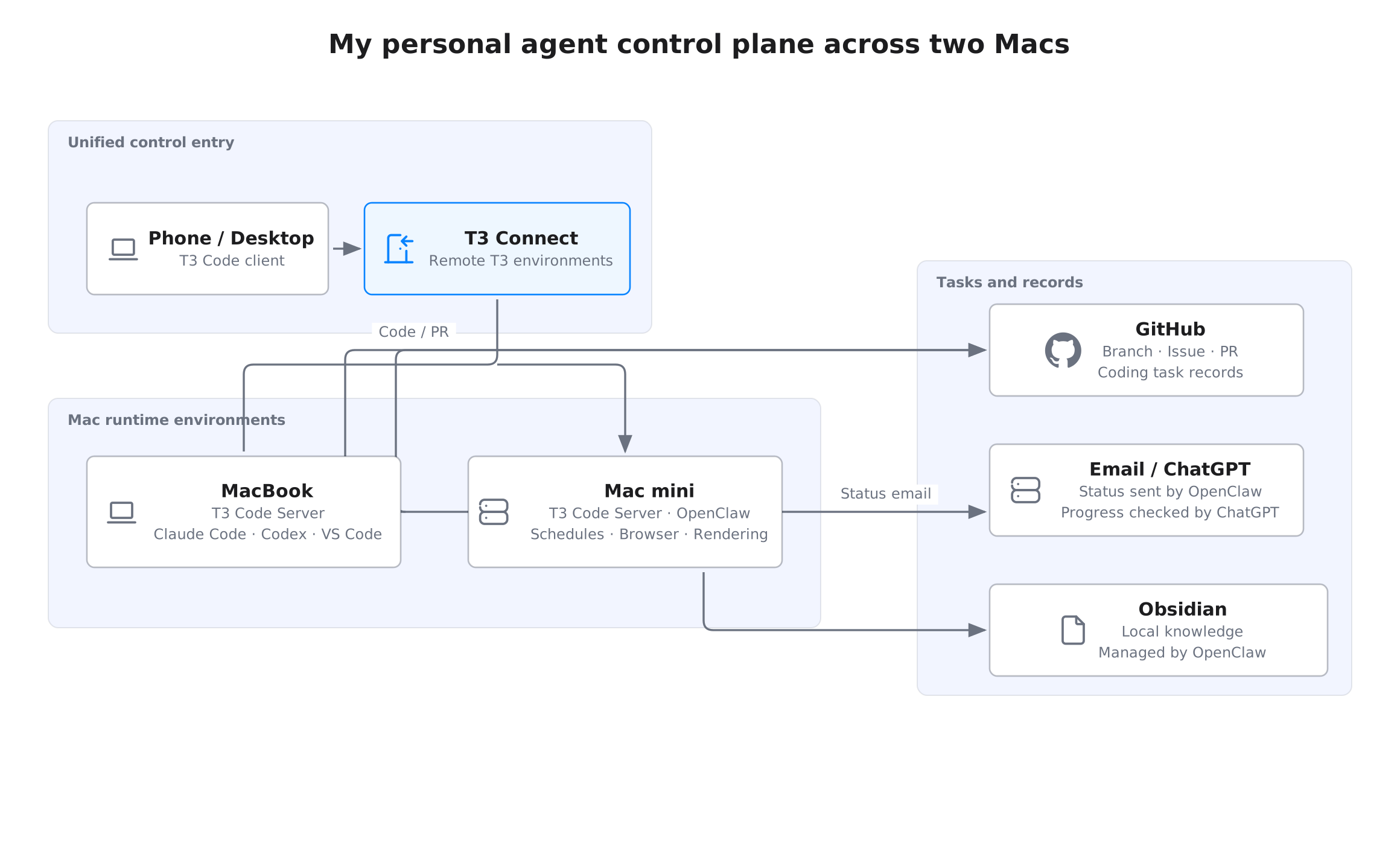
I would use the MacBook for interactive development and keep the Mac mini available for OpenClaw, overnight tasks, browser automation, and video rendering. The final placement should depend on the software dependencies, available resources, and whether a job is short or long-running.
Code changes return to GitHub so that branches and pull requests provide durable review records. OpenClaw would continue to send mail to a dedicated mailbox, and ChatGPT would inspect that mailbox using the existing workflow. Obsidian remains the local knowledge and working-memory layer, with OpenClaw operating it when needed.
Thus, mobile notifications and email notifications serve different purposes: T3 Code’s mobile client is better for reviewing coding threads, while OpenClaw email is better for reporting scheduled or non-coding jobs. ChatGPT reading the mailbox is part of my personal information flow, not an email integration built into T3 Code.
The T3 Code architecture boundary
From a user perspective, the core T3 Code flow is straightforward: a client connects to an agent-running machine, T3 Server communicates with local harnesses and project worktrees, and GitHub receives code changes through Git.
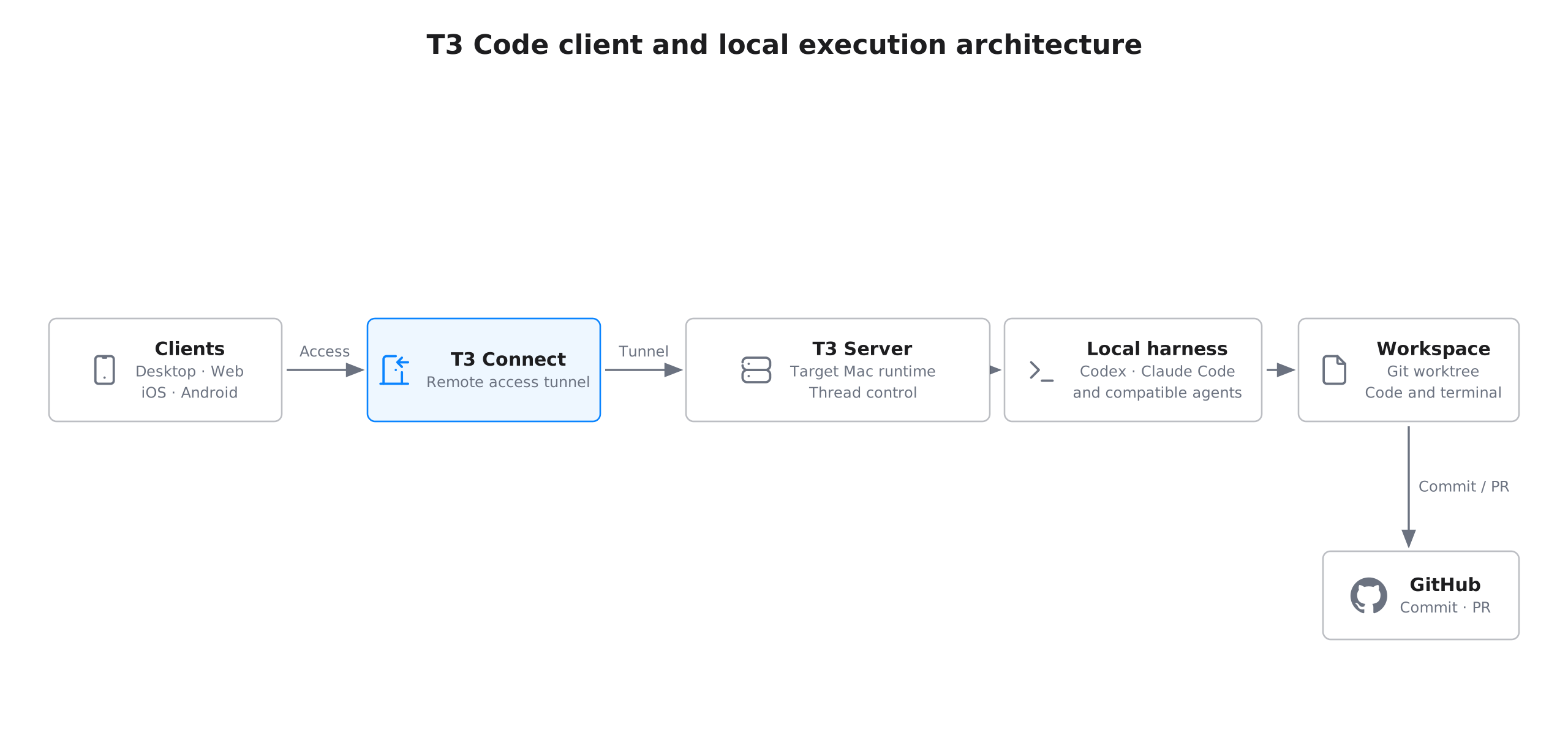
Every Mac that runs coding tasks needs a corresponding T3 environment and local agent. T3 Connect provides remote access to that environment, while the harness attached to it executes the actual work. Cross-environment sub-agent orchestration belongs to the coding workflow; it should not be read as a universal scheduler for every kind of task.
This boundary is why I would not put every automation into T3 Code. In my setup, T3 Code is the coding-agent control plane, while OpenClaw continues to handle calendars, email, Obsidian, and scheduled work. Clear responsibilities are more realistic than assuming one tool can do everything.
Validate the setup with real jobs
I would run the two Macs for a while before expanding the workflow. The first checks are whether a phone stays reliably connected to both machines, whether an overnight job on the Mac mini remains visible from the MacBook, and whether pull request review feels natural.
I would then run representative jobs: a long rendering task on the Mac mini, a round of email organization by OpenClaw, and a coding task in T3 Code using an isolated worktree. Each job should answer three questions: where it runs, how it reports completion, and where its result is stored.
I will also verify subscription and agent compatibility carefully. Connecting a coding harness to the control plane does not imply that every model plan switches seamlessly. Connecting a phone to T3 Connect does not turn it into a general-purpose VPN. Measuring those boundaries is more valuable than a polished demo.
Summary
I am not trying to build a universal agent. I am trying to build a personal AI workspace around two Macs: T3 Code provides a unified entry point for coding-agent access and remote control, OpenClaw handles broader automation, GitHub preserves coding-task results, and email and Obsidian carry notifications and local knowledge.
T3 Code has paused my plan to build a custom tunnel from scratch. Its current three-machine allowance covers both of my Macs, and its remote-control and GitHub workflows match the needs I have identified most clearly. It is not yet the control plane for every AI task. The practical path is for it to become the control plane for coding harnesses and cooperate with systems such as OpenClaw.