Note
This post builds on Ameen Alam’s three-part GPU Architecture series and draws on TrendForce, NVIDIA (Slinky/Slurm, the GPUDirect data path) and Mirantis material on GPU infrastructure and agentic AI. It’s written for Kubernetes veterans who have never touched a GPU and never trained or served a model.
Why a cloud-native veteran is writing about GPUs
For the past decade my home turf has been containers and Kubernetes. From service mesh to the whole cloud-native ecosystem, I’ve spent almost every day on scheduling, networking, storage and observability, but always on the CPU side of cloud native. Last year I formally moved into AI infrastructure (AI Infra).
Once I dove in, I found the concept density absurd. Token, Transformer, Tensor Core, HBM, KV Cache come at you one after another, and almost every doc and article assumes you already know them, which is deeply unfriendly to engineers who have never trained a model or run inference.
I quickly hit on a trick: don’t learn from scratch, use what you already know by heart as a translator.
The mental model a Kubernetes veteran already carries, scheduling, Jobs, Deployments, controllers, caches, utilization, multi-tenancy, and then microservices, service mesh, distributed systems, event-driven, high-availability, maps onto AI Infra almost one to one. Once you build that mapping, the intimidating concepts become “oh, it’s just the GPU version of X”. This “translate AI through cloud-native eyes” approach got me up to speed fast, and I’m writing it down to help friends with the same background skip the detour.
This is the first post in that translation series, tackling the most fundamental question: why does AI absolutely need GPUs? Later posts will cover GPU resource management, scheduling and observability, topics a K8s veteran knows well. If you’re also crossing over from cloud native, I hope this saves you a few days of digging.
You type a sentence and the AI replies word by word. For someone who has used K8s, the most natural mental model is: AI is a “workload” that runs on GPUs, and a GPU is a special kind of “node” built for it.
Translating the jargon into K8s
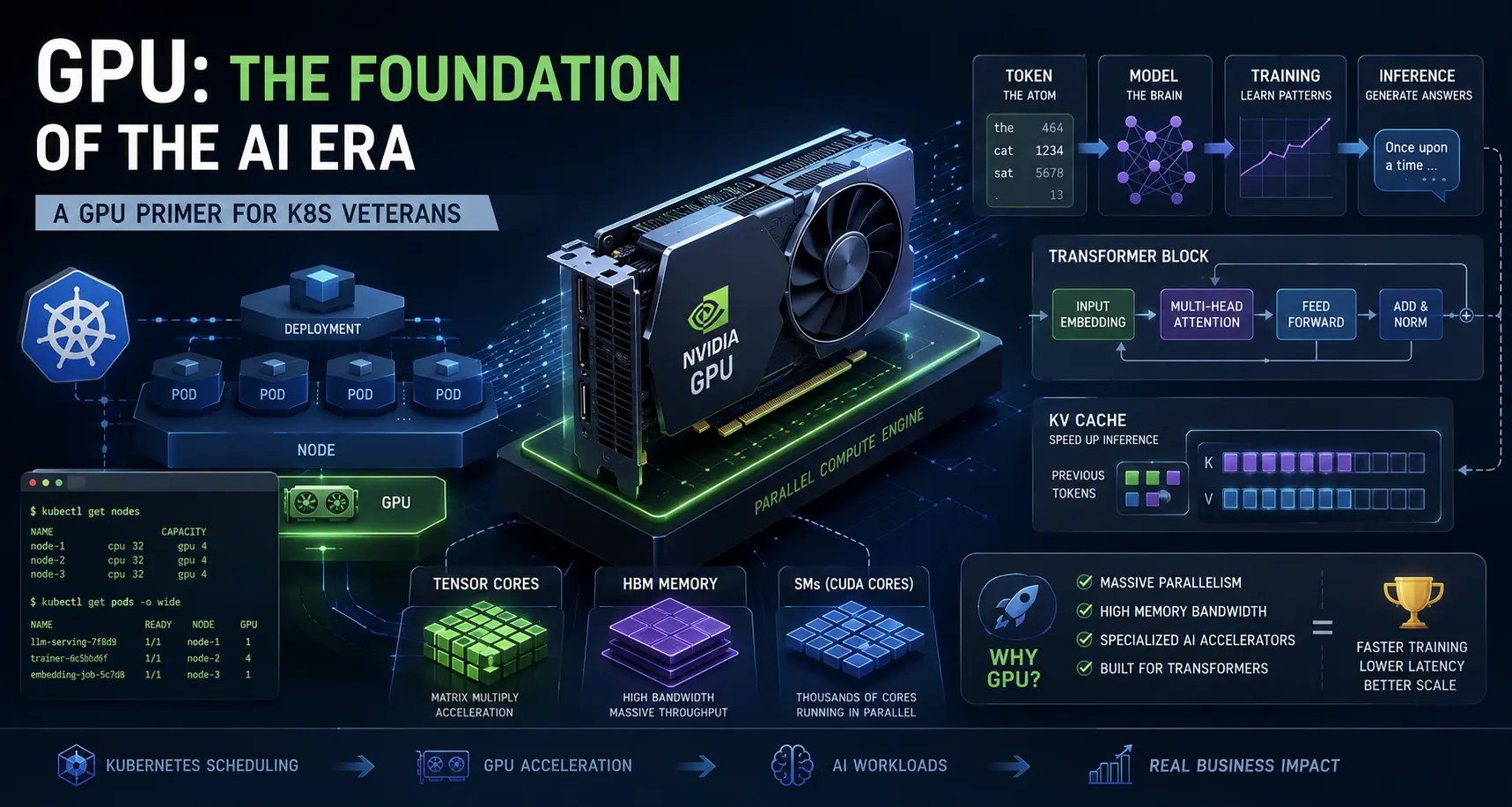
The AI world throws around terms that read like scripture to anyone who hasn’t done training or inference. Here’s a cheat sheet; I’ll re-explain each term in plain words below.
| AI concept | In plain words | K8s veteran’s analogy |
|---|---|---|
| Token | A small unit text is chopped into; AI generates them one at a time | A log line, a text chunk |
| Model | A “scoring program” holding billions of numbers (weights) | A giant image whose “weights” aren’t code |
| Training | Feed it huge data, tune params repeatedly, build the model | Run a Job to build an image; offline, batch, care about throughput |
| Inference | Model is done, serve user requests and emit answers | Run a Deployment taking traffic; online, care about latency |
| Transformer | The architecture shared by nearly all LLMs (GPT, Claude, LLaMA) | A controller design pattern |
| Tensor Core | A GPU unit that only does “matrix multiply” but insanely fast | A sidecar worker that only does batched multiply |
| HBM | The GPU’s on-board high-bandwidth memory; model and cache live here | Node-local RAM, but with bandwidth that crushes normal RAM |
| KV Cache | Attention state stored at inference time, grows with the conversation | A pod-local session notebook that gets thicker the longer you talk |
Memorize this table; the rest follows.
The question most people never ask
GPUs are everywhere in AI now, so accepted that most people skip past it. We care about which card to rent, which framework to use, which model to deploy, but rarely stop to ask the deeper question:
Why GPUs?
Why not the more general CPU? Why did a chip originally built to render game graphics become the foundation of the most important technology shift in a generation?
The answer isn’t just “it’s fast”, it’s about how computation itself is organized, and why AI workloads demand an architecture fundamentally different from fifty years of software.
Two philosophies of computing: the craftsman and the factory
You know CPUs well. K8s’s control plane, etcd, the scheduler all run on CPU; it excels at executing complex instructions one after another, with few cores (8 to 128) but each highly capable. A CPU optimizes for latency: how fast can I finish one complex task? Like a master craftsman doing one intricate job at a time.
A GPU takes the opposite path: execute simple instructions across massive amounts of data at once. A modern data-center GPU has thousands of small cores, and it optimizes for throughput: how many simple tasks can I finish at the same moment? Like a factory floor of thousands of workers, each doing one identical step simultaneously.

For any single complex job, the craftsman (CPU) is faster; but as long as the work is uniform and parallelizable, the factory (GPU) crushes the craftsman in total output per second. For decades CPU dominated because most software (web servers, databases, operating systems) is inherently serial. Then deep learning arrived.
Why AI broke the CPU
The core of a neural network is, essentially, a giant pile of matrix multiplications (an operation that batch-multiplies-and-adds two sets of numbers). When a model processes a token, it runs thousands or tens of thousands of these multiplies, and they don’t depend on each other.
The key insight in one line: these operations are naturally parallel.
A 128-core CPU looks at this workload and sweeps through it sequentially; a many-thousand-core GPU chops the matrix into blocks and hands them to its small cores to run at once. Same work, orders of magnitude faster on GPU, not because a single GPU core is faster (it’s slower), but because the problem is parallel and the GPU is built for exactly that shape of computation.
That’s the real reason AI runs on GPUs: not marketing, not legacy, architectural fit.
The three things inside a GPU, in K8s terms
1. Tensor Core: the sidecar that only does batched multiply
A GPU has two kinds of cores. Regular CUDA cores are general-purpose workers that can compute anything; a Tensor Core is a dedicated unit that does exactly one thing: multiply two small matrices in a single shot. But that one thing it does insanely fast, finishing in one cycle what would take a regular core thousands.
AI’s core operation is matrix multiplication, so Tensor Cores are tailor-made for it. In K8s terms: regular CUDA cores are like general pods in a Deployment that do everything; a Tensor Core is like a highly specialized sidecar that only does “batched multiply”, single-function but with crushing throughput.
2. HBM: the node’s high-speed local memory
Computing fast isn’t enough; you have to get the data. A GPU’s memory is layered just like a CPU node’s, and if you understand a K8s node’s L1/L2 cache, RAM and local disk, you understand the GPU’s:

The bottom layer, HBM (High Bandwidth Memory), is the GPU’s “main memory”; model weights, intermediate results and KV cache all live here. It’s characterized by large capacity (hundreds of GB per card) and extremely high bandwidth.
Why build HBM at all? Because traditional VRAM (GDDR) lies flat on the circuit board, you run out of routing space and hit a bandwidth wall. HBM’s answer is to stack memory chips vertically (connected by Through-Silicon Vias, TSVs), packed right against the GPU die with an interface thousands of lines wide running in parallel. By analogy: normal memory is like a warehouse spread across a parking lot where the movers can’t keep up; HBM is like building that warehouse into a dozens-story tower right next to the workshop, with TSV elevators running up and down at full speed.
Here’s a counter-intuitive fact: modern AI is memory-bound more than compute-bound. Tensor Cores do matrix multiplication faster than HBM can feed them data, so the GPU is often waiting. That’s why each new GPU generation (H200 → Blackwell → Vera Rubin) sees its most important upgrade in HBM bandwidth, not compute (4.8 → 8 → 22 TB/s, source).
Since data movement is the bottleneck, NVIDIA’s other move is to let data bypass the CPU and reach the GPU directly, the three “expressways” collectively called GPUDirect:
- GPUDirect Storage: data goes straight from NVMe to GPU memory, without detouring through host memory and the CPU.
- GPUDirect RDMA: GPU memory talks directly to the NIC (InfiniBand), so cross-node gradient exchange no longer hops through the CPU.
- NVLink: GPUs inside one machine connect directly and share memory.
In one line: the CPU is no longer the traffic cop for every data movement. In K8s terms, it’s like sending data over a direct data plane instead of routing every packet through the apiserver. NVIDIA’s edge isn’t just fast compute; it’s that the entire data highway from storage to GPU, GPU to GPU, and GPU to network has been straightened out.
3. Transformer + Token: the program that emits answers word by word
A Transformer isn’t hardware, it’s a model architecture (a program structure). GPT, Claude, LLaMA and other large models are all built on it. What it does is actually plain:
Read a piece of text, predict the next token.
A token is a small unit text is chopped into (a character, half a word). A Transformer feeds the input token sequence in, emits “the most likely next token”, appends it, feeds the new sequence back in, predicts the next-next, and so on, generating the whole answer one piece at a time.

In K8s terms: a Transformer is a controller whose reconcile logic is “look at the current state (tokens so far) → emit the next action (the next token)”, looping continuously. That’s where the “word by word” effect of AI assistants comes from.
Training vs Inference: writing the recipe vs serving the dish
This is the easiest pair to confuse when starting out, yet the most critical. Training and inference are two different things with completely different hardware needs.
- Training: feed huge data, repeatedly tune those billions of parameters, “teach” the model into existence. It runs for weeks to months as an offline batch job, cares about throughput, not per-request latency. In K8s terms, it’s a long-running Job whose goal is to build a model image.
- Inference: once the model is trained and online, it takes each user’s input, computes an answer and emits it back. The user is waiting, so it cares about latency; it must serve thousands of users at once, so it cares about concurrency. It’s like a Deployment taking traffic.

This directly affects which GPU metrics you should care about. The headline numbers (Tensor Core FLOPS, NVLink bandwidth, cluster size) are mostly training metrics; what actually determines whether your AI assistant feels snappy (HBM capacity, memory bandwidth, KV cache management) are inference metrics, and they get little airtime. Yet inference is where most production AI actually runs.
Multi-GPU collaboration: an AI cluster is just a distributed system
With single-card covered, back to reality: the biggest models don’t fit on one card, and training routinely needs hundreds or thousands of cards working together. At that point the GPU cluster is essentially a distributed system, and almost everything you know from cloud native applies.
Many GPUs = a microservice cluster. A card is like a service instance; the model is sharded across cards, each computes a slice and the results are stitched back. That’s exactly the microservices playbook of splitting by responsibility and sharing load.
Inter-card communication = the service-mesh data plane. Cards constantly exchange data (gradients especially during training). Within a rack it’s NVLink (several TB/s), across racks it’s InfiniBand. It’s just the east-west traffic between microservices: in-node pod-to-pod direct is fastest (NVLink), cross-node cross-cluster goes over the network (IB). NVIDIA packaging GPUs, switches, DPUs and RDMA into a whole rack (Vera Rubin NVL72) is exactly a service mesh unifying the data plane, control plane and observability.
Distributed training’s all-reduce = distributed consensus. Each training step synchronizes and averages the gradients across all cards, a step called all-reduce. Anyone who has done etcd or Raft gets it instantly: it’s distributed-system consensus and consistency, except here you’re syncing gradients, not a state-machine log.
Continuous batching = event-driven. During inference, new requests are dropped into the running batch as they arrive, no waiting for the whole batch to finish. Requests are events, the batcher is a consumer, batch-then-process: that’s the event-driven / message-queue mindset, all to keep the GPU busy.
Disaggregated inference = microservices. Split prefill (process input, compute-heavy) and decode (emit tokens, memory-bandwidth-heavy) into separate GPU pools that scale independently, with KV cache passed between them over NVLink/RDMA. That’s entirely the microservices pattern of splitting by responsibility and scaling each part; KV cache is the session context passed between services.
See the pattern? An AI cluster isn’t a new species, it’s your familiar distributed-systems, microservices and service-mesh toolkit replayed on GPU hardware. The instincts you built tuning traffic on Istio and Envoy, or consensus on etcd, are worth exactly as much here.
Running GPUs on K8s: Slurm for training, K8s for inference
By now, as a K8s veteran, you’re bound to ask: so what actually schedules a GPU cluster? The interesting answer: training and inference often run on two different schedulers.
On the training side, the HPC world’s heavyweight is Slurm. It manages 65% of the world’s TOP500 supercomputers (NVIDIA), and large AI training teams have years invested in Slurm scripts, fair-share policies and accounting. Training is a long-running batch job that wants topology awareness (place chatty GPUs close together), long exclusive holds and high throughput, areas Slurm has refined for over a decade.
On the inference side, the home field is Kubernetes. Inference is an online service that wants fast autoscaling, per-request scheduling and integration with service mesh and observability, exactly K8s’s strengths.
So what if a team needs both, maintain two environments? NVIDIA open-sourced the Slinky project to solve exactly this, in a very K8s-native way:
- slurm-operator: turns each Slurm daemon (slurmctld for scheduling, slurmd for compute, slurmdbd for accounting) into a K8s CRD and Pod, with the control plane made highly available through Pod regeneration instead of Slurm’s native HA. Config changes sync automatically via ConfigMap/Secret, workers autoscale with HPA, scale-in drains running jobs first, and upgrades use PodDisruptionBudget to protect in-flight work.
- GPU Operator + DCGM Exporter: auto-installs drivers and the device plugin, and can label metrics by Slurm job ID, giving you per-job GPU metrics (scraped by Prometheus).
- ComputeDomains + DRA: for cross-node-NVLink machines like GB200 NVL72, K8s uses DRA (Dynamic Resource Allocation) to dynamically manage the cross-node GPU interconnect domain, so distributed training hits full NVLink bandwidth across nodes.
NVIDIA itself runs Slinky in production up to 8,000+ GPUs, with NCCL all-reduce/all-gather performance matching bare Slurm, the K8s layer adding almost no overhead (NVIDIA production data). K8s is becoming the substrate for GPU computing, with Slurm as the scheduling layer on top.
Training and inference have fundamentally different GPU-scheduling needs, so they can’t be managed the same way. That’s also why GPU resource management (covered later) has to be scenario-specific, and why solutions like HAMi aim to be a unified GPU resource-management layer across Slurm + K8s hybrid environments.
The real trap of inference: KV Cache
If there’s one concept that separates “GPU theory” from “AI inference reality”, it’s KV Cache.
When a Transformer generates each token, it has to reference the relationships among all previous tokens (this is “attention”). To avoid recomputing from scratch every time, it stores each token’s attention state, and that store is the KV Cache.
The problem is it grows without bound:
- A user sends a 10,000-token conversation; the model stores a state entry for each.
- To generate the next token, it reads the entire KV Cache.
- A 70B model at 32K context can produce a KV Cache of 8 to 16 GB per request, larger than the model itself.
- 50 concurrent users land, and KV Cache eats hundreds of GB of memory.

In K8s terms: KV Cache is like a session notebook local to a Pod. The longer the conversation, the thicker the notebook, and every new word forces a full read from cover to cover. So inference memory is often eaten not by the model but by this “notebook”.
That’s also why we got paged attention (managing the notebook like virtual-memory pages to cut fragmentation, popularized by vLLM) and NVIDIA Dynamo’s multi-tier cache (hot pages in HBM, warm offloaded to CPU memory, cold spilled to NVMe). Half an inference engineer’s job is managing this notebook.
GPU utilization lies
K8s folks know “utilization lies” best: a pod reporting Running isn’t necessarily doing work, it might be in CPU steal or waiting on IO. GPUs are worse.
That “GPU utilization %” in monitoring usually only measures “is the GPU executing any kernel”, not how efficiently. A card can report 90% utilization while its Tensor Cores are actually busy only 30% of the time, with the rest spent on memory ops, kernel-launch overhead, or just waiting for data.
The more honest metric is SM Efficiency (SM activity rate): it looks at how many SMs are doing useful work each clock cycle. A card showing 100% utilization in nvidia-smi may have an SM Efficiency of only 20-30%. Many companies think their “GPUs are maxed out” when in fact huge amounts of compute are spinning idle. So to judge whether a GPU is truly working, don’t look at utilization, look at SM Efficiency.
The metrics that actually matter (mapping to the QPS, P99 latency and resource levels you watch in K8s):
- Token throughput: tokens generated per second per card, how many users you can serve (like QPS).
- TTFT (Time To First Token): time from receiving a request to emitting the first token, sets the “responsiveness feel” (like cold-start time).
- TPOT (Time Per Output Token, also called ITL / inter-token latency): average time to produce each token, sets streaming smoothness (like P99). Serving frameworks like vLLM and TGI generally use TPOT; NVIDIA more often calls it ITL, same thing.
- Memory breakdown: how much is weights vs KV cache vs transient activations, tells you whether you’re memory-bound (like breaking down a pod’s memory usage).
Why NVIDIA is so hard to dislodge
You can’t talk GPUs without NVIDIA’s dominance. The hardware is excellent, but hardware alone can’t explain why AMD, Intel and a crowd of startups have failed to gain ground. The answer is ecosystem depth.
CUDA isn’t just a parallel-computing platform, it’s a programming model, compiler, runtime and a stack of libraries, refined for 18 years. Nearly every AI framework (PyTorch, TensorFlow, JAX) grew up on CUDA first and was ported elsewhere as an afterthought. In K8s terms: CUDA is to GPUs roughly what the Linux kernel + containerd + the whole CNCF toolchain are to the container ecosystem, not something you replace by swapping a kernel.
Switching to another card means re-validating every layer of your inference stack (kernels, libraries, frameworks, serving, monitoring, ops). The switching cost isn’t buying different hardware, it’s rebuilding an entire software ecosystem. That’s the “CUDA moat”.
The future: AI factories
NVIDIA no longer describes its business in terms of “GPUs” or even “data centers”, but as “AI factories”: facilities that continuously convert electricity, silicon and data into intelligence. Beneath the language is a real architectural shift:
- Power is now the primary constraint: a single Vera Rubin rack draws over 100 kW (source), and a mid-size training cluster needs 10 to 50 MW, comparable to a small town. The GPU is no longer the hard part; securing reliable power is.
- Cooling moves off air: liquid cooling is now standard for high-density GPUs.
- Networking decides GPU placement: AI cluster design now starts with network topology and works backward to where GPUs go, the reverse of traditional data centers.
- Memory bandwidth remains the scaling frontier: each generation adds compute, but what actually moves the experience is HBM bandwidth.
- It’s fundamentally HA + datacenter ops: power redundancy, cooling failover, latency determined by network topology, single-point failure and DR are all old problems for anyone who has done distributed-systems HA. The AI factory isn’t new magic; it’s your HA-architecture skillset moved into a data center an order of magnitude denser in power and compute.
Don’t retire the CPU just yet: agentic AI is rebalancing the CPU:GPU ratio
After all this GPU praise, you might think the CPU is sidelined in the AI era. The opposite is true: agentic AI is putting the CPU back at center stage.
In traditional LLM inference the CPU mostly just compresses and routes data for the GPU, so AI data centers ran CPU:GPU ratios as low as 1:4 or even 1:8. Agents are different: they plan tasks autonomously, call tools, route data between sub-agents and decide whether a task is complete, and all of that orchestration logic lands squarely on the CPU. Add that agents are often trained with reinforcement learning, where every action has to be evaluated by the CPU, and the CPU load gets heavier still.
The signal for K8s veterans is clear: the future AI node is a mixed-workload node where CPU and GPU are billed together, and scheduling and resource management must handle both, not just stare at the GPU.
What this means for me (a K8s veteran)
After all this hardware, it lands on what I work on: only by first understanding why the GPU is the foundation of AI can you understand why “GPU resource management” is a real problem.
When a card costs hundreds of thousands of yuan, a whole rack draws over a hundred kilowatts, and production GPUs still run below capacity because memory bandwidth, KV cache or batching aren’t tuned, just “handing out cards” is nowhere near enough. How to run multiple tenants safely on one card (like K8s scheduling many pods onto one node), how to partition resources between the very different workloads of training and inference, how to push utilization from “looks full” to “actually full”, that’s exactly what GPU virtualization and sharing (the work I do) solves.
Here’s a sobering number: per the ClearML AI infrastructure survey, only about 7% of enterprises hit over 85% GPU utilization at peak, more than half sit at 51-70%, and 15% are below 50%. In other words, a big chunk of the GPUs companies pay dearly for are spinning idle. That’s usually not a hardware shortage, it’s scheduling and management not keeping up.
My own take is that GPU resource management is moving through three stages: Allocation → Utilization → Efficiency. Stage one only answers “who gets this card” (device plugin, exclusive or time-slicing); stage two asks “is this card full” (dynamic batching, elastic autoscaling, where most enterprises are stuck); stage three asks “is this card’s compute producing maximum value” (SM Efficiency, tokens per watt, bandwidth utilization). The real challenge is stage three, and the future GPU scheduler shouldn’t be a resource allocator but a fine-grained orchestrator of the GPU’s internals, reading how many SMs are active, the Tensor Core utilization, how much memory KV cache holds, and only then deciding whether one more request fits.
Plainly put, the AI era is replaying the cloud-native story: from “single-machine exclusive” toward “multi-tenant sharing + scheduling + observability.” And the GPU is the main stage of that play.
This is only the first half: who else is at the table besides NVIDIA
By now you’ve probably noticed this post barely mentions anyone but NVIDIA. Unavoidable, it’s the absolute protagonist today. But if you think the AI accelerator world begins and ends with NVIDIA, you’re very wrong.
In fact, an “anti-NVIDIA alliance” is gathering from all sides:
- Cloud-vendor silicon: Google’s TPU is on its sixth generation and backs almost all of its own AI; AWS’s Trainium (training) and Inferentia (inference) keep spreading; Meta and Microsoft aren’t sitting still.
- Traditional chip giants: AMD presses hard with the Instinct line and ROCm, Intel holds ground with Gaudi and oneAPI.
- China’s heterogeneous accelerator ecosystem: Huawei Ascend, Hygon DCU, Cambricon, Moore Threads, Enflame, Kunlunxin, Metax, Biren…, sprinting through the domestic-substitution window, with their software stacks climbing from “works” toward “works well”.
- The open ecosystem fights back: the UXL Alliance, OpenAI Triton, and PyTorch’s native AMD/TPU backends are all gnawing at the walls of the CUDA moat.
What does that mean for a K8s veteran? It means the future AI cluster is almost certainly heterogeneous: a rack might hold NVIDIA, AMD, TPU and domestic cards side by side, and one schedule has to manage several completely different kinds of hardware.
So the really interesting questions follow:
- How do you mix multiple accelerator types in one cluster and still schedule and observe them uniformly?
- Where do K8s device plugins and DRA (Dynamic Resource Allocation) evolve to, so they can elegantly describe this menagerie of hardware?
- Will the CUDA moat be breached by the open ecosystem, or will NVIDIA rule long-term like x86 did?
- What pieces are still missing before domestic heterogeneous accelerators are truly production-ready?
I’ll dig into those in later posts. This one only nails “why GPUs”; the next will tackle the big chess game of how AI infrastructure should schedule things once “GPUs aren’t just one kind”.
References
- Ameen Alam, Why GPUs Became the Foundation of Modern AI (Part 1 of the trilogy)
- Ameen Alam, The Hidden Technology Behind Modern AI GPUs (Part 2)
- Ameen Alam, Real AI Infrastructure and the Future of GPUs (Part 3)
- TrendForce, The Great Rebalance: How Agentic AI Is Reshaping the CPU/GPU Ratio
- Anton Polyakov (NVIDIA), Running Large-Scale GPU Workloads on Kubernetes with Slurm (Slinky / Slurm on K8s)
- Kawonise, Why NVIDIA GPU Architecture Is Perfect for AI: GPU Data Path for a Single Node (GPUDirect data path)
- Mirantis, GPU Infrastructure Automation and Strategy (GPU infra automation and utilization)