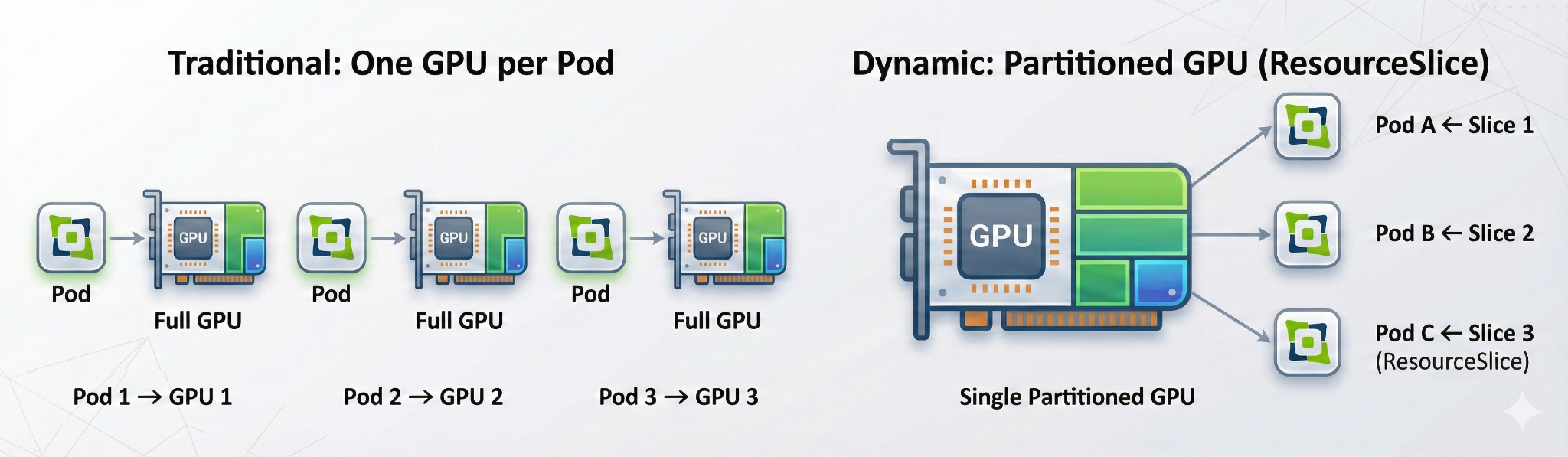
One GPU per task is the default
What it costs
Kubernetes allocates GPUs atomically: one whole device, one task.
- A 1 GB task blocks an 80 GB device
- Most GPUs sit idle most of the time
- No advanced scheduling yet: no binpack, no spread, no topology
ContainerDays 2026 Singapore · Hands-on Workshop
Hands-on GPU Scheduling in Kubernetes with HAMi
October 27, 12:30 to 13:15
Install HAMi. A kind node advertises two fake A100s as vGPU capacity.
Share a GPU. Fractional requests, the full interception chain, and a Pod that can never fit.
Scheduler policies. binpack vs spread on the card axis, and where topology comes in.
Beyond the default scheduler. KAI Scheduler, Volcano, and the DRA path.
Two metric families, what to try after the session.
Lab guide: workshop.project-hami.io/labs/containerdays-singapore
Everything runs on your laptop. The GPUs are fake.
git clone https://github.com/Project-HAMi/hami-workshop
cd hami-workshop/examples/containerdays-singapore
git clone https://github.com/fishman/hami-mock-monitor
docker pull kindest/node:v1.37.0 busybox:1.36 ghcr.io/llm-d/llm-d-inference-sim:v0.12.0
kind, kubectl, helm, jq, gitWhat it costs
Kubernetes allocates GPUs atomically: one whole device, one task.
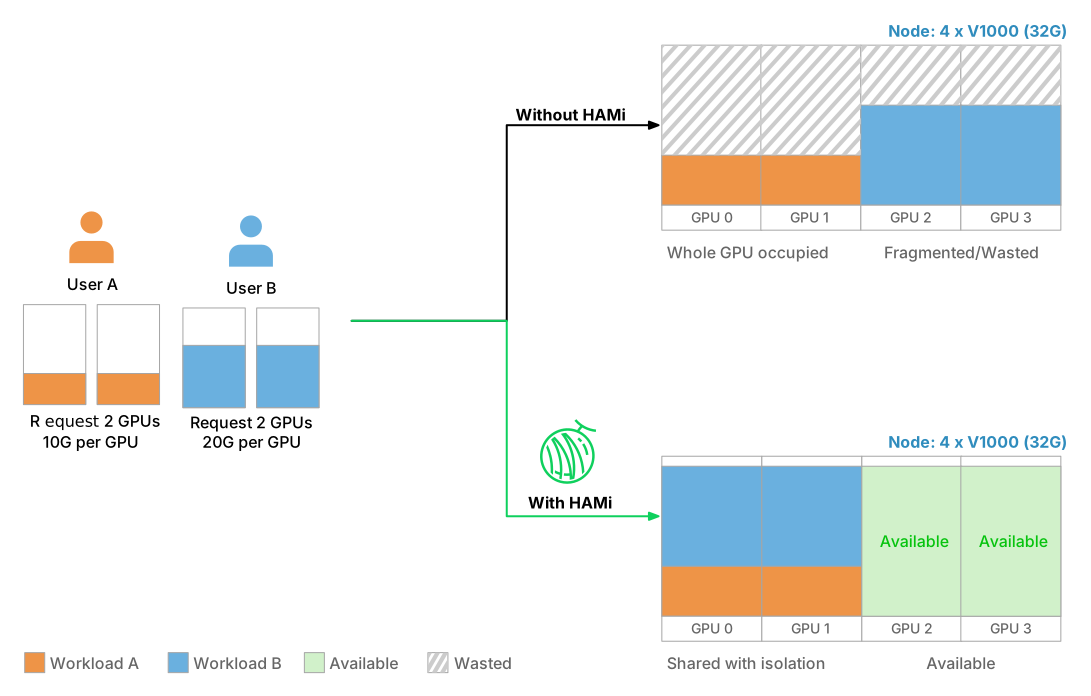
One GPU, many tasks
Six things HAMi brings to GPU scheduling
Manage GPU, NPU, MLU, and other accelerators in one workflow.
Slice memory and compute with hard isolation at runtime.
Binpack, spread, and topology-aware placement policies.
Kubernetes-native APIs, DRA, and CDI support.
Memory and core quotas for fair, stable sharing.
Consistent metrics and visibility across vendors.
One API across vendors, no code changes
# NVIDIA: 15 GB and 30% of one card
resources:
  limits:
    nvidia.com/gpu: 1
    nvidia.com/gpumem: 15000
    nvidia.com/gpucores: 30
# Ascend 910C: 8GB + 20% compute
resources:
  limits:
    huawei.com/Ascend910C: "1"
    huawei.com/Ascend910C-core: "20"
    huawei.com/Ascend910C-memory: "8192"
hami-schedulerFilter, score, Bind against per-card stateAllocatelibvgpu.so in the container, enforces limitsCode entry points: cmd/scheduler, cmd/device-plugin, cmd/vGPUmonitor, pkg/device/<vendor>
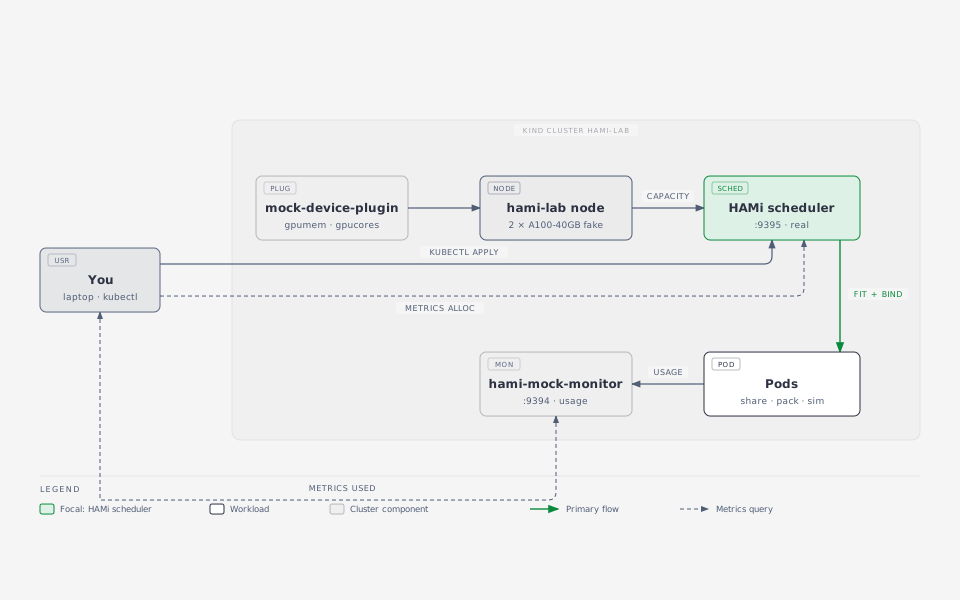
Turns a node annotation into nvidia.com/gpumem and nvidia.com/gpucores capacity. The real device plugin writes that annotation from NVML.
Produces HAMi's usage metrics (normally from vGPUmonitor and HAMi-core) from a load source instead of a GPU.
What you do not get without a GPU: memory and compute isolation inside the container. That part is HAMi-core, shown live on a real card in the wrap-up.
./setup.sh
The script:
hami-lab and labels the node gpu=onnvidia.com/gpu=20: the mock plugin's health gate, 2 cards x 10 splitshami.io/node-nvidia-register from fake-gpus.json, what the real device plugin writes after it reads NVMLcompleteBinds=trueExpected at the end:
{ "nvidia.com/gpu": "20", "nvidia.com/gpucores": "200",
  "nvidia.com/gpumem": "81920", "nvidia.com/gpumem-percentage": "200" }
kubectl -n kube-system get pods | grep hami
kubectl -n kube-system get cm hami-scheduler-device -o yaml | less
kubectl get node hami-lab-control-plane \
  -o jsonpath='{.metadata.annotations.hami\.io/node-nvidia-register}' | jq
[{"id":"GPU-mock-0","index":0,"count":10,"devmem":40960,"devcore":100,
  "type":"NVIDIA-A100-SXM4-40GB","health":true,"numa":0,"mode":"hami-core"}, ...]
count: how many Pods may share the card. devmem in MB, devcore in percentFilterkubectl apply -f share.yaml -f too-big.yaml
kubectl get pods -o wide
share-1..3 each ask for 15000 MB and 30% of a card, and run. too-big asks for 45000 MB, more than any 40960 MB card, and stays Pending:
kubectl get events --field-selector involvedObject.name=too-big | tail -2
# 0/1 nodes are available: 1 2/2 CardInsufficientMemory.
45000 MB fits the node total, but no single 40960 MB card.
for p in share-1 share-2 share-3; do
  echo -n "$p "; kubectl get pod $p -o jsonpath='{.metadata.annotations.hami\.io/vgpu-devices-allocated}{"\n"}'
done
# share-1 GPU-mock-1,NVIDIA,15000,30:;
# share-2 GPU-mock-0,NVIDIA,15000,30:;
# share-3 GPU-mock-1,NVIDIA,15000,30:;
The format is uuid,type,memory_mb,cores: per device, ; per container. The device plugin reads it in Allocate.
Four steps, one node
schedulerName to hami-schedulerFilter reads the node annotation hami.io/node-nvidia-register (the card list from Lab 1), checks memory and core headroom per card, and picks a physical card UUIDBind it writes hami.io/vgpu-devices-allocated onto the Pod, sets hami.io/bind-phase=allocating and takes the node lock hami.io/mutex.lockAllocate mounts /dev/nvidia* and the vGPU files, reading the target from the Pod annotation, then marks success and releases the lockcompleteBinds exists. Without it the next Pod waits up to 5 minutes for the lock.On a real node, step 4 also injects libvgpu.so via ld.so.preload, and HAMi-core enforces the memory and core limits from that moment on.
| Axis | Annotation | binpack | spread |
|---|---|---|---|
| Which node | hami.io/node-scheduler-policy | fewer nodes | across nodes |
| Which card on that node | hami.io/gpu-scheduler-policy | same card | across cards |
kubectl delete -f share.yaml -f too-big.yaml
kubectl apply -f binpack.yaml
for p in pack-1 pack-2; do
  echo -n "$p "; kubectl get pod $p -o jsonpath='{.metadata.annotations.hami\.io/vgpu-devices-allocated}{"\n"}'
done
Both Pods report the same GPU-mock-X: two workloads sharing one card. Frees whole cards for big jobs.
kubectl delete -f binpack.yaml
kubectl apply -f spread.yaml
for p in spread-1 spread-2; do
  echo -n "$p "; kubectl get pod $p -o jsonpath='{.metadata.annotations.hami\.io/vgpu-devices-allocated}{"\n"}'
done
One Pod per card. Same cluster, same requests, different policy, different placement.
metadata:
  annotations:
    hami.io/gpu-scheduler-policy: spread   # or binpack, per Pod
fake-gpus.json carries a numa field per card, the same hint the real device plugin records from the driverOne isolation layer, several scheduling brains
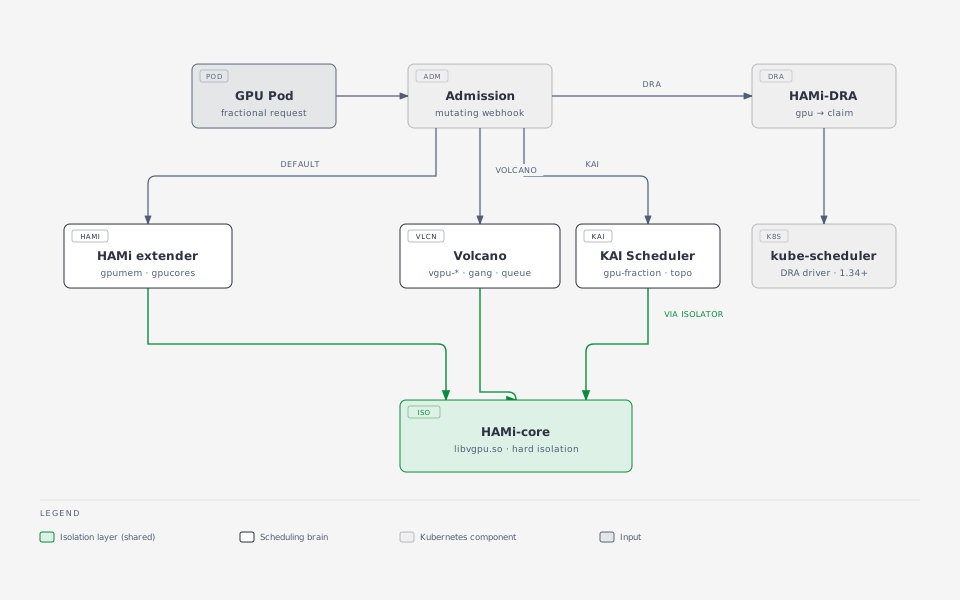
HAMi scheduler extender + HAMi device plugin.
nvidia.com/gpu, gpumem, gpucores
Volcano deviceshare + volcano-vgpu-device-plugin.
volcano.sh/vgpu-number, vgpu-memory, vgpu-cores
KAI GPU sharing + kai-resource-isolator.
gpu-memory or gpu-fraction annotation
All three use HAMi-core in the container for isolation. One rule: one device-plugin path per GPU node.
NVIDIA's scheduler for AI workloads (CNCF Sandbox): gang scheduling, hierarchical fair queues, fractional GPU, topology-aware placement.
helm install kai-scheduler oci://ghcr.io/nvidia/kai-scheduler --version v0.17.0 \
  --set global.gpuSharing=true --set binder.plugins.hamicore.enabled=true \
  -n kai-scheduler --create-namespace
libvgpu.so into PodsCUDA_DEVICE_MEMORY_LIMIT injected from gpu-fraction or gpu-memory annotationskind: Job # batch.volcano.sh/v1alpha1
spec:
schedulerName: volcano
minAvailable: 2 # both workers or none
queue: vgpu-queue
tasks:
- replicas: 2
template:
spec:
containers:
- resources:
limits:
volcano.sh/vgpu-number: 1
volcano.sh/vgpu-memory: 2000
volcano.sh/vgpu-cores: 30
deviceshare plugin plus the volcano-vgpu-device-plugincapability caps vGPU memory per team, even when the node has roomnvidia.com/gpu requests into DRA ResourceClaimsgithub.com/Project-HAMi/HAMi-DRA
Two metric families, what to try after the session
30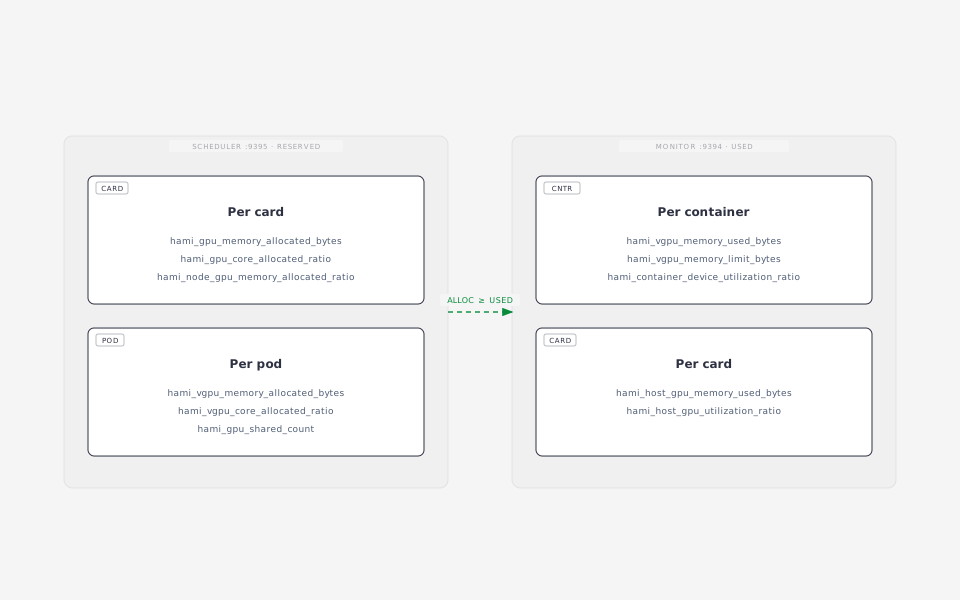
HAMi exposes two metric sets. Keep them apart: one is a reservation, the other is usage.
./metrics.sh scheduler   # allocation, port 9395
./metrics.sh monitor     # usage, port 9394
gpu_memory_allocated_bytesgpu_core_allocated_rationode_gpu_memory_allocated_ratiogpu_shared_countvgpu_memory_allocated_bytesresource_quota_usedvgpu_memory_used_bytesvgpu_memory_limit_bytescontainer_device_utilization_ratiohost_gpu_utilization_ratiohost_gpu_memory_used_bytescontainer_last_kernel_elapsed_secondsAll names start with hami_. Same labels: node, device_uuid, namespace, pod. Join them in PromQL.
kubectl apply -f sim.yaml      # llm-d-inference-sim, requests oscillate 0 to 5
watch -n 5 "./metrics.sh monitor | grep 'pod=\"sim\"'"
hami_container_device_utilization_ratio{pod="sim"} 26.4
hami_node_gpu_memory_allocated_ratio{device_uuid="GPU-mock-1"} 0.73
hami_host_gpu_utilization_ratio{device_uuid="GPU-mock-1"}      20.0
sim is a vLLM-compatible inference simulator: utilization moves between 0 and 33 (load x allocated cores)Question. Card GPU-mock-1 shows 73% memory allocated but 20% used. Which number goes on a capacity dashboard, and which on a cost report?
nvidia.com/gpumem: 3000
nvidia-smi in the Pod reports 3000 MiB total.
Allocating past the limit fails inside the Pod with out of memory. Neighbours keep running.
metrics.sh is fine for a terminal, but the HAMi WebUI turns the same numbers into dashboards. It needs a Prometheus in the cluster:
helm repo add prometheus-community https://prometheus-community.github.io/helm-charts
helm repo add hami-webui https://project-hami.github.io/HAMi-WebUI
helm upgrade --install prometheus prometheus-community/kube-prometheus-stack \
  --version 75.15.1 -n monitoring --create-namespace --set grafana.enabled=false --wait
kubectl apply -f monitoring.yaml   # scrape :9395 and :9394
kubectl apply -f webui-rules.yaml  # translate metric names for the WebUI
helm upgrade --install my-hami-webui hami-webui/hami-webui \
  --set externalPrometheus.enabled=true --set dcgm-exporter.enabled=false \
  -n kube-system --wait
kubectl -n kube-system port-forward svc/my-hami-webui 3000:3000
Open http://localhost:3000.
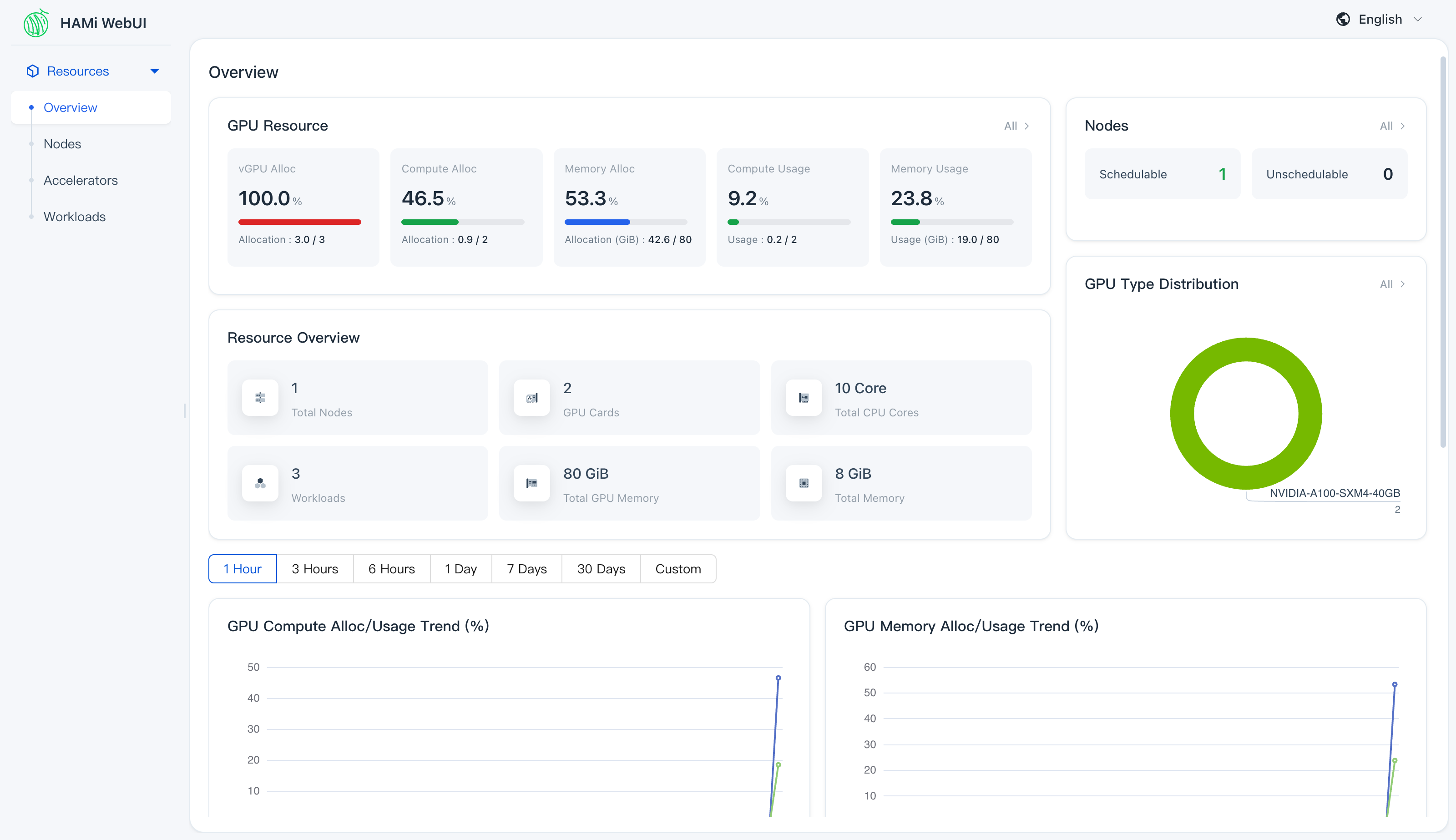
webui-rules.yamlhami_memory_size, hami_core_util, hami_container_vgpu_allocated, ...)hami_gpu_memory_limit_bytes, hami_host_gpu_utilization_ratio, ...)make test. Start in Fit, PatchAnnotations (pkg/device/nvidia/device.go) or Filter, Bind (pkg/scheduler/scheduler.go). git commit -s.
The webhook that turns nvidia.com/gpu requests into DRA ResourceClaims. Needs Kubernetes 1.34+.
Complete the bind in Allocate (a patch is prepared in hami-mock-monitor/upstream/mock-device-plugin), or add a vendor.
Other vendors (Ascend, Hygon), a Grafana dashboard for the lab, a published image.
Look for good first issue. Open a draft PR before you leave. Disclose AI help in the PR.
kind delete cluster --name hami-lab
ContainerDays 2026 Singapore · Hands-on Workshop
Hands-on GPU Scheduling in Kubernetes with HAMi
October 27, 12:30 to 13:15
Install HAMi. A kind node advertises two fake A100s as vGPU capacity.
Share a GPU. Fractional requests, the full interception chain, and a Pod that can never fit.
Scheduler policies. binpack vs spread on the card axis, and where topology comes in.
Beyond the default scheduler. KAI Scheduler, Volcano, and the DRA path.
Two metric families, what to try after the session.
Lab guide: workshop.project-hami.io/labs/containerdays-singapore
Everything runs on your laptop. The GPUs are fake.
git clone https://github.com/Project-HAMi/hami-workshop
cd hami-workshop/examples/containerdays-singapore
git clone https://github.com/fishman/hami-mock-monitor
docker pull kindest/node:v1.37.0 busybox:1.36 ghcr.io/llm-d/llm-d-inference-sim:v0.12.0
kind, kubectl, helm, jq, gitWhat it costs
Kubernetes allocates GPUs atomically: one whole device, one task.
One GPU, many tasks
Six things HAMi brings to GPU scheduling
Manage GPU, NPU, MLU, and other accelerators in one workflow.
Slice memory and compute with hard isolation at runtime.
Binpack, spread, and topology-aware placement policies.
Kubernetes-native APIs, DRA, and CDI support.
Memory and core quotas for fair, stable sharing.
Consistent metrics and visibility across vendors.
One API across vendors, no code changes
# NVIDIA: 15 GB and 30% of one card
resources:
  limits:
    nvidia.com/gpu: 1
    nvidia.com/gpumem: 15000
    nvidia.com/gpucores: 30
# Ascend 910C: 8GB + 20% compute
resources:
  limits:
    huawei.com/Ascend910C: "1"
    huawei.com/Ascend910C-core: "20"
    huawei.com/Ascend910C-memory: "8192"
hami-schedulerFilter, score, Bind against per-card stateAllocatelibvgpu.so in the container, enforces limitsCode entry points: cmd/scheduler, cmd/device-plugin, cmd/vGPUmonitor, pkg/device/<vendor>
Turns a node annotation into nvidia.com/gpumem and nvidia.com/gpucores capacity. The real device plugin writes that annotation from NVML.
Produces HAMi's usage metrics (normally from vGPUmonitor and HAMi-core) from a load source instead of a GPU.
What you do not get without a GPU: memory and compute isolation inside the container. That part is HAMi-core, shown live on a real card in the wrap-up.
./setup.sh
The script:
hami-lab and labels the node gpu=onnvidia.com/gpu=20: the mock plugin's health gate, 2 cards x 10 splitshami.io/node-nvidia-register from fake-gpus.json, what the real device plugin writes after it reads NVMLcompleteBinds=trueExpected at the end:
{ "nvidia.com/gpu": "20", "nvidia.com/gpucores": "200",
  "nvidia.com/gpumem": "81920", "nvidia.com/gpumem-percentage": "200" }
kubectl -n kube-system get pods | grep hami
kubectl -n kube-system get cm hami-scheduler-device -o yaml | less
kubectl get node hami-lab-control-plane \
  -o jsonpath='{.metadata.annotations.hami\.io/node-nvidia-register}' | jq
[{"id":"GPU-mock-0","index":0,"count":10,"devmem":40960,"devcore":100,
  "type":"NVIDIA-A100-SXM4-40GB","health":true,"numa":0,"mode":"hami-core"}, ...]
count: how many Pods may share the card. devmem in MB, devcore in percentFilterkubectl apply -f share.yaml -f too-big.yaml
kubectl get pods -o wide
share-1..3 each ask for 15000 MB and 30% of a card, and run. too-big asks for 45000 MB, more than any 40960 MB card, and stays Pending:
kubectl get events --field-selector involvedObject.name=too-big | tail -2
# 0/1 nodes are available: 1 2/2 CardInsufficientMemory.
45000 MB fits the node total, but no single 40960 MB card.
for p in share-1 share-2 share-3; do
  echo -n "$p "; kubectl get pod $p -o jsonpath='{.metadata.annotations.hami\.io/vgpu-devices-allocated}{"\n"}'
done
# share-1 GPU-mock-1,NVIDIA,15000,30:;
# share-2 GPU-mock-0,NVIDIA,15000,30:;
# share-3 GPU-mock-1,NVIDIA,15000,30:;
The format is uuid,type,memory_mb,cores: per device, ; per container. The device plugin reads it in Allocate.
Four steps, one node
schedulerName to hami-schedulerFilter reads the node annotation hami.io/node-nvidia-register (the card list from Lab 1), checks memory and core headroom per card, and picks a physical card UUIDBind it writes hami.io/vgpu-devices-allocated onto the Pod, sets hami.io/bind-phase=allocating and takes the node lock hami.io/mutex.lockAllocate mounts /dev/nvidia* and the vGPU files, reading the target from the Pod annotation, then marks success and releases the lockcompleteBinds exists. Without it the next Pod waits up to 5 minutes for the lock.On a real node, step 4 also injects libvgpu.so via ld.so.preload, and HAMi-core enforces the memory and core limits from that moment on.
| Axis | Annotation | binpack | spread |
|---|---|---|---|
| Which node | hami.io/node-scheduler-policy | fewer nodes | across nodes |
| Which card on that node | hami.io/gpu-scheduler-policy | same card | across cards |
kubectl delete -f share.yaml -f too-big.yaml
kubectl apply -f binpack.yaml
for p in pack-1 pack-2; do
  echo -n "$p "; kubectl get pod $p -o jsonpath='{.metadata.annotations.hami\.io/vgpu-devices-allocated}{"\n"}'
done
Both Pods report the same GPU-mock-X: two workloads sharing one card. Frees whole cards for big jobs.
kubectl delete -f binpack.yaml
kubectl apply -f spread.yaml
for p in spread-1 spread-2; do
  echo -n "$p "; kubectl get pod $p -o jsonpath='{.metadata.annotations.hami\.io/vgpu-devices-allocated}{"\n"}'
done
One Pod per card. Same cluster, same requests, different policy, different placement.
metadata:
  annotations:
    hami.io/gpu-scheduler-policy: spread   # or binpack, per Pod
fake-gpus.json carries a numa field per card, the same hint the real device plugin records from the driverOne isolation layer, several scheduling brains
HAMi scheduler extender + HAMi device plugin.
nvidia.com/gpu, gpumem, gpucores
Volcano deviceshare + volcano-vgpu-device-plugin.
volcano.sh/vgpu-number, vgpu-memory, vgpu-cores
KAI GPU sharing + kai-resource-isolator.
gpu-memory or gpu-fraction annotation
All three use HAMi-core in the container for isolation. One rule: one device-plugin path per GPU node.
NVIDIA's scheduler for AI workloads (CNCF Sandbox): gang scheduling, hierarchical fair queues, fractional GPU, topology-aware placement.
helm install kai-scheduler oci://ghcr.io/nvidia/kai-scheduler --version v0.17.0 \
  --set global.gpuSharing=true --set binder.plugins.hamicore.enabled=true \
  -n kai-scheduler --create-namespace
libvgpu.so into PodsCUDA_DEVICE_MEMORY_LIMIT injected from gpu-fraction or gpu-memory annotationskind: Job # batch.volcano.sh/v1alpha1
spec:
schedulerName: volcano
minAvailable: 2 # both workers or none
queue: vgpu-queue
tasks:
- replicas: 2
template:
spec:
containers:
- resources:
limits:
volcano.sh/vgpu-number: 1
volcano.sh/vgpu-memory: 2000
volcano.sh/vgpu-cores: 30
deviceshare plugin plus the volcano-vgpu-device-plugincapability caps vGPU memory per team, even when the node has roomnvidia.com/gpu requests into DRA ResourceClaimsgithub.com/Project-HAMi/HAMi-DRA
Two metric families, what to try after the session
HAMi exposes two metric sets. Keep them apart: one is a reservation, the other is usage.
./metrics.sh scheduler   # allocation, port 9395
./metrics.sh monitor     # usage, port 9394
gpu_memory_allocated_bytesgpu_core_allocated_rationode_gpu_memory_allocated_ratiogpu_shared_countvgpu_memory_allocated_bytesresource_quota_usedvgpu_memory_used_bytesvgpu_memory_limit_bytescontainer_device_utilization_ratiohost_gpu_utilization_ratiohost_gpu_memory_used_bytescontainer_last_kernel_elapsed_secondsAll names start with hami_. Same labels: node, device_uuid, namespace, pod. Join them in PromQL.
kubectl apply -f sim.yaml      # llm-d-inference-sim, requests oscillate 0 to 5
watch -n 5 "./metrics.sh monitor | grep 'pod=\"sim\"'"
hami_container_device_utilization_ratio{pod="sim"} 26.4
hami_node_gpu_memory_allocated_ratio{device_uuid="GPU-mock-1"} 0.73
hami_host_gpu_utilization_ratio{device_uuid="GPU-mock-1"}      20.0
sim is a vLLM-compatible inference simulator: utilization moves between 0 and 33 (load x allocated cores)Question. Card GPU-mock-1 shows 73% memory allocated but 20% used. Which number goes on a capacity dashboard, and which on a cost report?
nvidia.com/gpumem: 3000
nvidia-smi in the Pod reports 3000 MiB total.
Allocating past the limit fails inside the Pod with out of memory. Neighbours keep running.
metrics.sh is fine for a terminal, but the HAMi WebUI turns the same numbers into dashboards. It needs a Prometheus in the cluster:
helm repo add prometheus-community https://prometheus-community.github.io/helm-charts
helm repo add hami-webui https://project-hami.github.io/HAMi-WebUI
helm upgrade --install prometheus prometheus-community/kube-prometheus-stack \
  --version 75.15.1 -n monitoring --create-namespace --set grafana.enabled=false --wait
kubectl apply -f monitoring.yaml   # scrape :9395 and :9394
kubectl apply -f webui-rules.yaml  # translate metric names for the WebUI
helm upgrade --install my-hami-webui hami-webui/hami-webui \
  --set externalPrometheus.enabled=true --set dcgm-exporter.enabled=false \
  -n kube-system --wait
kubectl -n kube-system port-forward svc/my-hami-webui 3000:3000
Open http://localhost:3000.
webui-rules.yamlhami_memory_size, hami_core_util, hami_container_vgpu_allocated, ...)hami_gpu_memory_limit_bytes, hami_host_gpu_utilization_ratio, ...)make test. Start in Fit, PatchAnnotations (pkg/device/nvidia/device.go) or Filter, Bind (pkg/scheduler/scheduler.go). git commit -s.
The webhook that turns nvidia.com/gpu requests into DRA ResourceClaims. Needs Kubernetes 1.34+.
Complete the bind in Allocate (a patch is prepared in hami-mock-monitor/upstream/mock-device-plugin), or add a vendor.
Other vendors (Ascend, Hygon), a Grafana dashboard for the lab, a published image.
Look for good first issue. Open a draft PR before you leave. Disclose AI help in the PR.
kind delete cluster --name hami-lab
ContainerDays 2026 Singapore · Hands-on Workshop
Hands-on GPU Scheduling in Kubernetes with HAMi
October 27, 12:30 to 13:15
Install HAMi. A kind node advertises two fake A100s as vGPU capacity.
Share a GPU. Fractional requests, the full interception chain, and a Pod that can never fit.
Scheduler policies. binpack vs spread on the card axis, and where topology comes in.
Beyond the default scheduler. KAI Scheduler, Volcano, and the DRA path.
Two metric families, what to try after the session.
Lab guide: workshop.project-hami.io/labs/containerdays-singapore
Everything runs on your laptop. The GPUs are fake.
git clone https://github.com/Project-HAMi/hami-workshop
cd hami-workshop/examples/containerdays-singapore
git clone https://github.com/fishman/hami-mock-monitor
docker pull kindest/node:v1.37.0 busybox:1.36 ghcr.io/llm-d/llm-d-inference-sim:v0.12.0
kind, kubectl, helm, jq, gitWhat it costs
Kubernetes allocates GPUs atomically: one whole device, one task.
One GPU, many tasks
Six things HAMi brings to GPU scheduling
Manage GPU, NPU, MLU, and other accelerators in one workflow.
Slice memory and compute with hard isolation at runtime.
Binpack, spread, and topology-aware placement policies.
Kubernetes-native APIs, DRA, and CDI support.
Memory and core quotas for fair, stable sharing.
Consistent metrics and visibility across vendors.
One API across vendors, no code changes
# NVIDIA: 15 GB and 30% of one card
resources:
  limits:
    nvidia.com/gpu: 1
    nvidia.com/gpumem: 15000
    nvidia.com/gpucores: 30
# Ascend 910C: 8GB + 20% compute
resources:
  limits:
    huawei.com/Ascend910C: "1"
    huawei.com/Ascend910C-core: "20"
    huawei.com/Ascend910C-memory: "8192"
hami-schedulerFilter, score, Bind against per-card stateAllocatelibvgpu.so in the container, enforces limitsCode entry points: cmd/scheduler, cmd/device-plugin, cmd/vGPUmonitor, pkg/device/<vendor>
Turns a node annotation into nvidia.com/gpumem and nvidia.com/gpucores capacity. The real device plugin writes that annotation from NVML.
Produces HAMi's usage metrics (normally from vGPUmonitor and HAMi-core) from a load source instead of a GPU.
What you do not get without a GPU: memory and compute isolation inside the container. That part is HAMi-core, shown live on a real card in the wrap-up.
./setup.sh
The script:
hami-lab and labels the node gpu=onnvidia.com/gpu=20: the mock plugin's health gate, 2 cards x 10 splitshami.io/node-nvidia-register from fake-gpus.json, what the real device plugin writes after it reads NVMLcompleteBinds=trueExpected at the end:
{ "nvidia.com/gpu": "20", "nvidia.com/gpucores": "200",
  "nvidia.com/gpumem": "81920", "nvidia.com/gpumem-percentage": "200" }
kubectl -n kube-system get pods | grep hami
kubectl -n kube-system get cm hami-scheduler-device -o yaml | less
kubectl get node hami-lab-control-plane \
  -o jsonpath='{.metadata.annotations.hami\.io/node-nvidia-register}' | jq
[{"id":"GPU-mock-0","index":0,"count":10,"devmem":40960,"devcore":100,
  "type":"NVIDIA-A100-SXM4-40GB","health":true,"numa":0,"mode":"hami-core"}, ...]
count: how many Pods may share the card. devmem in MB, devcore in percentFilterkubectl apply -f share.yaml -f too-big.yaml
kubectl get pods -o wide
share-1..3 each ask for 15000 MB and 30% of a card, and run. too-big asks for 45000 MB, more than any 40960 MB card, and stays Pending:
kubectl get events --field-selector involvedObject.name=too-big | tail -2
# 0/1 nodes are available: 1 2/2 CardInsufficientMemory.
45000 MB fits the node total, but no single 40960 MB card.
for p in share-1 share-2 share-3; do
  echo -n "$p "; kubectl get pod $p -o jsonpath='{.metadata.annotations.hami\.io/vgpu-devices-allocated}{"\n"}'
done
# share-1 GPU-mock-1,NVIDIA,15000,30:;
# share-2 GPU-mock-0,NVIDIA,15000,30:;
# share-3 GPU-mock-1,NVIDIA,15000,30:;
The format is uuid,type,memory_mb,cores: per device, ; per container. The device plugin reads it in Allocate.
Four steps, one node
schedulerName to hami-schedulerFilter reads the node annotation hami.io/node-nvidia-register (the card list from Lab 1), checks memory and core headroom per card, and picks a physical card UUIDBind it writes hami.io/vgpu-devices-allocated onto the Pod, sets hami.io/bind-phase=allocating and takes the node lock hami.io/mutex.lockAllocate mounts /dev/nvidia* and the vGPU files, reading the target from the Pod annotation, then marks success and releases the lockcompleteBinds exists. Without it the next Pod waits up to 5 minutes for the lock.On a real node, step 4 also injects libvgpu.so via ld.so.preload, and HAMi-core enforces the memory and core limits from that moment on.
| Axis | Annotation | binpack | spread |
|---|---|---|---|
| Which node | hami.io/node-scheduler-policy | fewer nodes | across nodes |
| Which card on that node | hami.io/gpu-scheduler-policy | same card | across cards |
kubectl delete -f share.yaml -f too-big.yaml
kubectl apply -f binpack.yaml
for p in pack-1 pack-2; do
  echo -n "$p "; kubectl get pod $p -o jsonpath='{.metadata.annotations.hami\.io/vgpu-devices-allocated}{"\n"}'
done
Both Pods report the same GPU-mock-X: two workloads sharing one card. Frees whole cards for big jobs.
kubectl delete -f binpack.yaml
kubectl apply -f spread.yaml
for p in spread-1 spread-2; do
  echo -n "$p "; kubectl get pod $p -o jsonpath='{.metadata.annotations.hami\.io/vgpu-devices-allocated}{"\n"}'
done
One Pod per card. Same cluster, same requests, different policy, different placement.
metadata:
  annotations:
    hami.io/gpu-scheduler-policy: spread   # or binpack, per Pod
fake-gpus.json carries a numa field per card, the same hint the real device plugin records from the driverOne isolation layer, several scheduling brains
HAMi scheduler extender + HAMi device plugin.
nvidia.com/gpu, gpumem, gpucores
Volcano deviceshare + volcano-vgpu-device-plugin.
volcano.sh/vgpu-number, vgpu-memory, vgpu-cores
KAI GPU sharing + kai-resource-isolator.
gpu-memory or gpu-fraction annotation
All three use HAMi-core in the container for isolation. One rule: one device-plugin path per GPU node.
NVIDIA's scheduler for AI workloads (CNCF Sandbox): gang scheduling, hierarchical fair queues, fractional GPU, topology-aware placement.
helm install kai-scheduler oci://ghcr.io/nvidia/kai-scheduler --version v0.17.0 \
  --set global.gpuSharing=true --set binder.plugins.hamicore.enabled=true \
  -n kai-scheduler --create-namespace
libvgpu.so into PodsCUDA_DEVICE_MEMORY_LIMIT injected from gpu-fraction or gpu-memory annotationskind: Job # batch.volcano.sh/v1alpha1
spec:
schedulerName: volcano
minAvailable: 2 # both workers or none
queue: vgpu-queue
tasks:
- replicas: 2
template:
spec:
containers:
- resources:
limits:
volcano.sh/vgpu-number: 1
volcano.sh/vgpu-memory: 2000
volcano.sh/vgpu-cores: 30
deviceshare plugin plus the volcano-vgpu-device-plugincapability caps vGPU memory per team, even when the node has roomnvidia.com/gpu requests into DRA ResourceClaimsgithub.com/Project-HAMi/HAMi-DRA
Two metric families, what to try after the session
HAMi exposes two metric sets. Keep them apart: one is a reservation, the other is usage.
./metrics.sh scheduler   # allocation, port 9395
./metrics.sh monitor     # usage, port 9394
gpu_memory_allocated_bytesgpu_core_allocated_rationode_gpu_memory_allocated_ratiogpu_shared_countvgpu_memory_allocated_bytesresource_quota_usedvgpu_memory_used_bytesvgpu_memory_limit_bytescontainer_device_utilization_ratiohost_gpu_utilization_ratiohost_gpu_memory_used_bytescontainer_last_kernel_elapsed_secondsAll names start with hami_. Same labels: node, device_uuid, namespace, pod. Join them in PromQL.
kubectl apply -f sim.yaml      # llm-d-inference-sim, requests oscillate 0 to 5
watch -n 5 "./metrics.sh monitor | grep 'pod=\"sim\"'"
hami_container_device_utilization_ratio{pod="sim"} 26.4
hami_node_gpu_memory_allocated_ratio{device_uuid="GPU-mock-1"} 0.73
hami_host_gpu_utilization_ratio{device_uuid="GPU-mock-1"}      20.0
sim is a vLLM-compatible inference simulator: utilization moves between 0 and 33 (load x allocated cores)Question. Card GPU-mock-1 shows 73% memory allocated but 20% used. Which number goes on a capacity dashboard, and which on a cost report?
nvidia.com/gpumem: 3000
nvidia-smi in the Pod reports 3000 MiB total.
Allocating past the limit fails inside the Pod with out of memory. Neighbours keep running.
metrics.sh is fine for a terminal, but the HAMi WebUI turns the same numbers into dashboards. It needs a Prometheus in the cluster:
helm repo add prometheus-community https://prometheus-community.github.io/helm-charts
helm repo add hami-webui https://project-hami.github.io/HAMi-WebUI
helm upgrade --install prometheus prometheus-community/kube-prometheus-stack \
  --version 75.15.1 -n monitoring --create-namespace --set grafana.enabled=false --wait
kubectl apply -f monitoring.yaml   # scrape :9395 and :9394
kubectl apply -f webui-rules.yaml  # translate metric names for the WebUI
helm upgrade --install my-hami-webui hami-webui/hami-webui \
  --set externalPrometheus.enabled=true --set dcgm-exporter.enabled=false \
  -n kube-system --wait
kubectl -n kube-system port-forward svc/my-hami-webui 3000:3000
Open http://localhost:3000.
webui-rules.yamlhami_memory_size, hami_core_util, hami_container_vgpu_allocated, ...)hami_gpu_memory_limit_bytes, hami_host_gpu_utilization_ratio, ...)make test. Start in Fit, PatchAnnotations (pkg/device/nvidia/device.go) or Filter, Bind (pkg/scheduler/scheduler.go). git commit -s.
The webhook that turns nvidia.com/gpu requests into DRA ResourceClaims. Needs Kubernetes 1.34+.
Complete the bind in Allocate (a patch is prepared in hami-mock-monitor/upstream/mock-device-plugin), or add a vendor.
Other vendors (Ascend, Hygon), a Grafana dashboard for the lab, a published image.
Look for good first issue. Open a draft PR before you leave. Disclose AI help in the PR.
kind delete cluster --name hami-lab