部署 FlixTube
已发行
本章内容概览:
- 回顾技术栈
- FlixTube 应用架构
- 统一代码库开发
- 生产部署清单
- CI/CD 流水线
10.1 技术栈回顾
开发语言和运行时:
- Node.js 18.17.1
- JavaScript (ES6+)
容器化和编排:
- Docker 24.0.5
- Kubernetes
- Azure Container Registry (ACR)
云基础设施:
- Microsoft Azure
- Azure Kubernetes Service (AKS)
- Terraform
CI/CD:
- GitHub Actions
- Git
测试:
- Jest (单元测试和集成测试)
- Playwright (端到端测试)
数据存储:
- MongoDB
- Azure Blob Storage
消息队列:
- RabbitMQ
10.2 FlixTube 应用架构
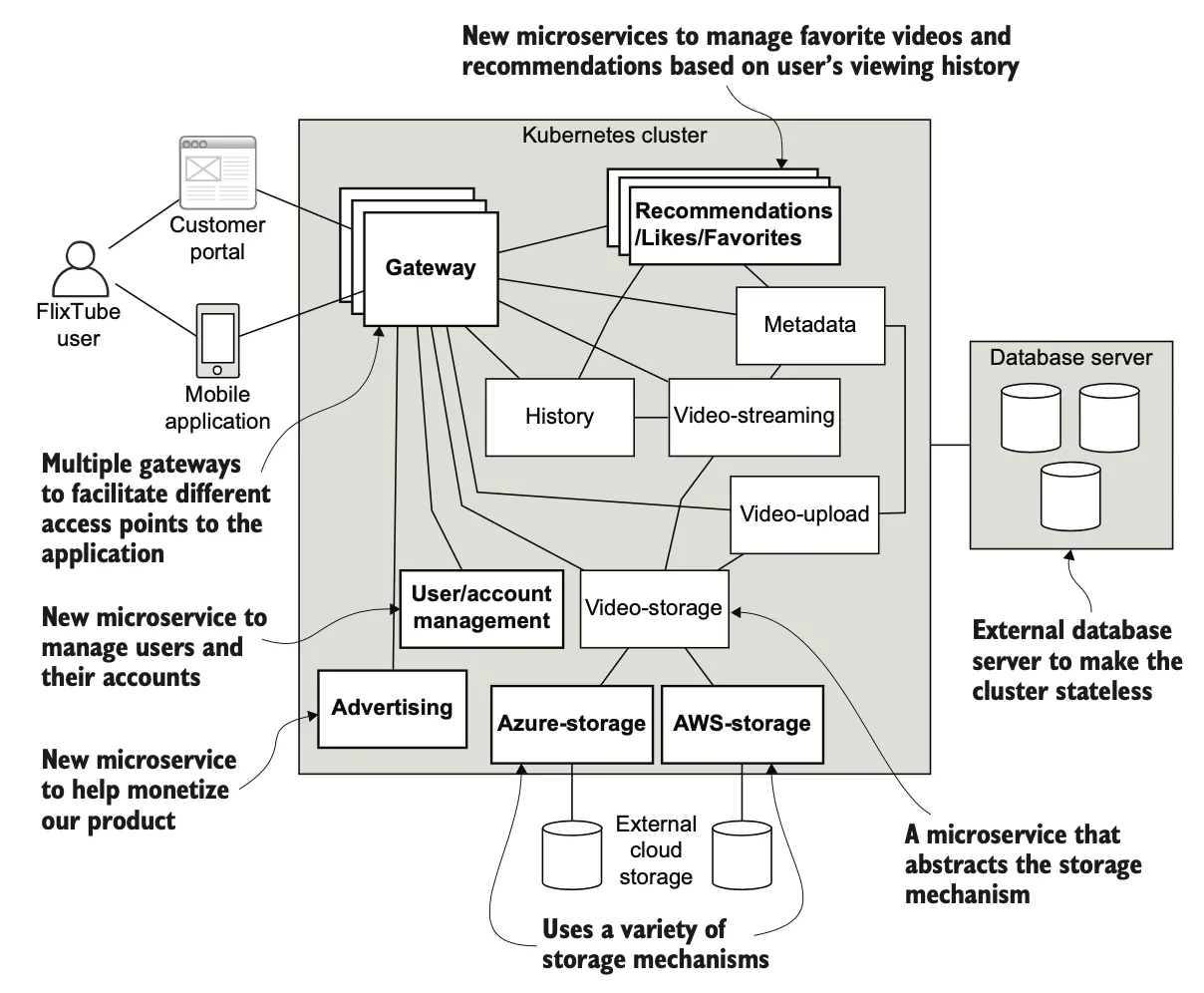
微服务列表:
Web Backend (前端网关)
- 处理来自 Web 用户的请求
- 端口:3000
- 依赖:video-streaming, video-upload
Mobile Backend (移动端网关)
- 处理来自移动应用的请求
- 端口:3100
- 依赖:video-streaming, video-upload
Video Upload (视频上传)
- 处理视频上传请求
- 端口:4000
- 依赖:video-storage, RabbitMQ
Video Storage (视频存储)
- 管理视频元数据
- 端口:4001
- 依赖:MongoDB
Video Streaming (视频流)
- 提供视频流服务
- 端口:3000
- 依赖:video-storage
数据流:
视频上传:
- 用户通过前端上传视频
- Web Backend 转发到 Video Upload 服务
- Video Upload 将视频存储到 Azure Blob Storage
- Video Upload 将元数据保存到 MongoDB
- Video Upload 发送消息到 RabbitMQ
视频播放:
- 用户请求播放视频
- Web Backend 转发到 Video Streaming 服务
- Video Streaming 从 MongoDB 获取视频信息
- Video Streaming 从 Azure Blob Storage 流式传输视频
10.3 统一代码库
统一代码库的优势:
- 简化代码共享
- 统一版本控制
- 简化依赖管理
- 跨服务重构更容易
- 统一 CI/CD 流程
目录结构:
flixtube/
  video-streaming/
    src/
    Dockerfile
    package.json
  video-upload/
    src/
    Dockerfile
    package.json
  video-storage/
    src/
    Dockerfile
    package.json
  web-backend/
    src/
    Dockerfile
    package.json
  mobile-backend/
    src/
    Dockerfile
    package.json
  docker-compose.yml
  k8s/
    deployment.yaml
    service.yaml
10.4 生产部署
Terraform 创建基础设施:
resource "azurerm_resource_group" "main" {
  name     = "flixtube-prod"
  location = "East US"
}

resource "azurerm_kubernetes_cluster" "main" {
  name                = "flixtube-aks"
  location            = azurerm_resource_group.main.location
  resource_group_name = azurerm_resource_group.main.name
  dns_prefix          = "flixtube"

  default_node_pool {
    name       = "default"
    node_count = 3
    vm_size    = "Standard_DS3_v2"
  }
}

resource "azurerm_container_registry" "main" {
  name                = "flixtubeacr"
  resource_group_name = azurerm_resource_group.main.name
  location            = azurerm_resource_group.main.location
  sku                 = "Standard"
  admin_enabled        = true
}
Kubernetes 部署清单:
apiVersion: apps/v1
kind: Deployment
metadata:
  name: video-streaming
spec:
  replicas: 3
  selector:
    matchLabels:
      app: video-streaming
  template:
    metadata:
      labels:
        app: video-streaming
    spec:
      containers:
      - name: video-streaming
        image: flixtubeacr.azurecr.io/video-streaming:latest
        ports:
        - containerPort: 3000
        resources:
          requests:
            memory: "128Mi"
            cpu: "100m"
          limits:
            memory: "256Mi"
            cpu: "200m"
10.5 CI/CD 流水线

步骤:
- 代码推送 → GitHub
- 触发构建 → GitHub Actions
- 运行测试 → Jest + Playwright
- 构建镜像 → Docker
- 推送镜像 → Azure Container Registry
- 部署到 Kubernetes → kubectl
- 健康检查 → Kubernetes Probes
10.6 监控和可观察性
健康检查:
app.get('/health', (req, res) => {
  res.status(200).json({ status: 'healthy' });
});
日志聚合:
kubectl logs -f deployment/video-streaming
总结
- FlixTube 由 5 个微服务组成
- 统一代码库简化代码共享和依赖管理
- Terraform 创建和管理基础设施
- Kubernetes 用于容器编排和部署
- GitHub Actions 实现完整的 CI/CD 流水线
- 健康检查确保服务的可用性
- 生产部署需要考虑资源限制和高可用性
下一章学习监控和维护运行中的微服务应用。