Webhook 与准入控制
HAMi Mutating Admission Webhook 是 GPU 资源控制平面的准入守卫,在 Pod 创建阶段拦截请求,自动注入调度所需信息与运行时配置,实现用户零侵入的 GPU 资源管理体验。
Mutating Admission Webhook 概述
在 Pod 创建阶段拦截请求
Kubernetes 的准入控制(Admission Control)机制允许在对象持久化到 etcd 之前拦截和修改请求。HAMi 使用 Mutating Admission Webhook 在 Pod 创建和更新阶段进行拦截。
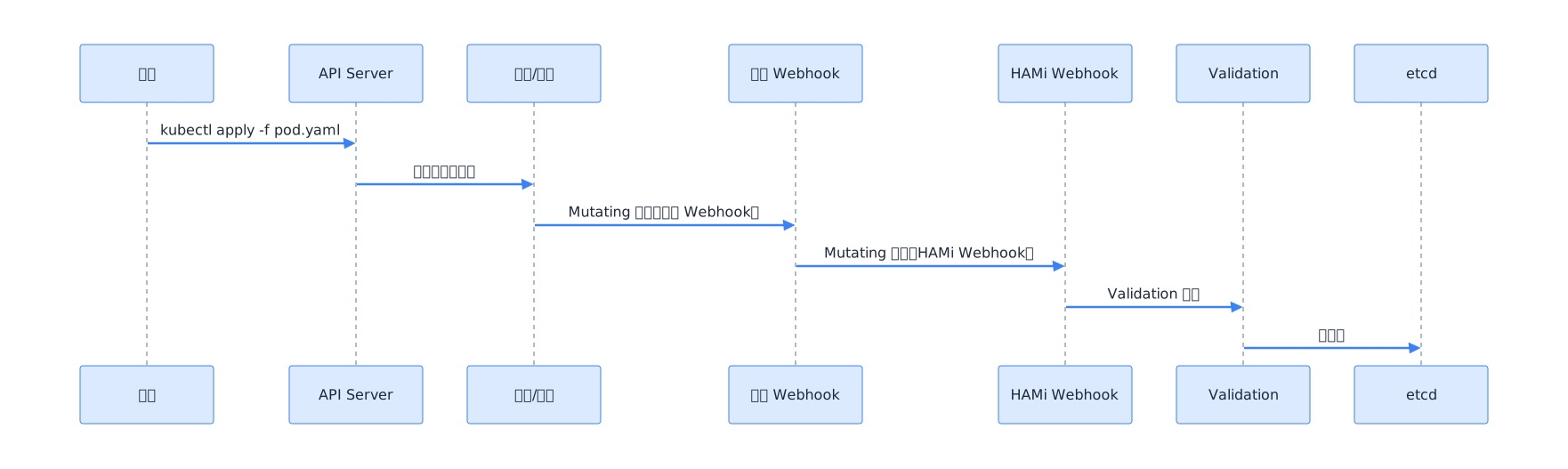
HAMi Webhook 职责:
- 解析 GPU 资源请求
- 转换 limits → requests
- 添加调度注解
- 注入环境变量
- 设置 schedulerName
- 配额检查
注入调度所需信息与运行时配置
Webhook 的核心价值在于"用户零感知",用户只需声明 GPU 资源需求,Webhook 自动完成以下工作:
- 确保调度器能识别 GPU 资源请求
- 为调度器标记设备类型和策略偏好
- 设置正确的调度器名称
- 预检资源合法性
零侵入式设计
用户提交的 Pod 定义只需包含标准的资源声明:
# 用户提交的原始 Pod
apiVersion: v1
kind: Pod
metadata:
  name: ai-inference
spec:
  containers:
  - name: inference
    image: tensorflow/serving:latest
    resources:
      limits:
        nvidia.com/gpu: 2
        nvidia.com/gpumem: 4000
Webhook 自动补全后:
# Webhook 注入后的 Pod
apiVersion: v1
kind: Pod
metadata:
  name: ai-inference
  annotations:
    hami.io/gpu-type: "NVIDIA"
    hami.io/device-bind-phase: "pending"
    hami.io/node-scheduler-policy: "binpack"
spec:
  schedulerName: hami-scheduler
  containers:
  - name: inference
    image: tensorflow/serving:latest
    resources:
      limits:
        nvidia.com/gpu: 2
        nvidia.com/gpumem: 4000
      requests:
        nvidia.com/gpu: 2
        nvidia.com/gpumem: 4000
Webhook 工作流程
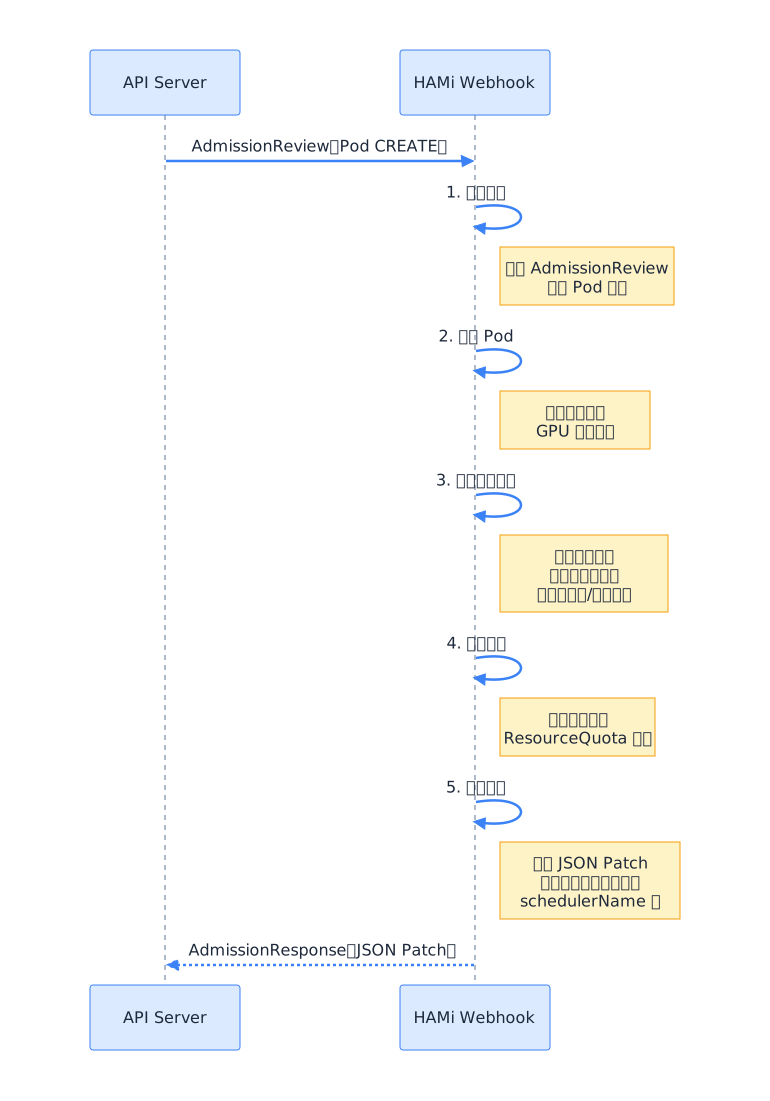
解码请求
func (wh *Webhook) Handle(admissionReview *admissionv1.AdmissionReview) *admissionv1.AdmissionResponse {
    // 解码 Pod 对象
    pod := &v1.Pod{}
    if err := json.Unmarshal(admissionReview.Request.Object.Raw, pod); err != nil {
        return admissionResponse(err)
    }

    // 检查是否包含 GPU 资源请求
    if !hasGPURequest(pod) {
        // 无 GPU 请求,直接放行
        return &admissionv1.AdmissionResponse{Allowed: true}
    }

    // 执行注入逻辑
    return wh.mutatePod(pod, admissionReview.Request)
}
校验 Pod
Webhook 首先检查 Pod 是否包含 HAMi 管理的自定义资源:
func hasGPURequest(pod *v1.Pod) bool {
    for _, container := range pod.Spec.Containers {
        resources := container.Resources
        // 检查 limits 和 requests
        for _, resMap := range []v1.ResourceList{resources.Limits, resources.Requests} {
            for name := range resMap {
                if strings.HasPrefix(string(name), "hami.io/") {
                    return true
                }
            }
        }
    }
    return false
}
设备适配注入
Webhook 根据节点上安装的设备类型,为 Pod 注入相应的运行时配置:
func (wh *Webhook) mutatePod(pod *v1.Pod, req *admissionv1.AdmissionRequest) *admissionv1.AdmissionResponse {
    var patches []jsonpatch.JsonPatchOperation

    // 1. 资源类型转换
    patches = append(patches, ensureRequestsFromLimits(pod)...)

    // 2. 添加调度注解
    patches = append(patches, addSchedulingAnnotations(pod)...)

    // 3. 设置 schedulerName
    patches = append(patches, setSchedulerName(pod)...)

    // 4. 设备类型匹配与运行时类注入
    patches = append(patches, injectDeviceRuntime(pod)...)

    // 5. 优先级与核心策略注入
    patches = append(patches, injectCorePolicy(pod)...)

    // 6. 配额检查
    if err := checkQuota(pod); err != nil {
        return admissionResponse(err)
    }

    // 构建响应
    patchBytes, _ := json.Marshal(patches)
    return &admissionv1.AdmissionResponse{
        Allowed: true,
        Patch:   patchBytes,
        PatchType: func() *admissionv1.PatchType {
            pt := admissionv1.PatchTypeJSONPatch
            return &pt
        }(),
    }
}
主要功能
资源类型转换(limits → requests)
Kubernetes 要求 Pod 的 requests 和 limits 必须同时设置。用户通常只声明 limits,Webhook 自动补全 requests:
func ensureRequestsFromLimits(pod *v1.Pod) []jsonpatch.JsonPatchOperation {
    var patches []jsonpatch.JsonPatchOperation

    for i, container := range pod.Spec.Containers {
        if container.Resources.Requests == nil {
            // 添加整个 requests 字段
            patches = append(patches, jsonpatch.JsonPatchOperation{
                Operation: "add",
                Path:      fmt.Sprintf("/spec/containers/%d/resources/requests", i),
                Value:     container.Resources.Limits,
            })
        } else {
            // 补充缺失的资源项
            for name, quantity := range container.Resources.Limits {
                if _, ok := container.Resources.Requests[name]; !ok {
                    patches = append(patches, jsonpatch.JsonPatchOperation{
                        Operation: "add",
                        Path: fmt.Sprintf("/spec/containers/%d/resources/requests/%s",
                            i, strings.ReplaceAll(string(name), "/", "~1")),
                        Value: quantity,
                    })
                }
            }
        }
    }
    return patches
}
添加调度注解
Webhook 为 Pod 添加调度所需的注解:
func addSchedulingAnnotations(pod *v1.Pod) []jsonpatch.JsonPatchOperation {
    annotations := map[string]string{
        "hami.io/gpu-type":            detectDeviceType(pod),
        "hami.io/device-bind-phase":   "pending",
        "hami.io/node-scheduler-policy": getSchedulerPolicy(),
    }

    // 合并用户已有的注解
    if pod.Annotations == nil {
        return []jsonpatch.JsonPatchOperation{{
            Operation: "add",
            Path:      "/metadata/annotations",
            Value:     annotations,
        }}
    }

    var patches []jsonpatch.JsonPatchOperation
    for key, value := range annotations {
        // 不覆盖用户显式设置的注解
        if _, exists := pod.Annotations[key]; !exists {
            patches = append(patches, jsonpatch.JsonPatchOperation{
                Operation: "add",
                Path:      fmt.Sprintf("/metadata/annotations/%s", escapeJSONPatchKey(key)),
                Value:     value,
            })
        }
    }
    return patches
}
注入环境变量(CUDA_VISIBLE_DEVICES 等)
Webhook 可以为容器预注入环境变量(部分环境变量由 Device Plugin 在 Allocate 阶段最终确定):
func injectEnvVars(pod *v1.Pod) []jsonpatch.JsonPatchOperation {
    var patches []jsonpatch.JsonPatchOperation

    envVars := []v1.EnvVar{
        {Name: "NVIDIA_VISIBLE_DEVICES", Value: "all"},
    }

    for i, container := range pod.Spec.Containers {
        for _, env := range envVars {
            if !hasEnvVar(container, env.Name) {
                patches = append(patches, jsonpatch.JsonPatchOperation{
                    Operation: "add",
                    Path:      fmt.Sprintf("/spec/containers/%d/env/-", i),
                    Value:     env,
                })
            }
        }
    }
    return patches
}
设置 schedulerName
确保使用 GPU 资源的 Pod 被路由到 HAMi 调度器:
func setSchedulerName(pod *v1.Pod) []jsonpatch.JsonPatchOperation {
    if pod.Spec.SchedulerName == "" || pod.Spec.SchedulerName == "default-scheduler" {
        return []jsonpatch.JsonPatchOperation{{
            Operation: "add",
            Path:      "/spec/schedulerName",
            Value:     "hami-scheduler",
        }}
    }
    return nil
}
配额检查与资源合法性校验
func checkQuota(pod *v1.Pod) error {
    gpuReq := parsePodGPURequest(pod)

    // 检查资源值是否合法
    if gpuReq.Count < 0 || gpuReq.Memory < 0 || gpuReq.Cores < 0 {
        return fmt.Errorf("GPU 资源请求值不能为负数")
    }

    if gpuReq.Count == 0 && gpuReq.Memory > 0 {
        return fmt.Errorf("请求了显存但未请求 GPU 设备")
    }

    // 检查命名空间配额
    quota, err := getResourceQuota(pod.Namespace)
    if err != nil {
        return nil // 无配额配置,跳过
    }

    used := getNamespaceGPUUsage(pod.Namespace)
    if used.Memory+gpuReq.Memory > quota.Memory {
        return fmt.Errorf("命名空间 %s 的 GPU 显存配额超限(已用 %d/%d,请求 %d)",
            pod.Namespace, used.Memory, quota.Memory, gpuReq.Memory)
    }

    return nil
}
Webhook 配置
Helm values.yaml
# values.yaml - Webhook 配置
webhook:
  enabled: true
  nameOverride: "hami-webhook"

  # 镜像配置
  image:
    repository: projecthami/hami
    tag: v2.5.0
    pullPolicy: IfNotPresent

  # 副本数
  replicas: 2

  # 服务配置
  service:
    type: ClusterIP
    port: 443
    targetPort: 9443

  # TLS 证书配置
  tls:
    enabled: true
    # 证书来源:auto | certManager | manual
    source: auto
    # 自动生成证书(使用 Kubernetes CA)
    auto:
      caBundle: null
    # cert-manager 配置
    certManager:
      enabled: false
      issuerRef:
        name: "hami-ca"
        kind: "Issuer"
    # 手动证书
    manual:
      cert: null
      key: null
      caCert: null

  # 准入配置
  admission:
    # 失败策略:Fail(安全优先)或 Ignore(可用性优先)
    failurePolicy: Fail
    # 重新验证策略
    reinvocationPolicy: Never
    # 匹配规则
    rules:
    - apiGroups: [""]
      apiVersions: ["v1"]
      resources: ["pods"]
      operations: ["CREATE", "UPDATE"]
    # 排除的命名空间
    namespaceSelector:
      matchExpressions:
      - key: hami.io/webhook
        operator: NotIn
        values: ["ignore"]

  # 资源限制
  resources:
    requests:
      cpu: 100m
      memory: 128Mi
    limits:
      cpu: 500m
      memory: 512Mi

  # 反亲和性
  affinity:
    podAntiAffinity:
      preferredDuringSchedulingIgnoredDuringExecution:
      - weight: 100
        podAffinityTerm:
          labelSelector:
            matchLabels:
              app: hami-webhook
          topologyKey: kubernetes.io/hostname
TLS 证书管理
Webhook 必须使用 HTTPS,需要 TLS 证书。HAMi 支持三种证书管理方式:
方式 1:自动生成(默认)
HAMi 在安装时自动生成自签名证书,并通过 Job 将证书写入 Secret:
# 自动生成的 Secret
apiVersion: v1
kind: Secret
metadata:
  name: hami-webhook-certs
  namespace: hami-system
type: kubernetes.io/tls
data:
  tls.crt: <base64-encoded-cert>
  tls.key: <base64-encoded-key>
方式 2:cert-manager 集成
# cert-manager Issuer
apiVersion: cert-manager.io/v1
kind: Issuer
metadata:
  name: hami-ca
  namespace: hami-system
spec:
  selfSigned: {}

---
# cert-manager Certificate
apiVersion: cert-manager.io/v1
kind: Certificate
metadata:
  name: hami-webhook-cert
  namespace: hami-system
spec:
  secretName: hami-webhook-certs
  duration: 8760h       # 1 年
  renewBefore: 720h     # 提前 30 天续签
  issuerRef:
    name: hami-ca
    kind: Issuer
  dnsNames:
  - hami-webhook.hami-system.svc
  - hami-webhook.hami-system.svc.cluster.local
方式 3:手动证书
# 使用已有证书
webhook:
  tls:
    source: manual
    manual:
      cert: |-
        -----BEGIN CERTIFICATE-----
        ...
        -----END CERTIFICATE-----
      key: |-
        -----BEGIN RSA PRIVATE KEY-----
        ...
        -----END RSA PRIVATE KEY-----
MutatingWebhookConfiguration
HAMi 安装时自动创建 MutatingWebhookConfiguration:
apiVersion: admissionregistration.k8s.io/v1
kind: MutatingWebhookConfiguration
metadata:
  name: hami-webhook
  annotations:
    cert-manager.io/inject-ca-from: hami-system/hami-webhook-cert
webhooks:
- name: hami-webhook.hami-system.svc
  clientConfig:
    service:
      name: hami-webhook
      namespace: hami-system
      path: "/webhook"
      port: 443
    caBundle: <ca-bundle>
  rules:
  - apiGroups: [""]
    apiVersions: ["v1"]
    resources: ["pods"]
    operations: ["CREATE", "UPDATE"]
    scope: "Namespaced"
  failurePolicy: Fail
  reinvocationPolicy: Never
  sideEffects: None
  timeoutSeconds: 10
  namespaceSelector:
    matchExpressions:
    - key: hami.io/webhook
      operator: NotIn
      values: ["ignore"]
设备适配注入
遍历容器进行设备类型匹配
Webhook 遍历 Pod 中的每个容器,匹配设备类型:
func detectDeviceType(pod *v1.Pod) string {
    for _, container := range pod.Spec.Containers {
        for name := range container.Resources.Limits {
            switch string(name) {
            case "nvidia.com/gpu":
                return "NVIDIA"
            case "hami.io/ascend":
                return "Ascend"
            case "hami.io/mlu":
                return "Cambricon"
            case "hami.io/dcu":
                return "Hygon"
            }
        }
    }
    return "NVIDIA" // 默认
}
用户也可以通过注解显式指定设备类型:
metadata:
  annotations:
    hami.io/gpu-type: "NVIDIA-A100-SXM4-40GB"
运行时类名注入
如果集群中配置了多种运行时类(RuntimeClass),Webhook 可以根据设备类型设置对应的 RuntimeClass:
func injectRuntimeClass(pod *v1.Pod, deviceType string) []jsonpatch.JsonPatchOperation {
    runtimeClassMap := map[string]string{
        "NVIDIA":     "nvidia",
        "Ascend":     "ascend",
        "Cambricon":  "cambricon",
        "Hygon":      "hygon",
    }

    if rc, ok := runtimeClassMap[deviceType]; ok && pod.Spec.RuntimeClassName == nil {
        return []jsonpatch.JsonPatchOperation{{
            Operation: "add",
            Path:      "/spec/runtimeClassName",
            Value:     rc,
        }}
    }
    return nil
}
优先级与核心策略注入
Webhook 从全局配置或 Pod 注解中读取核心策略,注入到调度注解中:
func injectCorePolicy(pod *v1.Pod) []jsonpatch.JsonPatchOperation {
    var patches []jsonpatch.JsonPatchOperation

    // 默认核心策略(限制算力使用)
    corePolicy := "default"  // default | force | none
    if val, ok := pod.Annotations["hami.io/core-policy"]; ok {
        corePolicy = val
    }

    patches = append(patches, jsonpatch.JsonPatchOperation{
        Operation: "add",
        Path:      "/metadata/annotations/hami.io~1core-policy",
        Value:     corePolicy,
    })

    return patches
}
核心策略说明:
| 策略 | 含义 | 适用场景 |
|---|---|---|
default | 限制算力使用,但允许短时突发 | 通用推理/训练 |
force | 严格限制算力,不允许突发 | 多租户公平共享 |
none | 不限制算力,仅隔离显存 | 对算力不敏感的任务 |
配额检查
命名空间 ResourceQuota 校验
Webhook 在准入阶段检查命名空间的 ResourceQuota:
# 定义命名空间 GPU 配额
apiVersion: v1
kind: ResourceQuota
metadata:
  name: gpu-quota
  namespace: ai-team
spec:
  hard:
    nvidia.com/gpu: "10"          # 最多 10 个 GPU 设备
    nvidia.com/gpumem: "128000"   # 最多 128000 MB 显存
    nvidia.com/cores: "200"    # 最多 200% 算力
func getResourceQuota(namespace string) (*GPUQuota, error) {
quotas, err := client.CoreV1().ResourceQuotas(namespace).List(ctx, metav1.ListOptions{})
if err != nil {
return nil, err
}
quota := &GPUQuota{}
for _, q := range quotas.Items {
for name, quantity := range q.Spec.Hard {
switch string(name) {
case "nvidia.com/gpu":
quota.Count = int(quantity.Value())
case "nvidia.com/gpumem":
quota.Memory = int(quantity.Value())
case "nvidia.com/cores":
quota.Cores = int(quantity.Value())
}
}
}
return quota, nil
}拒绝超额请求
当配额检查失败时,Webhook 返回拒绝响应:
func admissionResponse(err error) *admissionv1.AdmissionResponse {
    return &admissionv1.AdmissionResponse{
        Allowed: false,
        Result: &metav1.Status{
            Status:  "Failure",
            Message: err.Error(),
            Code:    403,
            Reason:  metav1.StatusReason("GPUQuotaExceeded"),
        },
    }
}
用户在创建 Pod 时会收到明确的错误信息:
kubectl apply -f pod.yaml
# Error from server: error when creating "pod.yaml": admission webhook "hami-webhook.hami-system.svc" denied the request:
# 命名空间 ai-team 的 GPU 显存配额超限(已用 38000/40000,请求 4000)
配额管理的最佳实践:
| 命名空间 | 显存配额 | 用途 |
|---|---|---|
| ai-inference | 256 GB | 推理服务 |
| ai-training | 512 GB | 训练任务 |
| ai-dev | 64 GB | 开发测试 |
| ai-platform | 128 GB | 平台服务 |
故障排查
Webhook 拒绝准入的常见原因
| 现象 | 原因 | 解决方法 |
|---|---|---|
| Pod 创建被拒绝,错误信息含"GPUQuotaExceeded" | 命名空间配额超限 | 增加配额或降低资源请求 |
| Pod 创建被拒绝,错误信息含"invalid resource" | 资源值不合法(负数、零值等) | 检查 resources 字段 |
| Pod 创建被拒绝,错误信息含"certificate" | TLS 证书过期或不匹配 | 重新生成证书 |
| 所有 Pod 创建都失败 | Webhook 服务不可用 | 检查 Webhook Pod 状态 |
| Pod 创建成功但未注入注解 | Webhook 未匹配(命名空间排除) | 检查 namespaceSelector |
查看日志
# 查看 Webhook 日志
kubectl logs -n hami-system -l app=hami-webhook

# 正常注入日志
# I0101 "Admission review" pod="default/ai-inference" allowed=true patches=6
# I0101 "Injected annotation" key="hami.io/gpu-type" value="NVIDIA"
# I0101 "Set schedulerName" value="hami-scheduler"

# 拒绝日志
# E0101 "Admission denied" pod="ai-team/big-model" reason="GPUQuotaExceeded"
# E0101 "Namespace quota exceeded" namespace="ai-team" used=38000 limit=40000 request=4000

# 查看详细日志(v5 级别)
kubectl logs -n hami-system -l app=hami-webhook -v=5
# I0101 "Processing container" name="inference" limits="{nvidia.com/gpu:2, nvidia.com/gpumem:4000}"
# I0101 "Generated patch" operation="add" path="/spec/schedulerName" value="hami-scheduler"
临时绕过 Webhook
在调试时,可以通过为命名空间添加标签来绕过 Webhook:
# 为命名空间添加排除标签
kubectl label namespace debug hami.io/webhook=ignore

# 在该命名空间中创建 Pod 将不会被 HAMi Webhook 拦截
kubectl apply -f pod.yaml -n debug

# 调试完成后移除标签
kubectl label namespace debug hami.io/webhook-
检查 Webhook 配置
# 查看 MutatingWebhookConfiguration
kubectl get mutatingwebhookconfiguration hami-webhook -o yaml

# 检查 Webhook 服务端点
kubectl get svc -n hami-system hami-webhook

# 测试 Webhook 连通性
kubectl run curl-test --image=curlimages/curl --rm -it -- \
  curl -k https://hami-webhook.hami-system.svc:443/healthz
证书问题排查
# 查看 Webhook 证书 Secret
kubectl get secret -n hami-system hami-webhook-certs -o yaml

# 检查证书有效期
kubectl get secret -n hami-system hami-webhook-certs \
  -o jsonpath='{.data.tls\.crt}' | base64 -d | openssl x509 -noout -dates

# 如果使用 cert-manager,检查 Certificate 状态
kubectl get certificate -n hami-system

# 重新生成证书(删除 Secret 触发重建)
kubectl delete secret -n hami-system hami-webhook-certs
# 重启 Webhook Pod
kubectl rollout restart deployment -n hami-system hami-webhook
Webhook 不可用的紧急恢复
当 Webhook 不可用导致所有 Pod 创建都失败时,可以临时修改失败策略:
# 临时将 failurePolicy 改为 Ignore
kubectl patch mutatingwebhookconfiguration hami-webhook \
  --type='json' -p='[{"op":"replace","path":"/webhooks/0/failurePolicy","value":"Ignore"}]'

# 注意:恢复后务必改回 Fail
kubectl patch mutatingwebhookconfiguration hami-webhook \
  --type='json' -p='[{"op":"replace","path":"/webhooks/0/failurePolicy","value":"Fail"}]'
注意:
failurePolicy: Ignore仅用于紧急恢复。跳过准入检查意味着 Pod 不会获得 GPU 资源注入,可能导致调度失败。生产环境应确保 Webhook 高可用(多副本 + 反亲和性)。
小结
本章详细介绍了 HAMi Mutating Admission Webhook 的设计与实现:
- 概述:在 Pod 创建阶段拦截请求,自动注入调度信息和运行时配置
- 工作流程:解码请求、校验 Pod、设备适配注入、配额检查、返回补丁
- 主要功能:资源类型转换、调度注解添加、环境变量注入、schedulerName 设置、配额检查
- Webhook 配置:Helmvalues.yaml 完整配置、三种 TLS 证书管理方式(自动/cert-manager/手动)
- 设备适配注入:设备类型匹配、运行时类名注入、优先级与核心策略
- 配额检查:命名空间 ResourceQuota 校验、拒绝超额请求
- 故障排查:常见拒绝原因、日志查看、临时绕过方法、证书问题排查
Webhook 是 HAMi “零应用改造"承诺的关键组件:用户只需声明资源请求,Webhook 自动完成所有注入工作。在下一章中,我们将进入第三部分,学习 HAMi 的部署配置与实战使用。